pctechguide.com

  • Home
  • Guides
  • Tutorials
  • Articles
  • Reviews
  • Glossary
  • Contact

Win98 Installation Drive Formating

With the Fdisk procedure completed, restart you computer with the Windows 98 Startup disk in the floppy disk drive and proceed to format the partitions you’ve created with a file system, using the Format tool as follows:

  1. When the Windows 98 Startup menu is displayed, choose the Start computer without CD-ROM support option, and then press Enter.
  2. When a command prompt is displayed, type:

    format c: /s

    and then press Enter.

  3. This command transfers the system files and should only be used when you format drive C (or your active drive). For all other partitions, type format drive: (where drive is the letter of the partition that you want to format).
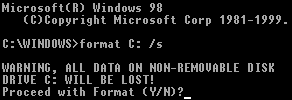
    Warning

  4. A warning that all data on your C: drive will be lost is displayed.
  5. Enter Y, and then press Enter to proceed with the format of drive C:.


  6. After the format procedure is finished, you receive the following prompt:

    Volume label (11 characters, ENTER for none)?

  7. This is an optional feature that you can use to type a name for the hard disk. Type an 11-character name for the drive, or leave it blank, and then press Enter.

  8. Format then prints a number of statistics, including the number of bytes comprising the total disk space, the number of bytes used by the system and the number of available bytes, culminating with a Volume Serial Number.
  9. You can format any additional partitions following a similar procedure to that used for the primary DOS partition above. The only variation is that the /s should be left off the format command.
  • Win98 Installation Planning
  • How To Create A Windows Start Up Disk
  • Installing Windows 98 – Getting Your CD Drive to Work for Installation
  • How To Create A FAT32 Partition on Your Hard Drive
  • Win98 Installation Drive Formating
  • Win98 Installation
  • Win98 Installation Phase 1
  • Win98 Installation Phase 2
  • Installing Windows 98 – Copying the Windows Files to Your Computer
  • Restarting Your Computer After Installing Windows
  • How To Do a Clean Installation of Win98 – Phase 5: Setting Up Hardware and Finalising
  • Installing Windows 98 – Upgrading to Win98SE
  • How to Update Microsoft Windows with Patches and Service Packs
  • Win98 Driver Installation
  • Win98 Installation Tuning

Filed Under: How To Do a Clean Installation of Win98

Latest Articles

RAID tutorial – maintaining the RAID array

Since the context of this tutorial is a new system build, the configuration of of the RAID array was performed via the RAID Controller's BIOS Setup program. Subsequent maintenance of the array - and the initial set up in cases where it's being carried out in a fully operational environment - can … [Read More...]

Navigating the Internet’s VPN Chaos

You don’t have to be a black hat hacker or a dark web dweller to appreciate the benefits of online anonymity. According to a poll from Pew, a plurality of Americans are more concerned about their privacy than ever. Around 57% of Americans don’t want the government monitoring private citizens and the … [Read More...]

Pentium 4

In early 2000, Intel unveiled details of its first new IA-32 core since the Pentium Pro - introduced in 1995. Previously codenamed Willamette - after a river that runs through Oregon - it was announced a few months later that the new generation … [Read More...]

Why Internet Bundles Are the Next Battleground for Gamers

A weak internet connection can turn seamless gaming sessions into frustrating experiences filled with lag, buffering or sudden disconnects. For … [Read More...]

Importance of Inbound Marketing in the Digital Age

A couple of months ago, Zacks reported that Hubspot was starting to make some major changes to its inbound marketing strategy. They talk a lot about … [Read More...]

Damage Control Strategies for Resolving Online PR Crises

Last July, Astrologer faced a major crisis after its CEO went viral at a ColdPlay concert when having an affair. This was just one of the many times a … [Read More...]

AI is Not Killing Computer Jobs Like Doomers Projected

There is no denying the reality that AI technology has played a massive role in disrupting our lives. A growing number of people claim that AI … [Read More...]

Everything You Need to Know About Sourcing Circuit Boards From U.S. Suppliers

In This Article This article includes: Why Source PCBs From the United States?How to Get a Quote From a U.S.-Based PCB ManufacturerThe Top U.S. … [Read More...]

Top Taplio Alternatives in 2025 : Why MagicPost Leads for LinkedIn Posting ?

LinkedIn has become a strong platform for professionals, creators, and businesses to establish authority, grow networks, and elicit engagement. Simple … [Read More...]

Guides

  • Computer Communications
  • Mobile Computing
  • PC Components
  • PC Data Storage
  • PC Input-Output
  • PC Multimedia
  • Processors (CPUs)

Recent Posts

CD-RW Installation Mounting

Make sure the power to your computer and any external peripherals are off and your computer is unplugged from its power source. If you haven't … [Read More...]

How to Remove File Recovery

File Recovery Welcome! If you've made your way to this page, you've likely been infected with File Recovery. Infections of this kind are generally … [Read More...]

How to avoid scams with bitcoin and other cryptocurrencies

Cryptocurrencies got a bad reputation when scams multiplied like ants on a piece of cake. Even today many people associate bitcoin and other … [Read More...]

[footer_backtotop]

Copyright © 2026 About | Privacy | Contact Information | Wrtie For Us | Disclaimer | Copyright License | Authors