pctechguide.com

  • Home
  • Guides
  • Tutorials
  • Articles
  • Reviews
  • Glossary
  • Contact

How to Disable Find Fast Indexer?

If you attempt to disable the Find Fast control panel by simply removing the Microsoft Find Fast shortcut from the StartUp group, the following problems may occur:

  • The index files are not removed from the hard disk. The size of these index files depends on the number and size of Microsoft Office documents you store on your computer.
  • Microsoft Office programs continue to use the existing index files whenever you click Open on the File menu. When you disable Find Fast by removing its shortcut, the index files are not updated as you create or modify documents. This may prevent you from finding files you want to open, or cause unnecessary delays when you open files.

The correct way to disable Find Fast requires that you delete the Find Fast index files. To do this, use the following steps:

  1. On the Start menu, point to Settings, and then click Control Panel.
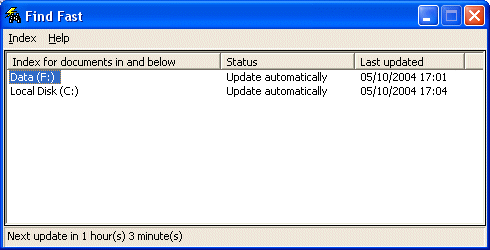
  2. In the Control Panel window, double-click Find Fast.
  3. In the Index for documents in and below list, click the first item.
  4. Find

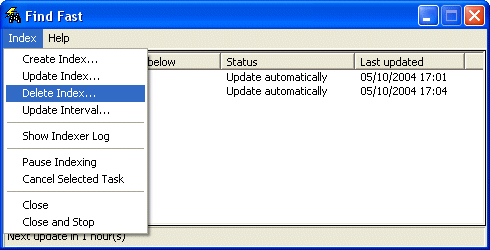
  5. On the Index menu, click Delete Index.
  6. Index

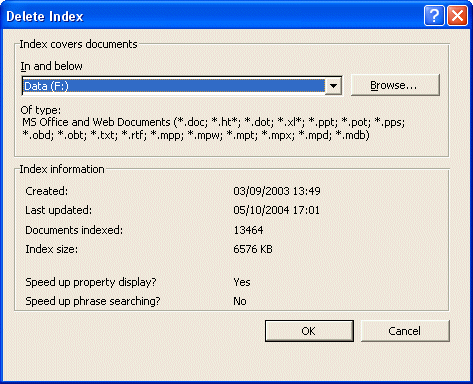
  7. In the Delete Index dialog box, click OK.
  8. Delete

    When you’re prompted whether to delete the index, click OK.

  9. Repeat steps 4 and 5 until no more indices are listed.
  10. On the Index menu, click Close And Stop. Then, click OK to stop Find Fast.
  11. Check to make sure there is no Microsoft Find Fast shortcut in the StartUp folder (Start > Programs > Startup). If there is, remove it.
To re-enable Find Fast, do either of the following:

  • Add the shortcut for Microsoft Find Fast back into the StartUp folder. The default command line for the shortcut is:

    C:Program FilesMicrosoft OfficeOfficeFINDFAST.EXE, or

  • Run the Microsoft Office Setup program, and reinstall Find Fast.

The next time you start Windows, as a consequence of the Find Fast Indexer having been removed from the Startup program group …
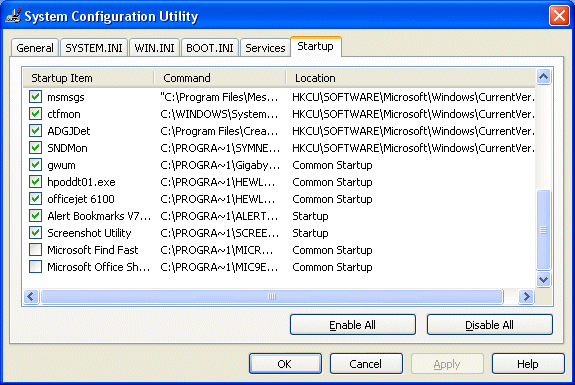
Startup

… you’ll likely see the following System Configuration Utility warning:
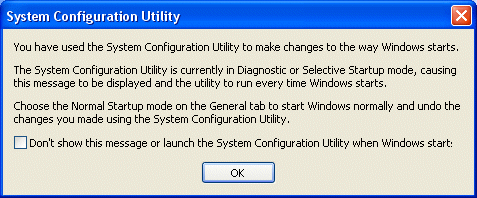
System

Check the box to inhibit the message or launch the System Configuration Utility, and click OK.

Relevant Microsoft Knowledge Base Articles

  • 166302: OFF97: Overview of Find Fast Indexer
  • 158705: OFF97: How to Disable the Find Fast Indexer
  • What is the Find Fast Indexer?
  • How To Determine if You Have Find Fast Indexer Installed?
  • How to Disable Find Fast Indexer?

Filed Under: How To Disable the Find Fast Indexer

Latest Articles

Free Bitdefender Adware Removal Tool

It has been said that Adware is just Malware with lawyers behind it. Basically, that means that they are both disruptive, but there is usually a commercial enterprise behind malware. Adware may not have malicious goals in mind, but it can do just as good a job of screwing up your computer as … [Read More...]

Guidelines on Removing Backgrounds of Images with Photoshop

There are a lot of great benefits of leveraging Photoshop. One of the powerful features it offers is the ability to remove backgrounds from images. Here is a tutorial on using Photoshop for this purpose. How to remove the background of an image with Photoshop As we mentioned, this … [Read More...]

1998 updates for the PC Technology Guide – www.pctechguide.com

Date Details of updates 6Dec '98 Processors: Addition of Copper interconnect section and extension of Roadmap to include confirmed Intel developments for 2000 and beyond; Inkjet Printers: Addition of Manageability section; Serial Comms: Addition of Modulation section … [Read More...]

Why Internet Bundles Are the Next Battleground for Gamers

A weak internet connection can turn seamless gaming sessions into frustrating experiences filled with lag, buffering or sudden disconnects. For … [Read More...]

Importance of Inbound Marketing in the Digital Age

A couple of months ago, Zacks reported that Hubspot was starting to make some major changes to its inbound marketing strategy. They talk a lot about … [Read More...]

Damage Control Strategies for Resolving Online PR Crises

Last July, Astrologer faced a major crisis after its CEO went viral at a ColdPlay concert when having an affair. This was just one of the many times a … [Read More...]

AI is Not Killing Computer Jobs Like Doomers Projected

There is no denying the reality that AI technology has played a massive role in disrupting our lives. A growing number of people claim that AI … [Read More...]

Everything You Need to Know About Sourcing Circuit Boards From U.S. Suppliers

In This Article This article includes: Why Source PCBs From the United States?How to Get a Quote From a U.S.-Based PCB ManufacturerThe Top U.S. … [Read More...]

Top Taplio Alternatives in 2025 : Why MagicPost Leads for LinkedIn Posting ?

LinkedIn has become a strong platform for professionals, creators, and businesses to establish authority, grow networks, and elicit engagement. Simple … [Read More...]

Guides

  • Computer Communications
  • Mobile Computing
  • PC Components
  • PC Data Storage
  • PC Input-Output
  • PC Multimedia
  • Processors (CPUs)

Recent Posts

RAID tutorial – installing the drivers

Now is the time to use the previously prepared floppy disk containing the RAID Controller driver software. Proceed as follows: Press F6 when … [Read More...]

What is Ransomware

We talk a lot about different viruses and malware on PC Tech Guide. But, there is one particular strain of malware that is becoming increasingly … [Read More...]

Intel Centrino mobile computer platform

The first generation Centrino platform (codenamed Montara) was announced in March 2003. The trio of systems that comprise … [Read More...]

[footer_backtotop]

Copyright © 2026 About | Privacy | Contact Information | Wrtie For Us | Disclaimer | Copyright License | Authors