High-Bandwidth Digital Content Protection is effectively a copy protection scheme designed to eliminate the possibility of intercepting digital data midstream between the source to the display. Using hardware on both the graphics adapter card and the monitor, HDCP will encrypt data on the PC before sending it to the display device, where it will be decrypted. HDCP-equipped DVI cards will be able to determine whether or not the display device it is connected to is also has HDCP features. If not, the card will still be able to protect the content being displayed – by slightly lowering the image quality!
An HDCP system comprises three elements, each of which plays a specific role in affording content protection. First, there is the authentication protocol, through which the HDCP Transmitter verifies that a given HDCP Receiver is licensed to receive HDCP Content. With the legitimacy of the HDCP Receiver determined, encrypted HDCP Content is transmitted between the two devices based on encryption keys established during the authentication protocol. This prevents eavesdropping devices from utilising the content. Finally, in the event that legitimate devices are compromised to permit unauthorised use of HDCP Content, renewability allows a HDCP Transmitter to identify such compromised devices and prevent the transmission of HDCP Content.
By design, the HDCP protocol couples a single transmitter to a single receiver. However, the specification also defines a repeater function, to allow configurations such as that depicted below:
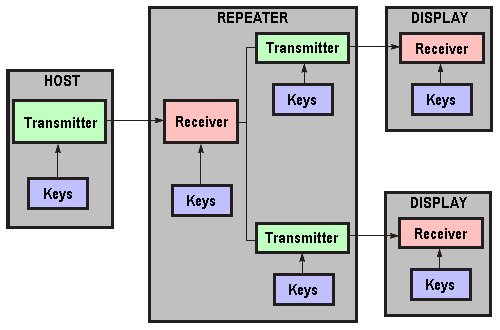
Each HDCP link is separate, with a unique transmitter/receiver pair which encrypts data in a unique way, as determined by the keys for a particular link. Though separate, the links are not entirely independent. Certain HDCP functions require status and other information about the system as a whole, and the protocol specifies how such information is disseminated system wide.
Each HDCP capable device model has a unique set of keys; there are 40 keys, each 56 bits long. These keys are confidential and failure to keep them secret may be seen as a violation of the license agreement. For each set of keys a special key called a KSV (Key Selection Vector) is created. Each KSV has exactly 20 bits set to 0 and 20 bits set to 1. During the authentication process, both parties exchange their KSVs. Then each device adds (without overflow) its own secret keys according to a KSV received from another device. If a particular bit in the vector is set to 1, then the corresponding secret key is used in the addition, otherwise it is ignored. Keys and KSVs are generated in such a way that during this process both devices get the same 56 bit number as a result. That number is later used in the encryption process.
HDCP is licensed by Digital Content Protection, LLC, a subsidiary of Intel. In addition to paying fees, licensees agree to limit the capabilities of their products. For example, High-definition digital video content must be restricted to DVD quality on non-HDCP compliant video outputs when requested by the source. DVD-Audio content is restricted to DAT quality on non-HDCP digital audio outputs (analogue audio outputs have no quality limits). Licensees cannot allow their devices to make copies of content, and must design their products to effectively frustrate attempts to defeat the content protection requirements.
- How Do Computers Make Pictures?
- Graphic Card Resolution
- Graphic Card Colour Depth
- Graphic Card Components
- Graphic Card Memory
- Graphic Card Driver Software
- 3d Accelerated Graphic Cards
- Graphic Card Geometry
- 3D Rendering
- FSAA Graphic Card Technology
- Digital Graphic Cards
- DVI Graphic Cards
- HDCP Technology
- Graphic Card HDMI Ports
- Graphic Card Display Port
- Unified Display Special Interest Group
- DirectX
- OpenGL technology
- Direct3D
- Talisman
- Fahrenheit Graphic Cards
- SLI Technology
- CrossFire Graphic Cards