pctechguide.com

  • Home
  • Guides
  • Tutorials
  • Articles
  • Reviews
  • Glossary
  • Contact

AutoSave Essentials Review

autosave Essentials Review

PROS: AutoSave Essentials is a simple to use data backup program that is very straight forward and does an excellent job backup up data. This program is very light on system resources.

CONS: No full image backup of the operating system is capable with AutoSave Essentials. This is not a big deal to most end users but business users should have a full image backup of their computer.

OVERVIEW: For the $40 dollar price tag this program does deliver perhaps the simplest user interface I have ever used for backup up data. If you are not tech savvy and just want a simple program that will work to backup your files, this program is for you.


AutoSave Essentials Review

Program: Autosave Essentials v3.50 (build 102)

Company: Avanquest

Supported OS: Windows XP, Windows Vista, Windows 7

Price: $39.95 per license

Purpose:

AutoSave Essentials does what it says, it automatically saves (backs up) your essential files by creating a duplicate copy in the safest place you have specified.

Installation:

Autosave Essentials took just over a minute to install with no noticeable degradation to system performance during that time.

Details:

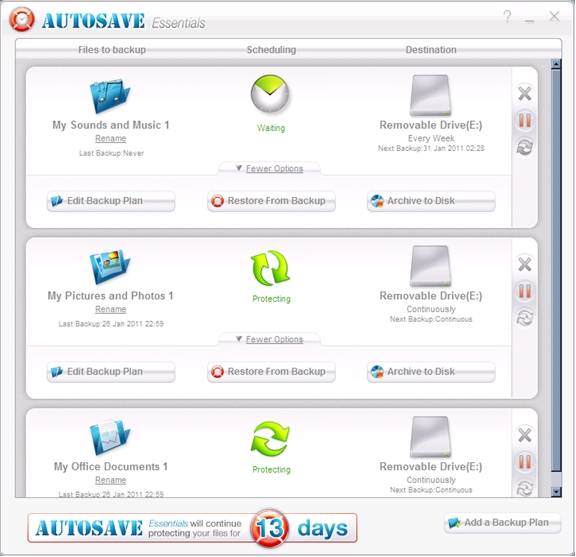
Immediately from startup, Autosave Essentials automatically copies and saves the directory structure of your files to a default location. Even while it’s running, there is no noticeable hit to system performance. From the main screen, Autosave Essentials tells you exactly what it’s doing, and even gives you the option to rename the folders that it saves files to. To enable the buttons, click on “more options”.
Autosave Essentials Review

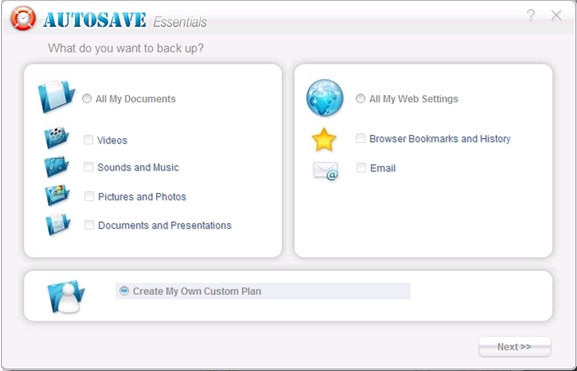
When selecting the button “Edit Backup Plan”, a fairly intuitive and painless screen is used to determine what kind of files you want to have automatically saved. If you choose to “All My Documents”, you can select the options to save everything from videos to documents and presentations. “All My Web Settings” only saves bookmarks, history, and email.
Autosave Essentials

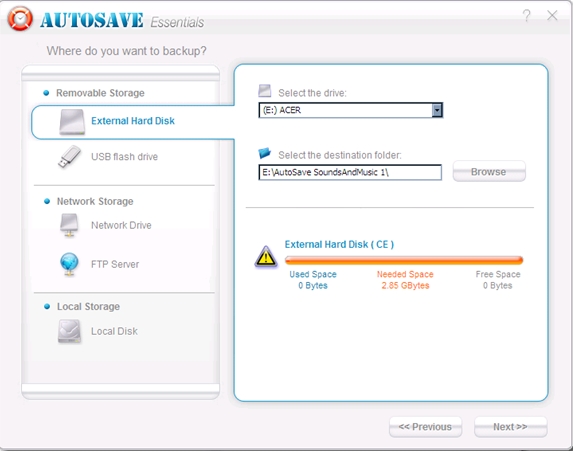
After choosing which files to save from the first two categories, Autosave Essentials allows you to choose where to save the files. Among these are External and USB Flash Drives, Network Drives, FTP Servers and Local Disks. Naturally, if you use FTP servers to store your data, you will need to know the login information to perform the operation.
Autosave Essentials setup

After choosing to create a custom backup plan, you will be shown the interface below, and given the option of what locations to choose from. Under the “Specific Extensions” tab, you merely need to specify the extensions of the files you want to save.
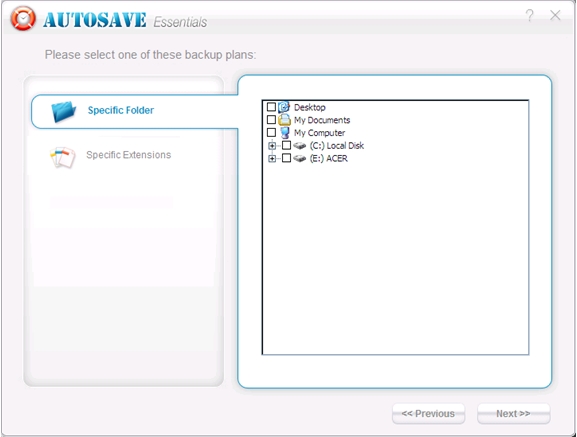
Autosave Essentials Review backup selection

Below is the interface used to specify which file extensions should be used with a customized backup plan.
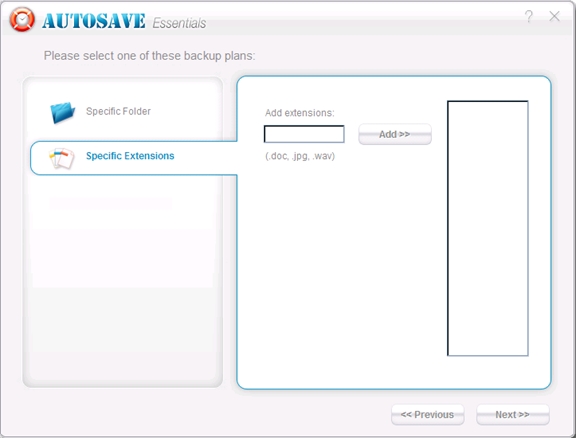
Autosave Essentials backup plan

When choosing the “Restore From Backup” option from the main screen, you can choose which backup to restore from a dropdown list, and choose which backup version you wish to restore when clicking on the “+” symbol.
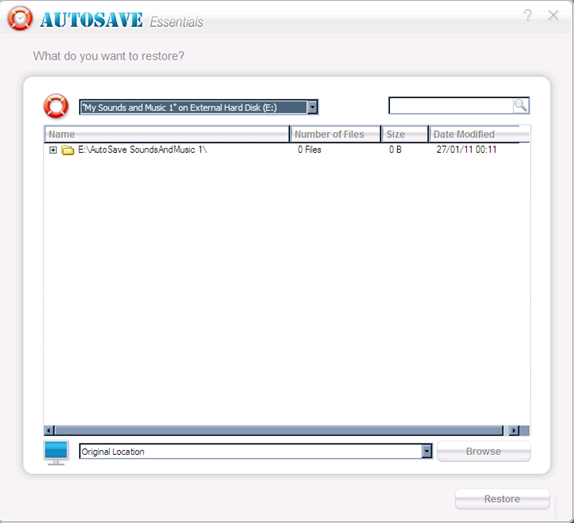
Autosave Essentials Review restore

Choosing “Archive To Disk” allows the user to choose which backups to save to a CD or DVD, and title the backup media with the default name, or one of your own choosing.
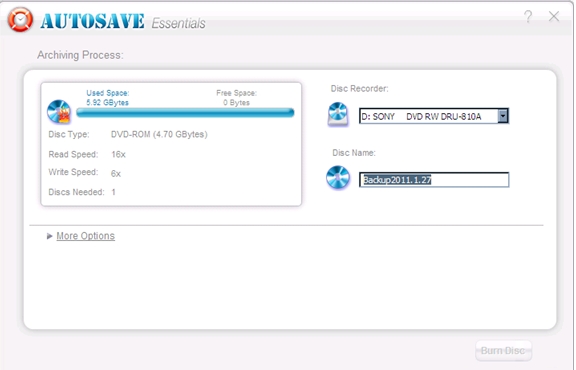
Autosave Essentials archiving process

Ease Of Use:

Autosave Essentials is one of the easiest applications that I’ve used. While its design is clearly meant for the novice user, even advanced users will undoubtedly have a deep appreciation for the simplicity in design, and elegance in execution.

Summary:

Autosave Essentials begins saving your data to an easy-to-find default location from the start, and lets you know of its progress as this happens. Even when Autosave Essentials is active in memory, it only uses about 9MB worth of RAM. This is an application that is extremely easy to use, and doesn’t have a lot of clutter to distract the user from what they’re trying to accomplish. Its interface and selling price are easy on the eyes and the wallet.

Filed Under: Data Backup Software Tagged With: AutoSave Essentials, AutoSave Essentials buy, AutoSave Essentials coupon, AutoSave Essentials Review

Latest Articles

autosave Essentials Review

AutoSave Essentials Review

PROS: AutoSave Essentials is a simple to use data backup program that is very straight forward and does an excellent job backup up data. This program is very light on system resources. CONS: No full image backup of the operating system is capable with AutoSave Essentials. This is not a big deal … [Read More...]

Chrome Remote Desktop Plugin

Imagine being able to access your PC from anywhere in the world as long as you have a device connected to the Internet. Remote access has been a real game changer for support personnel and the travelling workforce. We have been discussing some free options for remote PC support and we want to talk … [Read More...]

Ensure your IT is Ready for 2016

With the holidays around the corner, 2016 will be here sooner than you know it. This makes it an excellent time to start thinking about next year’s IT budget, and how to best address your technology needs to keep your practice growing, compliant, and not stifled by outdated IT that distracts you … [Read More...]

Comments

  1. gina3ritter@yahoo.com says

    March 17, 2014 at 1:19 pm

    There is a box that keeps bopping up in the bottom right hand corner and its so annoying how do I make it stop

Why Internet Bundles Are the Next Battleground for Gamers

A weak internet connection can turn seamless gaming sessions into frustrating experiences filled with lag, buffering or sudden disconnects. For … [Read More...]

Importance of Inbound Marketing in the Digital Age

A couple of months ago, Zacks reported that Hubspot was starting to make some major changes to its inbound marketing strategy. They talk a lot about … [Read More...]

Damage Control Strategies for Resolving Online PR Crises

Last July, Astrologer faced a major crisis after its CEO went viral at a ColdPlay concert when having an affair. This was just one of the many times a … [Read More...]

AI is Not Killing Computer Jobs Like Doomers Projected

There is no denying the reality that AI technology has played a massive role in disrupting our lives. A growing number of people claim that AI … [Read More...]

Everything You Need to Know About Sourcing Circuit Boards From U.S. Suppliers

In This Article This article includes: Why Source PCBs From the United States?How to Get a Quote From a U.S.-Based PCB ManufacturerThe Top U.S. … [Read More...]

Top Taplio Alternatives in 2025 : Why MagicPost Leads for LinkedIn Posting ?

LinkedIn has become a strong platform for professionals, creators, and businesses to establish authority, grow networks, and elicit engagement. Simple … [Read More...]

Guides

  • Computer Communications
  • Mobile Computing
  • PC Components
  • PC Data Storage
  • PC Input-Output
  • PC Multimedia
  • Processors (CPUs)

Recent Posts

HOW TO CONFIGURE VIRTUALHOSTS WITH APACHE IN WINDOWS (IN 2 STEPS)

When working with Apache on Windows, the most usual is to use WampServer or Xampp. These "packages" allow us to install Apache, MySQL and PHP in a … [Read More...]

Stellar Phoenix SQL Recovery Review

Stellar Phoenix SQL Recovery Stellar SQL Recovery can rebuild/repair the SQL tables. There aren't very many product choices when it comes to SQL … [Read More...]

DVD DivX Codec

DIVX is essentially a limited-use, pay-per-view DVD technology. Marketed as a more affordable DVD format - with the … [Read More...]

[footer_backtotop]

Copyright © 2026 About | Privacy | Contact Information | Wrtie For Us | Disclaimer | Copyright License | Authors