pctechguide.com

  • Home
  • Guides
  • Tutorials
  • Articles
  • Reviews
  • Glossary
  • Contact

Skip the Windows 8 Password Screen

windows 8When you first login to Windows 8, it is standard to have to login. However, it is possible to skip the password screen. I would say this Is not a good idea, however because it lowers the security of your computer. Nevertheless, there are those that are willing to sacrifice good security for a little bit of convenience.

So, keep in mind that the information in this post is given with a strong word of caution. If you lose your laptop or leave it lying around, you are basically begging someone to look at all of your personal files and documents. If you do plan on doing this maybe it is a good idea to keep any important documents elsewhere. If you feel that there is nothing on the laptop or computer worth losing, then you can use the steps below to disable the password requirement.

Disable Password Requirement in Windows 8

The following steps are what you need to follow in order to disable the password requirement in Windows 8.

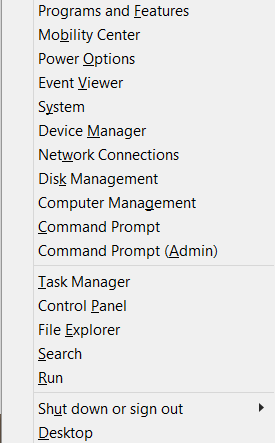
  1. Open up the Quick Menu by pressing the Windows Key + X
image

  1. Click on the Command Prompt
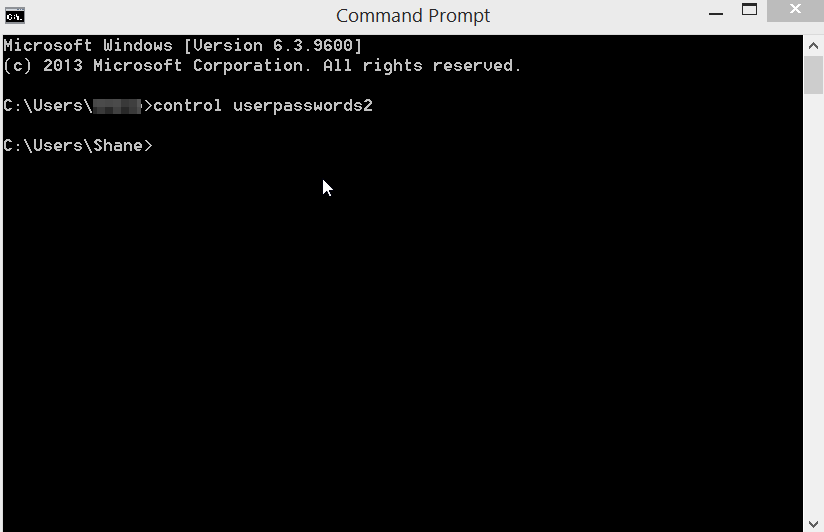
  2. When the Command Prompt opens, type in control userpasswords2 and hit enter.
Start Windows 8 without password

3.  In the User Accounts Windows click on the username that you want to disable and uncheck the box that says “Users must enter a username and password to use this comptuer.

4. Click OK

5. Enter your password that you were usign.

6. Reboot the comptuer.

From here on out the computer will boot directly into Windows and will not prompt you to enter a password.

Again, I would strongly caution against performing this process. It may seem more convenient to be able to boot directly into Windows. However, the risk certainly outweighs the convenience you will gain from doing this. Even if you think there is nothing important on the computer, it is still not a good idea.

But, if you feel you must do this, hopefully this article provides an easy set of instructions in order to accomplish the task.

Filed Under: Articles

Latest Articles

Holographic Data Storage

In late 1995 a joint university/industry/government consortium initiated the Holographic Data Storage System (HDSS) programme, with the initial goals of developing several key components for the system, including a high-capacity, … [Read More...]

Using Antivirus Reviews to Protect Your System

If you type the word “antivirus” into a web browser, you'll see a nearly limitless list of products asking for your money in exchange for antivirus protection. Now, we all know that having an antivirus program is one of the most important steps for any PC owner, but it isn't as cut and dry … [Read More...]

Getting Started With Resizing Images in Photoshop

Our most recent article delved into some of the nuances of Photoshop. We gave you a basic primer on some of the core features, such as using layers. We wanted to get into some more detailed aspects of this photo-editing software. One of the most important things that you will have to do is … [Read More...]

Why Internet Bundles Are the Next Battleground for Gamers

A weak internet connection can turn seamless gaming sessions into frustrating experiences filled with lag, buffering or sudden disconnects. For … [Read More...]

Importance of Inbound Marketing in the Digital Age

A couple of months ago, Zacks reported that Hubspot was starting to make some major changes to its inbound marketing strategy. They talk a lot about … [Read More...]

Damage Control Strategies for Resolving Online PR Crises

Last July, Astrologer faced a major crisis after its CEO went viral at a ColdPlay concert when having an affair. This was just one of the many times a … [Read More...]

AI is Not Killing Computer Jobs Like Doomers Projected

There is no denying the reality that AI technology has played a massive role in disrupting our lives. A growing number of people claim that AI … [Read More...]

Everything You Need to Know About Sourcing Circuit Boards From U.S. Suppliers

In This Article This article includes: Why Source PCBs From the United States?How to Get a Quote From a U.S.-Based PCB ManufacturerThe Top U.S. … [Read More...]

Top Taplio Alternatives in 2025 : Why MagicPost Leads for LinkedIn Posting ?

LinkedIn has become a strong platform for professionals, creators, and businesses to establish authority, grow networks, and elicit engagement. Simple … [Read More...]

Guides

  • Computer Communications
  • Mobile Computing
  • PC Components
  • PC Data Storage
  • PC Input-Output
  • PC Multimedia
  • Processors (CPUs)

Recent Posts

The Case for Multiple Screens

In the past, multiple monitors have been the domain of programmers. Visit Google headquarters, for example, and you wll see awe-inspiring … [Read More...]

Lightness is Power – iPad Air

If you are looking for new tech-design weighing 1 pound, this is the right one for you. The thinner slope end of iPad Air Retina Display makes you see … [Read More...]

Installing Windows 98 – Getting Your CD Drive to Work for Installation

A Windows 98 Startup Disk is a considerable improvement on that produced by earlier versions of Windows, not least because it contains a number of … [Read More...]

[footer_backtotop]

Copyright © 2026 About | Privacy | Contact Information | Wrtie For Us | Disclaimer | Copyright License | Authors