pctechguide.com

  • Home
  • Guides
  • Tutorials
  • Articles
  • Reviews
  • Glossary
  • Contact

MyStart Search Protection Removal

The MyStart Search Protectoin program is another annoying piece of software that is meant to protect other programs it bundles with. This is to make sure they stay installed and are difficult to remove by the user. This keeps them earning money and keeps the annoyances on your computer. MyStart Search Protection will also change the home page on your computer to mystart.com and it will change your default search engine. It will also prevent you from reverting to other settings in the browser. It will block you from doing so and will show a warning in the system tray.

This program is developed by a software company called Spigot. They have a reputation for developing malicious software. A good clue that it is installed on your machine is if you have a process running in your computer called SearchProtection.exe. You can find this by typing CTRL+ALT+DEL and selecting TASK Manager.

If you would like an easy way to remove this malicious software, you can check out SpyHunter. This software will attempt to automatically detect and remove the offending program from your computer.



The program is typically installed when you download and run other free software. Typically, you will be alerted during the install process if you use the custom install. However, since most people do not pay attention then the software makes it onto many computers. Sometimes people have no idea how the software even made it onto their computers.

Its not technically a virus, but it does have several capabilities that should raise questions. It has rootkit abilities and can do browser hijacking. It can also be a real pain and nuisance for working with your computer. Unfortunately, the software is bundled with software downloaded from reputable download sites. Therefore, never trust downloads completely. Always try to do a custom install and pay attention to the options as you go through the wizard.

It can also be bundled with many toolbars available for download. Be very careful when installing these as well. Again, select the custom installation so you can watch what is being installed on your computer.

Uninstall MyStart Search Protection from Windows.

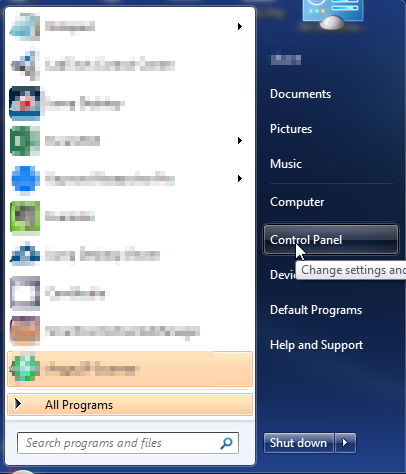
  1. Open up control panel by clicking on the start button in the lower left corner of your computer, and then going to Control Panel
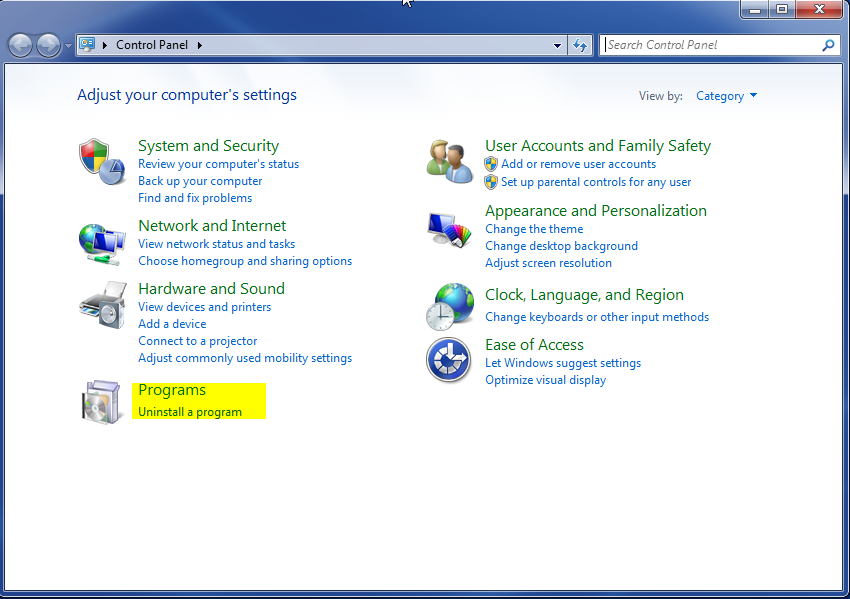
  1. Once, you are in Control Panel, go to the link labeled “Uninstall a Program”. If your computer does not look like the view below, you may have to sort by categories at the top right.
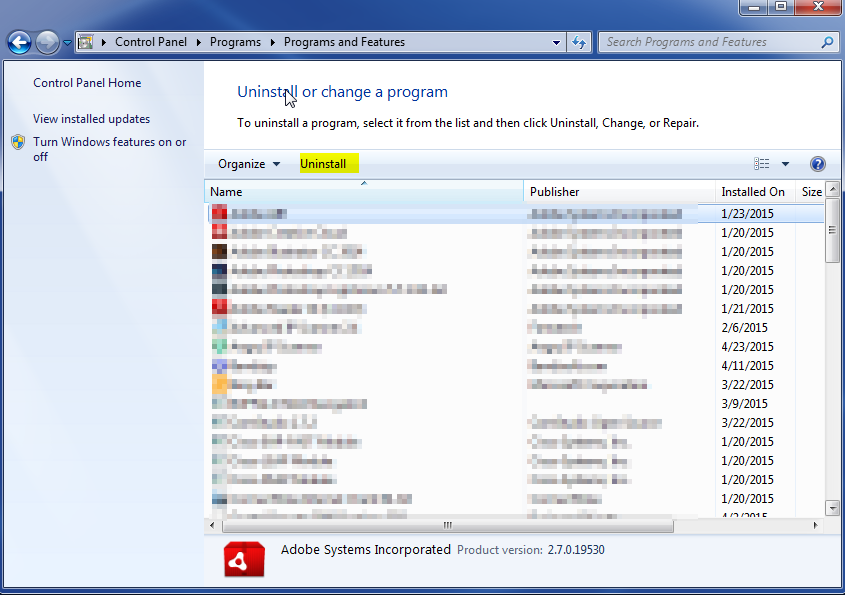
  1. Once in the uninstall programs section, look for the offending program. You can scroll by date installed to find programs that were installed recently. This may be a clue as to what the offending program is. Once you have found the program, highlight it and select “Uninstall” to remove
 

Once you have done this, you will need to go into your browser and set it to its default settings to remove the other changes it made. You will also want to scan your computer to make sure no new issues were introduced by the vulnerability. A good tool to use for this is MalwareBytes. If you already have a virus scanner, you should run this as well.

Filed Under: Virus Removal

Latest Articles

Graphic Card Components

The modern PC graphics card consists of four main components: the graphics processor the video memory the random access memory digital-to-analogue converter (RAMDAC) the driver software The early VGA systems were slow. The CPU had a heavy workload processing … [Read More...]

TCO Monitor Standards

In 1995, TCO modified the requirements for visual ergonomics and added a range of conditions to cover environmental issues, including the use of certain chemicals in manufacturing and the recycling of components. The most stringent standard … [Read More...]

What is Intel’s 925X PCI Express Chipset

In the summer of 2004 Intel introduced a new family of chipsets that they claimed brought the most profound changes in PC platform architecture in more than a decade. The relative positioning of the chipsets - codenamed Alderwood and Grantsdale - is similar to that of the Canterwood and … [Read More...]

Why Internet Bundles Are the Next Battleground for Gamers

A weak internet connection can turn seamless gaming sessions into frustrating experiences filled with lag, buffering or sudden disconnects. For … [Read More...]

Importance of Inbound Marketing in the Digital Age

A couple of months ago, Zacks reported that Hubspot was starting to make some major changes to its inbound marketing strategy. They talk a lot about … [Read More...]

Damage Control Strategies for Resolving Online PR Crises

Last July, Astrologer faced a major crisis after its CEO went viral at a ColdPlay concert when having an affair. This was just one of the many times a … [Read More...]

AI is Not Killing Computer Jobs Like Doomers Projected

There is no denying the reality that AI technology has played a massive role in disrupting our lives. A growing number of people claim that AI … [Read More...]

Everything You Need to Know About Sourcing Circuit Boards From U.S. Suppliers

In This Article This article includes: Why Source PCBs From the United States?How to Get a Quote From a U.S.-Based PCB ManufacturerThe Top U.S. … [Read More...]

Top Taplio Alternatives in 2025 : Why MagicPost Leads for LinkedIn Posting ?

LinkedIn has become a strong platform for professionals, creators, and businesses to establish authority, grow networks, and elicit engagement. Simple … [Read More...]

Guides

  • Computer Communications
  • Mobile Computing
  • PC Components
  • PC Data Storage
  • PC Input-Output
  • PC Multimedia
  • Processors (CPUs)

Recent Posts

How To Remove Spyware Now

Spyware is a type of software that gets installed to your computer quietly without your knowledge. Spyware can watch and record your activities the … [Read More...]

Outlook Express Restoration

To import your backed-up email messages point to Import on the File menu ... ... and then click Messages. Select the appropriate email … [Read More...]

Flash Memory

Flash memory is a solid-state, non-volatile, rewritable memory that works like RAM and a hard-disk drive combined. It resembles conventional memory, … [Read More...]

[footer_backtotop]

Copyright © 2026 About | Privacy | Contact Information | Wrtie For Us | Disclaimer | Copyright License | Authors