pctechguide.com

  • Home
  • Guides
  • Tutorials
  • Articles
  • Reviews
  • Glossary
  • Contact

MSTechSupport.info Scam Removal

You may be getting random popups in your browser from a company claiming to be MSTechSupport.info. These can happen inside any browser like Internet Explorer, Chrome or Firefox. This is a scam trying to trick you into thinking there is a company on the other end ready to help you.

It is caused by extensions within the browsers. It is installed when you install other free software. It is bundled with that software and installed without your knowledge if you do not pay close attention during the installation process.

When you are infected with this virus you will get a popup that states your computer is, in fact, infected with a virus. They will then give you a phone number that you can call to have your computer cleaned for $199. The funny part is your computer really is infected. But, they don’t the point is to make you think it is infected with something else.

You may also see advertising banners inserted into the pages that you view. If you visit the page often these may look strange to you because you had not seen the ads before. However, they may look natural if you have never been to the page before. The virus will also turn text into links. Furthermore, you will get popups advertising other products.

If you need an easy way to remove the malware from your system, we recommend SpyHunter. It is an easy, automated way to remove these types of issues from your computer.

It is a good idea to always pay close attention when installing free software. Try to always use the custom installer so you can see what other programs are being installed. And, read the directions closely. They will try to trick you with what button to click on.

How To Remove MSTechSupport.Info

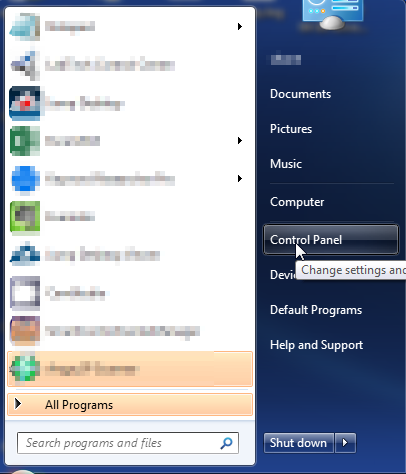
  1. Open up control panel by clicking on the start button in the lower left corner of your computer, and then going to Control Panel
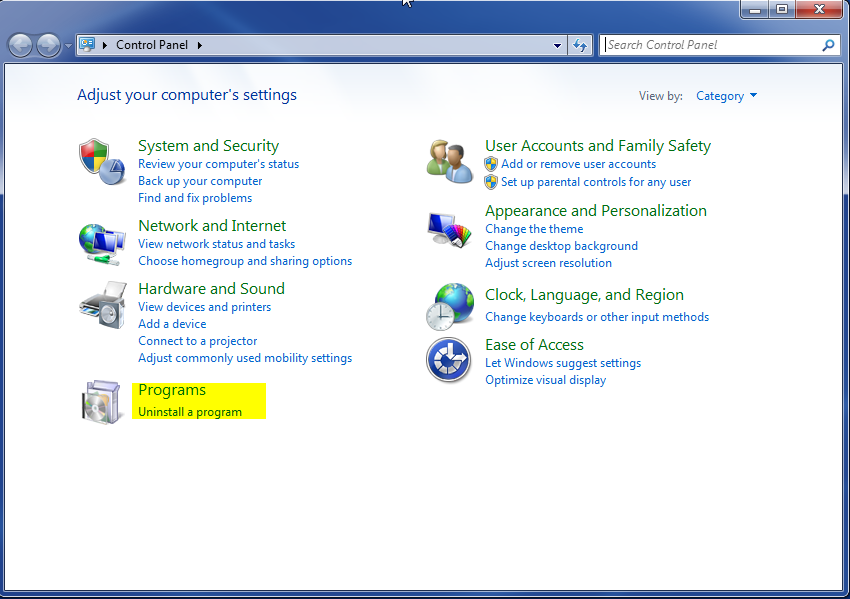
  1. Once, you are in Control Panel, go to the link labeled “Uninstall a Program”. If your computer does not look like the view below, you may have to sort by categories at the top right.
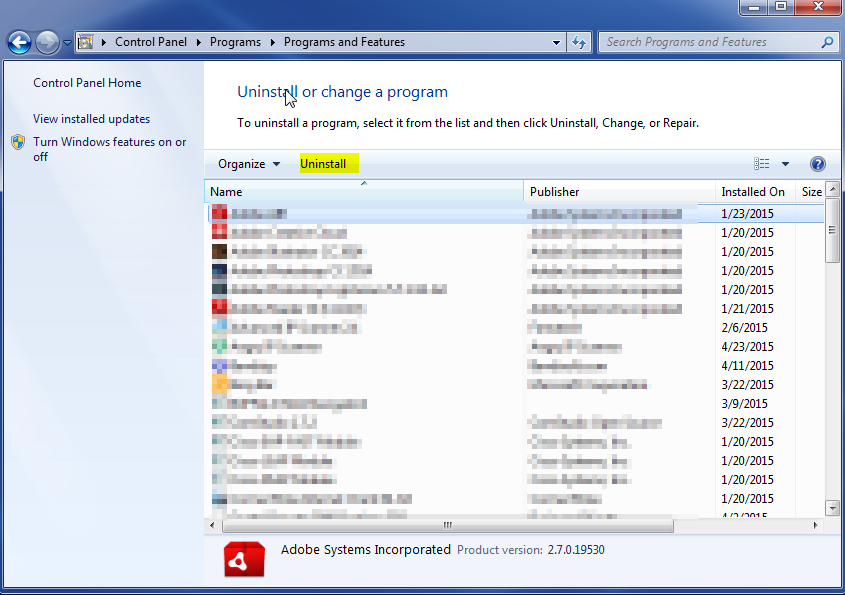
  1. Once in the uninstall programs section, look for the offending program. You can scroll by date installed to find programs that were installed recently. This may be a clue as to what the offending program is. Once you have found the program, highlight it and select “Uninstall” to remove
 

Once you have done this, you will need to go into your browser and set it to its default settings to remove the other changes it made. You will also want to scan your computer to make sure no new issues were introduced by the vulnerability. A good tool to use for this is MalwareBytes. If you already have a virus scanner, you should run this as well.

Filed Under: Virus Removal

Latest Articles

CD-RW Burning Software

The computer’s operating system, whether it is Windows XP, Windows Me, Windows 98, Windows 95, Windows 2000 or Windows XP supplies a generic CD-ROM device driver that will allow your CD-ReWriter to function as a standard CD-ROM drive. You don’t need to install anything else. However, in order … [Read More...]

SCSI Explained – With Pictures

As with most specifications in the computer world, the original SCSI (pronounced scuzzy) specification was completed (in 1986) after work had already begun on a better version (SCSI-2). It was developed as a result of attempts by Shugart and NCR … [Read More...]

Sell Cell Phone – Quick Ways to Sell your Iphone or Any Phone

You got that brand new shinny toy and chances are you have already put it to use.  It's likely you are reading this on that nice sexy piece of technology.  We have your back when it comes to selling your phone for the most amount of cash. First the Options Out there. Sell Iphone Special … [Read More...]

Why Internet Bundles Are the Next Battleground for Gamers

A weak internet connection can turn seamless gaming sessions into frustrating experiences filled with lag, buffering or sudden disconnects. For … [Read More...]

Importance of Inbound Marketing in the Digital Age

A couple of months ago, Zacks reported that Hubspot was starting to make some major changes to its inbound marketing strategy. They talk a lot about … [Read More...]

Damage Control Strategies for Resolving Online PR Crises

Last July, Astrologer faced a major crisis after its CEO went viral at a ColdPlay concert when having an affair. This was just one of the many times a … [Read More...]

AI is Not Killing Computer Jobs Like Doomers Projected

There is no denying the reality that AI technology has played a massive role in disrupting our lives. A growing number of people claim that AI … [Read More...]

Everything You Need to Know About Sourcing Circuit Boards From U.S. Suppliers

In This Article This article includes: Why Source PCBs From the United States?How to Get a Quote From a U.S.-Based PCB ManufacturerThe Top U.S. … [Read More...]

Top Taplio Alternatives in 2025 : Why MagicPost Leads for LinkedIn Posting ?

LinkedIn has become a strong platform for professionals, creators, and businesses to establish authority, grow networks, and elicit engagement. Simple … [Read More...]

Guides

  • Computer Communications
  • Mobile Computing
  • PC Components
  • PC Data Storage
  • PC Input-Output
  • PC Multimedia
  • Processors (CPUs)

Recent Posts

Site Navigation

There are several methods of navigating the site, including the main menu, side menu, and a crumb trail. There are also context menus and … [Read More...]

500 Internal Server Error

The 500 Internal Server is a pretty generic HTTP Error code. It basically means that something has gone wrong on the server side of the request. It is … [Read More...]

All About Malware: The Myths and Facts

In a period of time, people realized the importance of computer security. The industry on security felt the demand dealing with the challenges when it … [Read More...]

[footer_backtotop]

Copyright © 2026 About | Privacy | Contact Information | Wrtie For Us | Disclaimer | Copyright License | Authors