pctechguide.com

  • Home
  • Guides
  • Tutorials
  • Articles
  • Reviews
  • Glossary
  • Contact

InBoxNow Toolbar Removal

The InboxNow toolbar is another browser plugin that promises lots of useful features, but all it gives you is a bunch of headaches.

If you have noticed this toolbar in your browser it is recommended to remove it as soon as possible. It will attach itself to all the major web browsers like Internet Explorer, Google Chrome and Mozilla Firefox. The plugin is not to be trusted. This is another toolbar that is put out by MIndspark Interactive Network, Inc. Anything you get from them should be treated as suspect. The best defense from these kinds of tools is to have a reputable virus scanning software on your computer. Even better, it is a good idea to not install software from third-party websites.

This toolbar will change the homepage and default search engine to Ask.com. During installation you are given the chance to block these changes. But, most people do not read this or skip over it.

You can remove the InBoxNow Toolbar from your system by following the manual steps we have outlined below. It is not too difficult to do, but does require a bit of computer knowledge. However, if you want something that is more automated, then we recommend using SpyHunter. You can get a free copy by clicking on the link below.

iStartSurf is typically installed in bundled software. Many times it is bundled in video recording software, download manager and PDF creators. Unfortunately, even if you find out what it was bundled with and uninstall it, it will not remove the iStartSurf malware. Therefore, it is best to follow the directions below to help remove the program from your system.

Uninstall InBoxNow Toolbar from Windows.

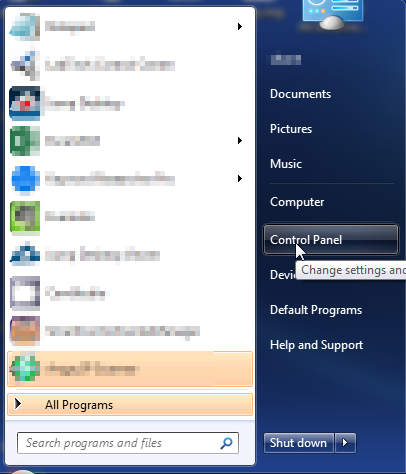
  1. Open up control panel by clicking on the start button in the lower left corner of your computer, and then going to Control Panel
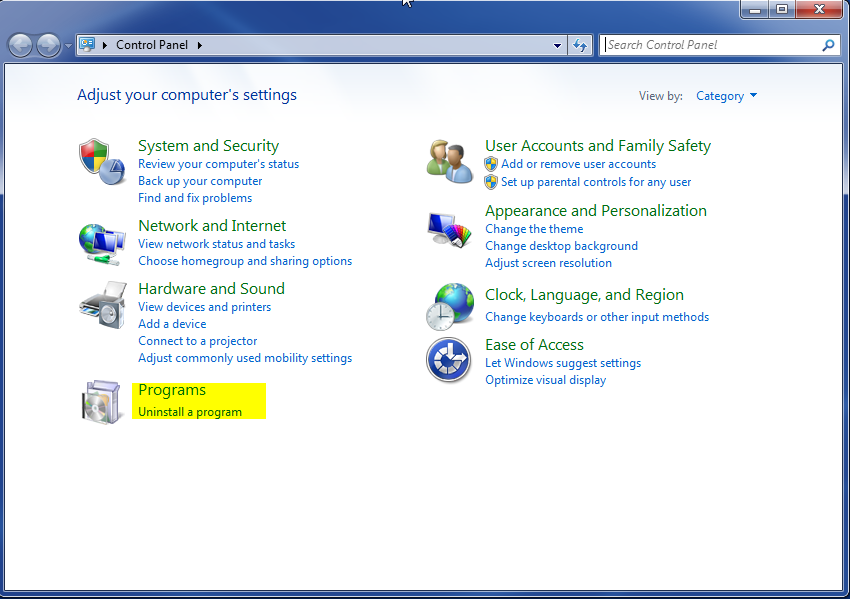
  1. Once, you are in Control Panel, go to the link labeled “Uninstall a Program”. If your computer does not look like the view below, you may have to sort by categories at the top right.
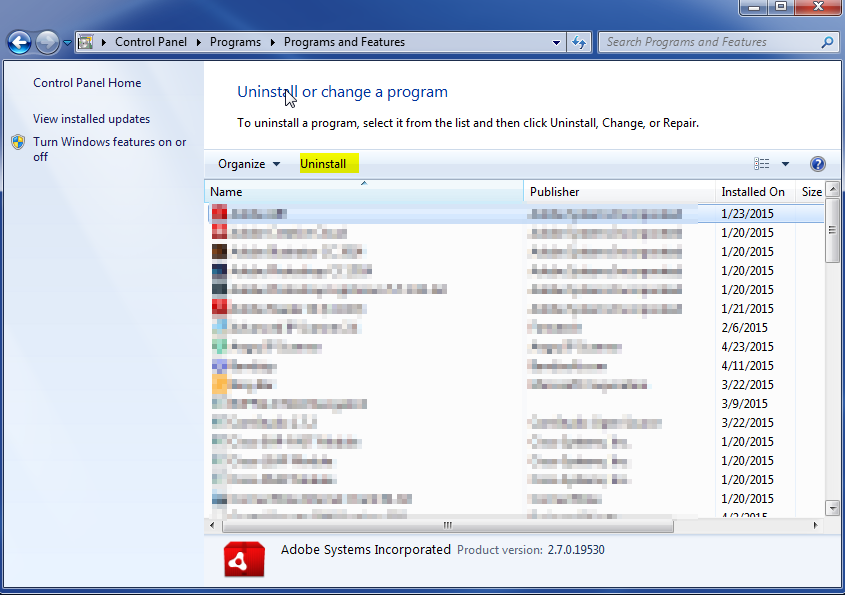
  1. Once in the uninstall programs section, look for the offending program. You can scroll by date installed to find programs that were installed recently. This may be a clue as to what the offending program is. Once you have found the program, highlight it and select “Uninstall” to remove
 

Once you have done this, you will need to go into your browser and set it to its default settings to remove the other changes it made. You will also want to scan your computer to make sure no new issues were introduced by the vulnerability. A good tool to use for this is MalwareBytes. If you already have a virus scanner, you should run this as well.

Filed Under: Virus Removal

Latest Articles

Protect Your PC From Fake Antivirus Programs

A fake anti-virus program can be the worst and most unrelenting malware that you may encounter on the internet. Malware are programs that phish out your personal information in exchange of “free anti-virus programs” (which are fake antivirus programs). Usually the fake antivirus clients offer a free … [Read More...]

IA-32 (Intel Architecture 32 ) – base instruction set for 32 bit processors

IA-32 - sometimes generically called x86-32 - is the instruction set architecture of Intel\'s family of 32-bit microprocessors; previous microprocessor architecture had been 16-bit. It was introduced in the Intel\'s third generation 80386SX and DX processors in 1985. In fact, the 386SX was … [Read More...]

Optimizing Startup Menu

Video Covering Optimizing Startup Menu - Part of our Fix Slow Computer tutorial found on  https://www.pctechguide.com/how-to-fix-your-slow-computer Transcription of Video: Hi, this is Jacob with pctechguide.com. This is part four in our video series of "How to Speed Up Your Slow Computer" … [Read More...]

Why Internet Bundles Are the Next Battleground for Gamers

A weak internet connection can turn seamless gaming sessions into frustrating experiences filled with lag, buffering or sudden disconnects. For … [Read More...]

Importance of Inbound Marketing in the Digital Age

A couple of months ago, Zacks reported that Hubspot was starting to make some major changes to its inbound marketing strategy. They talk a lot about … [Read More...]

Damage Control Strategies for Resolving Online PR Crises

Last July, Astrologer faced a major crisis after its CEO went viral at a ColdPlay concert when having an affair. This was just one of the many times a … [Read More...]

AI is Not Killing Computer Jobs Like Doomers Projected

There is no denying the reality that AI technology has played a massive role in disrupting our lives. A growing number of people claim that AI … [Read More...]

Everything You Need to Know About Sourcing Circuit Boards From U.S. Suppliers

In This Article This article includes: Why Source PCBs From the United States?How to Get a Quote From a U.S.-Based PCB ManufacturerThe Top U.S. … [Read More...]

Top Taplio Alternatives in 2025 : Why MagicPost Leads for LinkedIn Posting ?

LinkedIn has become a strong platform for professionals, creators, and businesses to establish authority, grow networks, and elicit engagement. Simple … [Read More...]

Guides

  • Computer Communications
  • Mobile Computing
  • PC Components
  • PC Data Storage
  • PC Input-Output
  • PC Multimedia
  • Processors (CPUs)

Recent Posts

Grow your Instagram reach by adding real value

Over 1 billion people use Instagram each month, 81% of people use it to research products and services, and 90% of Instagram users currently follow a … [Read More...]

Graphic Card Display Port – History

Announced in May 2006, the new DisplayPort standard was developed by a VESA Task Group comprised of leading companies in the display … [Read More...]

Spear Phishing – The New Cyber Attack

Hackers come up with new ways every day to gain access to our computers. They have been evolving on a continual basis, and there is a new attack that … [Read More...]

[footer_backtotop]

Copyright © 2026 About | Privacy | Contact Information | Wrtie For Us | Disclaimer | Copyright License | Authors