pctechguide.com

  • Home
  • Guides
  • Tutorials
  • Articles
  • Reviews
  • Glossary
  • Contact

Browser Hero Removal Guide

If you have Browser Hero installed on your computer then chances are you were tricked into needing this type of software on your computer. We recommend removing it as soon as possible because it is not all it is cracked up to be. It is advertised as a free web security app that is ad supported. But, you will be slammed with many third-party ads that will make browsing a real hassle.

The software is similar to PriceHorse and Price-hips. It makes money through its pay per click model. It will show you predefined ads and will collect data about the types of ads that you click on . Therefore, it is showing you many ads, but it is also spying on your browsing habits. The things is that many of these ads are also suspect. And, it may lead you to get even more unsavory software installed on your PC.

The software can be directly downloaded from the developers website. However, you most likely got the software from it being bundled with another package. This can come with software that you downloaded from a free download site or could be inside a browser hijacker or potentially unwanted programs (PUPS).

The software will affect all popular browsers like FireFox, Chrome and Internet Explorer. The only way to be safe from all the ads is to remove the software from your system. The easiest way to remove Browser Hero is to use an automated tool like SpyWare Hunter or a similar program. I have included a link for the software below. Furthermore, if you want to do it manually, there is a link below that you can use.


How To Remove Browser Hero

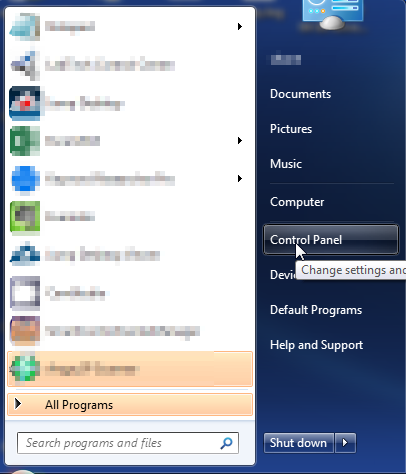
  1. Open up control panel by clicking on the start button in the lower left corner of your computer, and then going to Control Panel
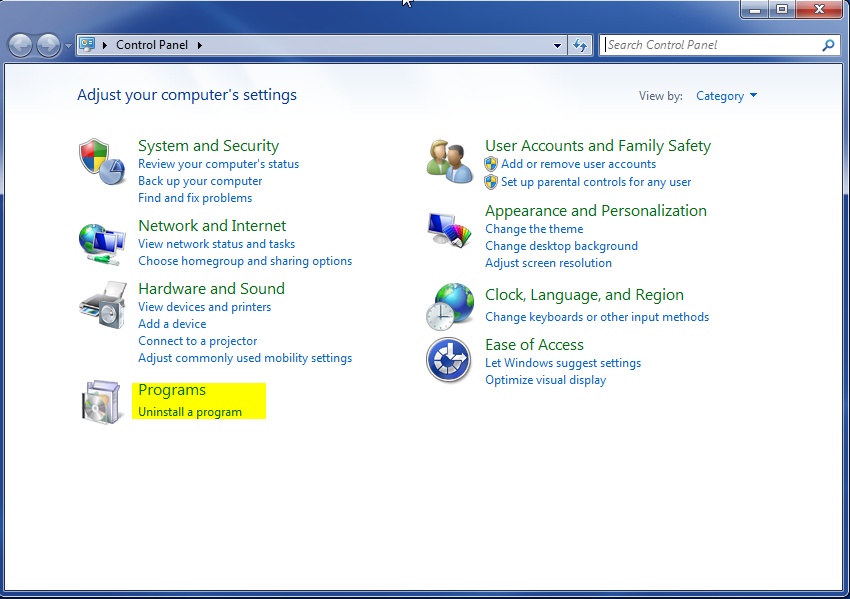
  1. Once, you are in Control Panel, go to the link labeled “Uninstall a Program”. If your computer does not look like the view below, you may have to sort by categories at the top right.
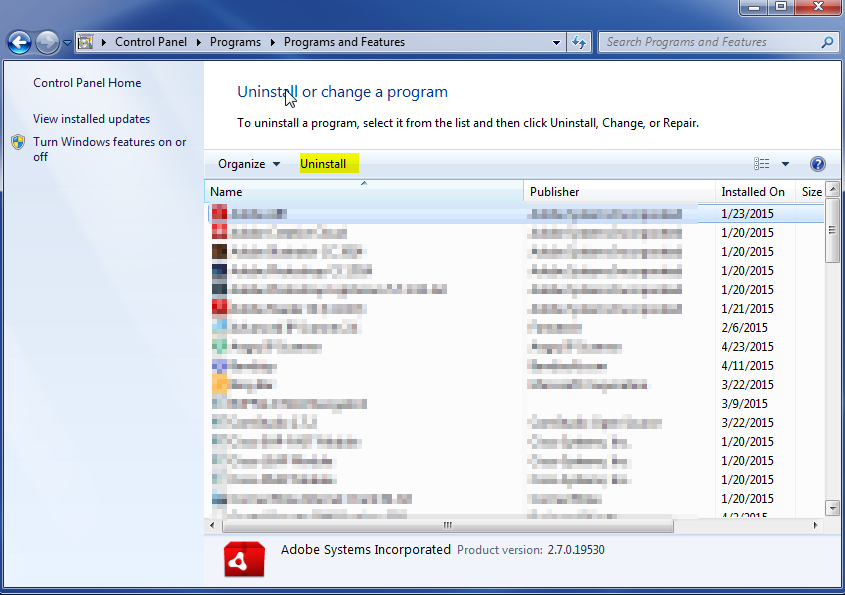
  1. Once in the uninstall programs section, look for the offending program. You can scroll by date installed to find programs that were installed recently. This may be a clue as to what the offending program is. Once you have found the program, highlight it and select “Uninstall” to remove
 

Once you have done this, you will need to go into your browser and set it to its default settings to remove the other changes it made. You will also want to scan your computer to make sure no new issues were introduced by the vulnerability. A good tool to use for this is MalwareBytes. If you already have a virus scanner, you should run this as well.

Filed Under: Virus Removal

Latest Articles

Encryption Software for Windows XP Users

Encryption software is one of the most important yet most overlooked aspects of PC upkeep. In today's world, it seems that nothing is safe and secure. Even government institutions and Fortune 500 companies experience problems with security and with more of us online each day, it is vastly … [Read More...]

Digital Camera Connectivity

Despite the trend towards removable storage, digital cameras still allow connection to a PC for the purpose of image downloading. Until the late 1990s the principal method of transfer was via a conventional RS-232 serial cable at a maximum … [Read More...]

Problems Accessing Windows Update

Windows, in its various operating systems throughout the years, has always been a dependable, trusty, and powerful program. But no piece of software is perfect and Windows is definitely no exception. From registry errors to system crashes, there is plenty to gripe about. But some of these … [Read More...]

Why Internet Bundles Are the Next Battleground for Gamers

A weak internet connection can turn seamless gaming sessions into frustrating experiences filled with lag, buffering or sudden disconnects. For … [Read More...]

Importance of Inbound Marketing in the Digital Age

A couple of months ago, Zacks reported that Hubspot was starting to make some major changes to its inbound marketing strategy. They talk a lot about … [Read More...]

Damage Control Strategies for Resolving Online PR Crises

Last July, Astrologer faced a major crisis after its CEO went viral at a ColdPlay concert when having an affair. This was just one of the many times a … [Read More...]

AI is Not Killing Computer Jobs Like Doomers Projected

There is no denying the reality that AI technology has played a massive role in disrupting our lives. A growing number of people claim that AI … [Read More...]

Everything You Need to Know About Sourcing Circuit Boards From U.S. Suppliers

In This Article This article includes: Why Source PCBs From the United States?How to Get a Quote From a U.S.-Based PCB ManufacturerThe Top U.S. … [Read More...]

Top Taplio Alternatives in 2025 : Why MagicPost Leads for LinkedIn Posting ?

LinkedIn has become a strong platform for professionals, creators, and businesses to establish authority, grow networks, and elicit engagement. Simple … [Read More...]

Guides

  • Computer Communications
  • Mobile Computing
  • PC Components
  • PC Data Storage
  • PC Input-Output
  • PC Multimedia
  • Processors (CPUs)

Recent Posts

Hard Disk Capacity Barriers

Whilst Bill Gates' assertion that 640KB ought to be enough for anyone is the most famous example of lack of foresight when … [Read More...]

Securing Your Privacy Against Deep Packet Inspections

Network administrators, cybersecurity analysts and watchdogs use a variety of different tools to monitor Internet traffic. Deep packet inspection is … [Read More...]

What is L2 (Level 2) cache memory?

Most PCs are offered with a Level 2 cache to bridge the processor/memory performance gap. Level 2 cache - also referred to as secondary cache) … [Read More...]

[footer_backtotop]

Copyright © 2026 About | Privacy | Contact Information | Wrtie For Us | Disclaimer | Copyright License | Authors