pctechguide.com

  • Home
  • Guides
  • Tutorials
  • Articles
  • Reviews
  • Glossary
  • Contact

Android NewTab Virus Removal Guide

Android Newtab is a browser hijacker that will redirect your browser homepage and default home page to start.androidnewtab.com.
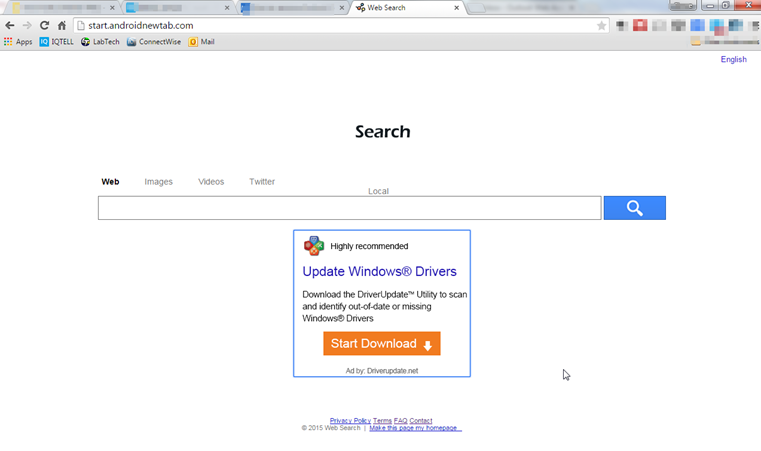
The homepage you are sent to will display ads and links for sponsors in the search results. It looks a great deal like a legitimate website, so you need to be on the lookout. The sole purpose of the site is to raise ad revenue for the sites found in the search results. Many blackhat SEO practices will use it to help a site get better rankings in legitimate search engines.

The bug isn’t a virus per se, but it has plenty of things to watch out for. It does have some rootkit abilities where it can hook into your operating system and possibly do damage, or open the doors for others to do damage. Plus, it can slow down the user experience for the person using the computer.

It is typical to see a great deal of advertising on the website. This comes in the form of banner ads, pop-ups and in text links. You will also see some pop unders and interstitial advertising going on. It can be found on popular browsers like Chrome, Internet Explorer and Firefox. The way it is distributed is primarily by being bundled with money making schemes. The browser extension will modify many settings within the browser. It will change the home page, lock down browsers from settings being made and even disable security policies on the browsers. This can make them vulnerable to further issues.

If you notice traits of this virus on your computer, you should try to remove it as soon as possible. It may seem like a helpful utility, but it should be uninstalled. An easy way to remove this is to use the tool called SpyHunter. You can find out more by using the button below:



As stated before, the NewTab bug is installed by being bundled with other software. However, even if you remove the software it was bundled with it will not repair the browser settings that were messed up. You will have ot go back into the browser and repair those yourself.

It is important to be careful when installing any software from a download site. It is not uncommon for them to bundle things in their downloads. A lot of times during the installation process, you will see a warning or prompt that will ask you if you would like to install and added feature. Read these carefully and see if there is a way to skip these extra features. Sometimes, you can only get the option to skip them if you elect to do custom installs. “Simple” installs will sometimes assume that you want all the bundled junk.

Uninstall NewTab from Windows.

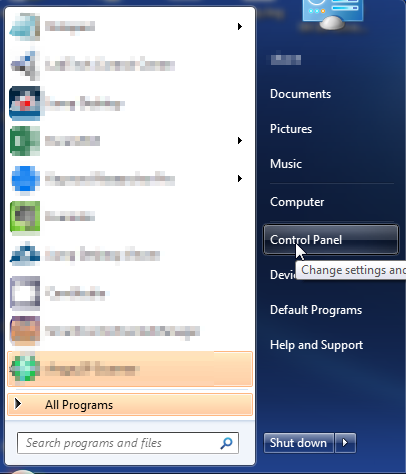
  1. Open up control panel by clicking on the start button in the lower left corner of your computer, and then going to Control Panel
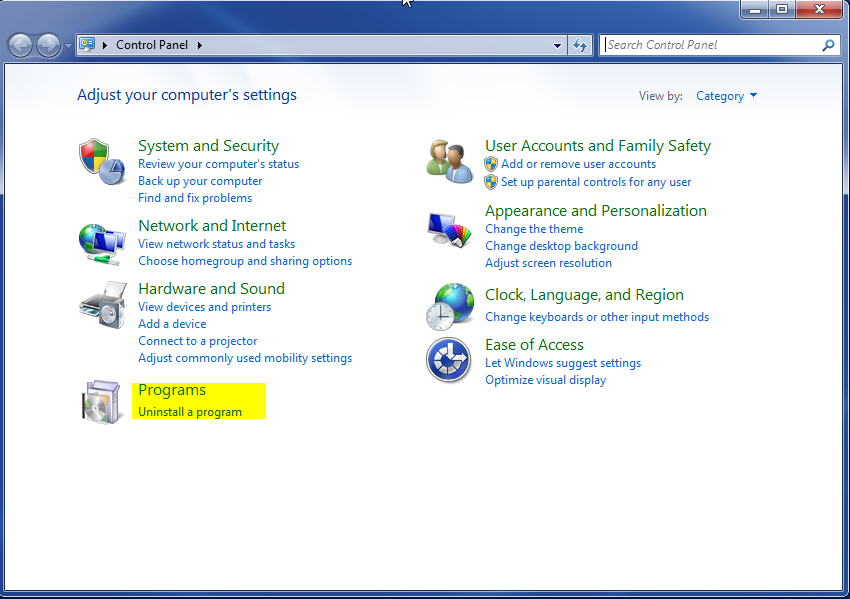
  1. Once, you are in Control Panel, go to the link labeled “Uninstall a Program”. If your computer does not look like the view below, you may have to sort by categories at the top right.
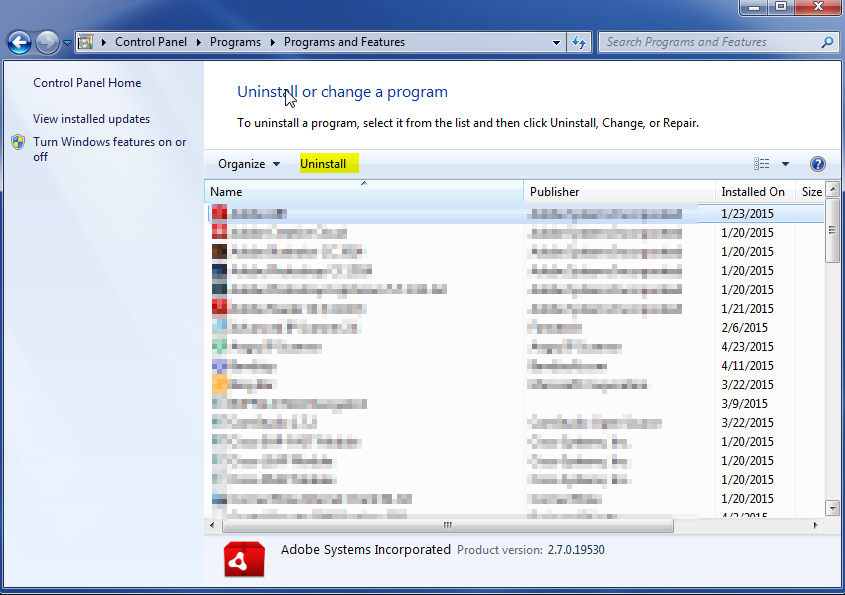
  1. Once in the uninstall programs section, look for the offending program. You can scroll by date installed to find programs that were installed recently. This may be a clue as to what the offending program is. Once you have found the program, highlight it and select “Uninstall” to remove
 

Once you have done this, you will need to go into your browser and set it to its default settings to remove the other changes it made. You will also want to scan your computer to make sure no new issues were introduced by the vulnerability. A good tool to use for this is MalwareBytes. If you already have a virus scanner, you should run this as well.

Filed Under: Virus Removal

Latest Articles

10 Tips To Keep Your Computer Safe From Hackers And Viruses

There`s a never-ending flow of sophisticated scams and they come in many different disguises, that even the most IT savvy people can get caught in the hacker`s net. From corrupt email links to people calling you claiming to be from your provider, wanting your credit card details or trying to make … [Read More...]

Motherboards and Win98

On attempting to boot to Windows 98SE the signs were good, with lots of messages about Windows having found new hardware and attempting to locate and install new software for it. While Windows is doing this you may find that the system restarts one or more times and you'll probably be asked to … [Read More...]

Protect Business From Cyber Attacks

A company is only as safe as its computer network and, though it's hard to admit, many businesses are frightfully unprotected when it comes to possible hackers, viruses, and other nasty internet elements. Cyber attacks have leveled people from all walks of life. A local business owner might have his … [Read More...]

Why Internet Bundles Are the Next Battleground for Gamers

A weak internet connection can turn seamless gaming sessions into frustrating experiences filled with lag, buffering or sudden disconnects. For … [Read More...]

Importance of Inbound Marketing in the Digital Age

A couple of months ago, Zacks reported that Hubspot was starting to make some major changes to its inbound marketing strategy. They talk a lot about … [Read More...]

Damage Control Strategies for Resolving Online PR Crises

Last July, Astrologer faced a major crisis after its CEO went viral at a ColdPlay concert when having an affair. This was just one of the many times a … [Read More...]

AI is Not Killing Computer Jobs Like Doomers Projected

There is no denying the reality that AI technology has played a massive role in disrupting our lives. A growing number of people claim that AI … [Read More...]

Everything You Need to Know About Sourcing Circuit Boards From U.S. Suppliers

In This Article This article includes: Why Source PCBs From the United States?How to Get a Quote From a U.S.-Based PCB ManufacturerThe Top U.S. … [Read More...]

Top Taplio Alternatives in 2025 : Why MagicPost Leads for LinkedIn Posting ?

LinkedIn has become a strong platform for professionals, creators, and businesses to establish authority, grow networks, and elicit engagement. Simple … [Read More...]

Guides

  • Computer Communications
  • Mobile Computing
  • PC Components
  • PC Data Storage
  • PC Input-Output
  • PC Multimedia
  • Processors (CPUs)

Recent Posts

AMD Morgan

AMD's Duron family of processors have succeeded in winning the company a significant share in the value PC market … [Read More...]

Transfer VHS to DVD Method

Transferring  a VHS tape  to a DVD sounds like something hard to do but in reality it's not.  It's basically taking what is on tape and converting it … [Read More...]

What You Need to Know When Choosing the Best VPN for an iPhones

Today millions of people have smartphones; most use them to access the Internet. Research shows that more than 50% of Internet users access it with … [Read More...]

[footer_backtotop]

Copyright © 2026 About | Privacy | Contact Information | Wrtie For Us | Disclaimer | Copyright License | Authors