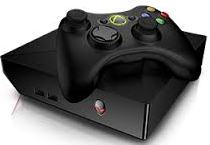
 Alienware Alpha is the latest development of Alienware which is now the subsidiary of Dell. Accordingly it can provide the excitement of PC gaming and browsing right on your TV’s large screen while matching the essential features of the popular game consoles. Basically, what you only need with Alienware Alpha is your flat screen TV with HDMI port and your Wi-Fi for your browsing, updating and downloading your games.
Over the years, Steam has put its best foot forward to catch up with the giant game console manufacturers but with different package in mind. With this recent development, the Alienware Alpha is much, much different from the old, rough PC game consoles that were piloted during the last part of 2013. The Alpha now has better improved graphics and unbelievable speed and better responsiveness with its games. Powered by Steam Big Picture, its Steam library is keeping more than 3 thousand accessible games in its database and 500 of these are controller-supported games for single and multiplayer games.
The Alpha – Steam’s Positive Innovation
The Alienware Alpha PC-console is actually a hybrid. Its major selling point is its dual gaming and browsing purposes. Gamers don’t have to huddle on narrow computer screens anymore while playing. With the wider TV screen, your play is more felt and larger than life so the concept of living room gaming has still been achieved.
Alienware Alpha really looks like a game console but only smaller. Square and weighing around 4.5 pounds, it is just slightly wider than the adult’s open palm and can be easily slipped even underneath your flatscreen TV.
With front power button, USB ports on back and front and HDMI input and output, it really look so basic and yet really easy to use. Setting it up is also a breeze and no installation needed. You just plug everything in and sign in to Valve’s PC digital distribution network, Steam and you are ready to play. You turn on your Wi-Fi and go cruise the web and there you go with your usual browsing and networking.
Compared to other popular gaming consoles in terms of graphics and speed, you can adjust the Alpha’s graphics from medium to high depending on your game’s specs requirements. It can play games that are up to 1920x 1080 resolution with smooth frame rates. Even the Xbox and PlayStation 4 can hardly reach this level of resolution and this provides Alpha the advantage.
On the desktop mode, the Alpha is surprisingly silent and with low thermal signs which is uncommon for game consoles. With just a slight maneuver of the controller, you can leave the game console and switch to PC mode. You can navigate your screen during initial startups and when adjusting settings to getting to the Steam play using the Xbox controller.

The Alpha is also upgradable. You can open it up and tinker its hardware but you cannot touch its GPU because it is solidly attached to the motherboard. It is also compatible with all PC peripherals. Any high-end wireless keyboard, mouse or headset can work with it.
The Alienware Alpha comes with 130-watt external AC adaptor, PC-compatible Xbox 360 controller, a USB dongle for the controller, HDMi cable and an installation disk also for the Xbox controller.
What Can We Expect?
Every unit of Alienware Alpha has its GeForce NVIDIA GPU which engineers develop to produce the best graphics in every game and maximize performance. By pairing Alienware technology with NVIDIA, the engineers installed 2GB of GDDR5 memory on Alpha’s conventional GTX GPU for swifter performance. And with carefully set up thermal envelop and power balancer, the unit will run really quiet and remain cool in any mode.
Installed with Windows 8.1 OS, your TV has now the power to run like a large computer screen. And being equipped with a CPU Intel Core i3 2.9 GHz Dual Core Processor with 4 GB RAM and 500 GB HDD you can enjoy almost the same games like what you play with the popular consoles like Microsoft’s Xbox 360 and Sony’s Playstation series. The graphics are much alike, the interface is also smooth and absolutely no delay in response with the maneuver.
Alpha is built with Steam OS and it is also Steam Controller ready so you can play ‘Early Access games’ that are not playable with the PlayStations and Xbox. These games are mostly the classic games but continue to evolve and improve to catch up with the innovations in the present gaming technology.
The Alpha has four base models so its prices also vary. But particularly the first model which we discussed here has this specs and costs $549 at Dell’s website.
• 4th Generation Intel Core i3 Haswell processor
• Alpha chassis with NVIDIA® GeForce® GTX GPU 2GB GDDR5
• 500GB SATA 3 HDD
• 4GB of 1600MHz memory
• Dual-band Wireless-AC 1×1 with Bluetooth 4.0
• HDMI-out, HDMI-in, Gigabit Ethernet, optical audio out
• 2 USB 3.0 ports, two USB 2.0 ports
• OS Windows 8.1
The largest model which is packed with CPU Intel Core i7 Quadcore, 8 GB of DDR5 RAM and 2TB SATA 6GB/s hard drive, costs $899. It is also equipped with Nvidia GeForce GPU that makes up for maximum graphics performance and speed.
Though some people think that the Alpha is quite expensive considering that it is just new in the market and have to prove a lot of its worth, many people still find it the best console to have for living room play. And even it’s more than a hundred dollar expensive than the popular consoles, people like the browsing feature and the gaming experience it offers that can match any existing consoles of this generation. Aside from it’s upgradable we should expect for more added specs and innovations in the coming years.