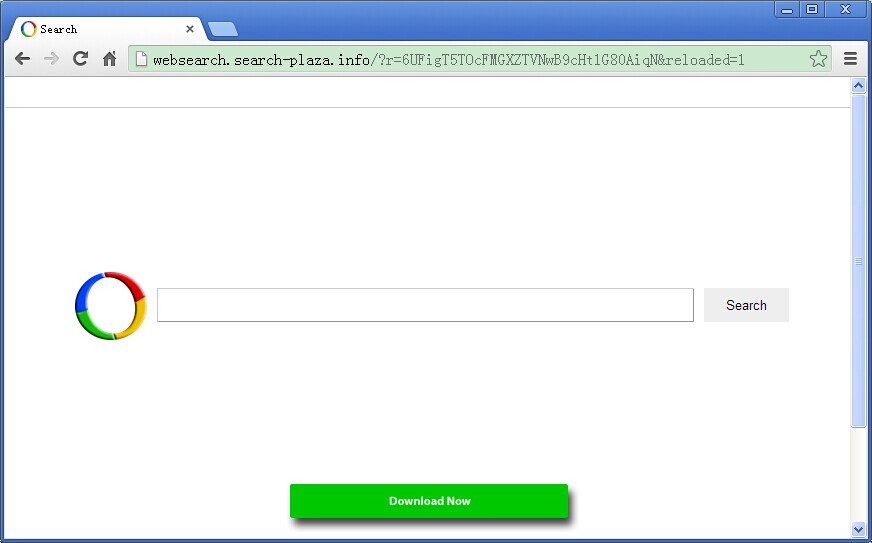
 Websearch.search-plaza.info is a browser redirect malware that can modify your computer’s DNS settings and won’t permit you to restore it unless this will be cleaned out from your system. This browser hijacker commonly makes its way into your computer when you download free software or applications that are bundled up with extensions, more applications and images but have a malware infection amongst its files.
Bundling method is commonly used by scammers to get inside your computer. They attach and hide their malwares onto free applications’ components and when you allow download to an infected application and run the program, you let loose of a potentially hazardous program that eventually weakens your antivirus program and firewall.
Websearch-search-plaza.info does its job from within your system so even you have an antivirus program and with a set-up firewall, your browser like Google Chrome, Firefox or Internet Explorer can be hijacked easily. Once infected, your computer will be literally exposed to so many types of risks. The same thing what search.strtpoint.com and Mystart.uninstallmaster.com can do, it can also record and collect your browsing history and send it to third parties which can put your personal files and financial account in peril.
Identifying the Infection
Specifically, you will know that the Websearch.search-plaza.info has intruded your system when you see that it has changed your search engine into its own home page. So instead of Yahoo or Google running, for example, your home page becomes the Websearch.search-plaza.info.
The Websearch malware does have a search box like any real search engine and an advertisement clickable button at the bottom of its homepage. Clicking this would bring you to many anomalous sites that offer more downloadable applications. Using its search bar, the same thing happens or it can redirect you to a fake Google search engine that is full of advertisements, banners, affiliate marketing sites, adult sites and other potentially risky sites that you don’t want to see. And as it renders your antivirus and firewall useless, you will encounter so many pop-up ads.
What You Must Know
As mentioned, downloading free programs from unfamiliar sites can give you the Websearch malware infection. Notorious in this aspect are PDF creators, download managers, video and music players, games and many more. Unfortunately, even the supposed to be reliable sites are becoming key players in the spread of browser hijackers these days.
Before, we can rely on sites like softonic.com, brothersoft.com and cnet.com in getting clean free apps. They also assure us they use the best web security platforms that can detect even the slightest signs of virus attachment in their downloadable free software. However, a lot of people are now complaining getting attacked by malwares that include Websearch.search-plaza.info whenever they download free applications from these sites.
In reality, these supposed to be reliable websites use download managers in order to earn money from advertisers. So even the site owners say their free applications and software are safe, a lot of these basically have really malwares in them. This simply means that if there is no such thing as safe free apps, the same goes for the websites that offer them.
End of Your Happy Downloads?
Moreover, this does not mean that your happy days of downloading apps and freeware can be over. You can still enjoy having your free apps on your computers as long as you have an effective malware protection installed so that every time there’s even a harmful bit of malware that goes in, you can effectively hunt it and eliminate it. And this is what the SpyHunter is good for.
SpyHunter can eliminate your worry in getting back your hijacked browser. By fully scanning your system, files and programs included, it reports all the seemingly malicious extensions or bad pieces of data that if finds. From there, you can delete these all throughout so what you get is a healthy computer system without any type of malware or virus prowling on your programs and files. You can also try the System Restore.
The System Restore process is very simple. All Windows-based operating systems have System Restore features. By restoring your system’s status to its previous clean state, you can get rid of the present infection. Just make sure you have uninstalled the Websearch.search-plaza.info first before proceeding to System Restore.
To do System Restore, click Start button on your Windows desktop and type System Restore on the search box. When you find it and clicked it, a prompt screen will ask you to allow operation so click yes. You will be given the dates you want to restore your computer so choose the date you think you have the cleanest state. Once system restore is completed, reboot your computer. About your files, they will be safe so don’t worry because System Restore does not affect files.
Back-Up Options
On the other hand, in case you have some large files you want to ensure they have back-ups, go for cloud storage sites. Affordable and safe websites we know are Mozy and Carbonite. These sites are also very safe and will secure your data accordingly. If you want free cloud backup, there’s the Google Drive that offers 15 GBs of free space and Microsoft’s OneDrive with free 10 GB space.
Lastly, for future protection, we really recommend having a reliable guard protection for your computer that must be there every bit of a second. And we really mean SpyHunter in this aspect.