pctechguide.com

  • Home
  • Guides
  • Tutorials
  • Articles
  • Reviews
  • Glossary
  • Contact

VBA Macro to See If Your Birthday is the Same As a US President

This is an election year, so people are showing a lot of interest in politics right now. We thought it would be cool to create a VBA macro that makes an otherwise frustrating and stressful election season a little more fun.

This macro will ask for your birthday and then tell you if you share the same birthday as a United States president.

Here is a screenshot of the macro asking for your birthday:
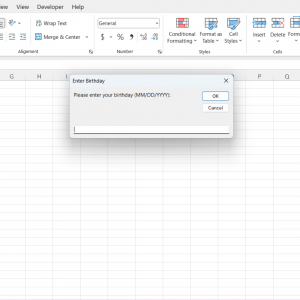
ask for input presidential VBA maco

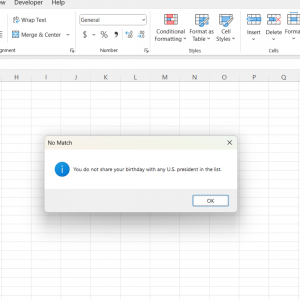
And here is the output:

VBA MAcro presidential output 2

Sub CheckPresidentialBirthday()
‘ List of U.S. presidents’ birthdays (MMDD format)
Dim presidentsBirthdays As Collection
Set presidentsBirthdays = New Collection

‘ Adding all presidents’ birthdays
presidentsBirthdays.Add “0222”, “George Washington” ‘ George Washington
presidentsBirthdays.Add “1030”, “John Adams” ‘ John Adams
presidentsBirthdays.Add “0413”, “Thomas Jefferson” ‘ Thomas Jefferson
presidentsBirthdays.Add “0711”, “James Madison” ‘ James Madison
presidentsBirthdays.Add “0428”, “James Monroe” ‘ James Monroe
presidentsBirthdays.Add “0711”, “John Quincy Adams” ‘ John Quincy Adams
presidentsBirthdays.Add “0315”, “Andrew Jackson” ‘ Andrew Jackson
presidentsBirthdays.Add “1205”, “Martin Van Buren” ‘ Martin Van Buren
presidentsBirthdays.Add “0318”, “Grover Cleveland” ‘ Grover Cleveland
presidentsBirthdays.Add “1004”, “Rutherford B. Hayes” ‘ Rutherford B. Hayes
presidentsBirthdays.Add “1102”, “James K. Polk” ‘ James K. Polk
presidentsBirthdays.Add “0810”, “Herbert Hoover” ‘ Herbert Hoover
presidentsBirthdays.Add “0820”, “Benjamin Harrison” ‘ Benjamin Harrison
presidentsBirthdays.Add “0304”, “William McKinley” ‘ William McKinley
presidentsBirthdays.Add “0915”, “William Howard Taft” ‘ William Howard Taft
presidentsBirthdays.Add “1027”, “Theodore Roosevelt” ‘ Theodore Roosevelt
presidentsBirthdays.Add “0808”, “Richard Nixon” ‘ Richard Nixon
presidentsBirthdays.Add “0714”, “Gerald Ford” ‘ Gerald Ford
presidentsBirthdays.Add “1001”, “Jimmy Carter” ‘ Jimmy Carter
presidentsBirthdays.Add “0614”, “Donald Trump” ‘ Donald Trump
presidentsBirthdays.Add “1120”, “Joe Biden” ‘ Joe Biden

‘ Prompt user for their birthday
Dim userBirthday As String
userBirthday = InputBox(“Please enter your birthday (MM/DD/YYYY):”, “Enter Birthday”)

‘ Ensure valid date input
On Error Resume Next
Dim userDate As Date
userDate = DateValue(userBirthday)
On Error GoTo 0

If userDate = 0 Then
MsgBox “Invalid date format. Please enter the date in MM/DD/YYYY format.”, vbExclamation, “Invalid Date”
Exit Sub
End If

‘ Extract MMDD part from the input
Dim monthDay As String
monthDay = Format(userDate, “MMDD”)

‘ Check if the entered MMDD matches any president’s birthday
Dim presidentName As String
Dim matchFound As Boolean
matchFound = False

On Error Resume Next
presidentName = presidentsBirthdays(monthDay)
On Error GoTo 0

If presidentName <> “” Then
matchFound = True
End If

‘ Display result to the user
If matchFound Then
MsgBox “You share your birthday with President ” & presidentName & “!”, vbInformation, “Birthday Match”
Else
MsgBox “You do not share your birthday with any U.S. president in the list.”, vbInformation, “No Match”
End If
End Sub

We hope you enjoy using this macro!

Filed Under: Articles

Latest Articles

CD-ROM Operations

Apart from far more sophisticated error-checking techniques, the innards of a CD-ROM drive are pretty much the same as those used in CD audio players. Data is stored in the same way on all CDs. The information is stored in sequential 2KB … [Read More...]

Flat Panel ALiS Technology

Fujitsu has developed a new plasma display type that overcomes the low-resolution restrictions of conventional PDPs. Called Alternate Lighting of Surfaces (ALiS), the technique uses interlaced rather than progressive scans. In a … [Read More...]

Bios Configuration

Whichever method you've used to update your BIOS, it's important that the new BIOS Setup defaults are used when the system is next powered on. You can do this by entering Setup by pressing the appropriate key - generally DEL as soon as POST starts and by then selecting the option to Load BIOS Setup … [Read More...]

Why Internet Bundles Are the Next Battleground for Gamers

A weak internet connection can turn seamless gaming sessions into frustrating experiences filled with lag, buffering or sudden disconnects. For … [Read More...]

Importance of Inbound Marketing in the Digital Age

A couple of months ago, Zacks reported that Hubspot was starting to make some major changes to its inbound marketing strategy. They talk a lot about … [Read More...]

Damage Control Strategies for Resolving Online PR Crises

Last July, Astrologer faced a major crisis after its CEO went viral at a ColdPlay concert when having an affair. This was just one of the many times a … [Read More...]

AI is Not Killing Computer Jobs Like Doomers Projected

There is no denying the reality that AI technology has played a massive role in disrupting our lives. A growing number of people claim that AI … [Read More...]

Everything You Need to Know About Sourcing Circuit Boards From U.S. Suppliers

In This Article This article includes: Why Source PCBs From the United States?How to Get a Quote From a U.S.-Based PCB ManufacturerThe Top U.S. … [Read More...]

Top Taplio Alternatives in 2025 : Why MagicPost Leads for LinkedIn Posting ?

LinkedIn has become a strong platform for professionals, creators, and businesses to establish authority, grow networks, and elicit engagement. Simple … [Read More...]

Guides

  • Computer Communications
  • Mobile Computing
  • PC Components
  • PC Data Storage
  • PC Input-Output
  • PC Multimedia
  • Processors (CPUs)

Recent Posts

External graphics cards: are they worth the investment?

When we hear about external graphics cards (also known as eGPUs) we can't help but think about how promising the concept is. You can get … [Read More...]

DVD OSTA

The Optical Storage Technology Association (OSTA) is an association-not a standards body-and its members account for more … [Read More...]

Disabling and Uninstalling Soundcards

You first need to remove or disable any existing audio components. Under Windows XP, invoke Device Manager by right-clicking My Computer > … [Read More...]

[footer_backtotop]

Copyright © 2026 About | Privacy | Contact Information | Wrtie For Us | Disclaimer | Copyright License | Authors