pctechguide.com

  • Home
  • Guides
  • Tutorials
  • Articles
  • Reviews
  • Glossary
  • Contact

Using the Windows Troubleshooting App To Repair Your PC

If you have been around computers for any length of time, then you may be familiar with the infamous/notorious blue screen of death (BSOD). This is the screen you would get when the computer would crash, and it was largely a screen full of undecipherable gibberish. You would have to write down any codes you found on there and then hunt on a search engine looking for the culprit to your problem. Well, there is a little known tool that may help you fix some of these nagging problems. It is called the Windows Troubleshooting tool. Not very original of a name, but helpful nonetheless.

Getting to the troubleshooting tool is pretty simple. You just need to go to the Control Panel and then click on the Troubleshooting icon in the All Control Panel Items section. Or, you can type Troubleshooting in the search box of the Start Menu

Once you click on the Troubleshooting tool you will be taken to the next window where you will have several options to choose from.
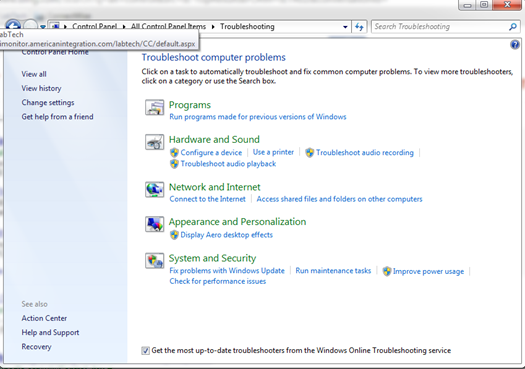
As you can see there are several troubleshooting tools across different categories of potential problems. These include areas like audio, networking, video, security and many other areas. The important thing to keep in mind is that these are definitive troubleshooting tools. They will not fix every problem that you run across. Sometimes it is necessary to get your hands dirty and really dig in to fix problems. However, this is a good starting point for simple diagnostics.

If you do not know much about computers it can maybe save you a lot of money to get answers for simple problems. Just running some of these could save you hundreds of dollars compared to taking your machine down to the local computer repair shop.

A common problem is getting speakers to work in Windows 7. If you have this problem, you can launch the “Troubleshoot Audio Playback” link. This will scan your system for possible driver issues with your speakers and sound card. It will identify any corrupt or incorrect drivers and either fix it or recommend a more suitable driver.

Some of these tools also act as a wizard to help identify your problem better. It will walk you through steps to try to isolate your problem. It will work to narrow down possible issues and ask you a series of questions. It may make changes or suggestions based on how you answer certain questions.

Stumping the troubleshooter is not too hard to do. There are just some things that it cannot do or fix. But, it is still a valuable tool for initial diagnosis of your problem. It may be the difference in fixing your computer in minutes versus paying someone hundreds of dollars to fix something you could have done yourself with this tool.

Filed Under: Articles

Latest Articles

DirectMusic Technology

The establishment of the MIDI protocol in 1982 enabled independent composers to effectively control the entire recording process from home-based studios and contributed significantly to the sound of the 1980s - from sequenced industrial mixes … [Read More...]

LP to CD Recording

Software to facilitate the digitalisation of analogue music is increasingly widely available. The Windows Sound Recorder is not suitable, since it doesn't allow for recording of more than 60 seconds. The application we're going to use in this tutorial is Audacity. This is quite a sophisticated … [Read More...]

Eliminating Search.strtpoint.com Browser Hijacker From Your Computer

One of the most intriguing but very antagonistic malware programs recently created is the search.strtpoint.com. From its name itself, you would smell something strange but you would be more surprised if you found it as your browser. Basically, search.strtpoint.com is a damaging hijack … [Read More...]

Why Internet Bundles Are the Next Battleground for Gamers

A weak internet connection can turn seamless gaming sessions into frustrating experiences filled with lag, buffering or sudden disconnects. For … [Read More...]

Importance of Inbound Marketing in the Digital Age

A couple of months ago, Zacks reported that Hubspot was starting to make some major changes to its inbound marketing strategy. They talk a lot about … [Read More...]

Damage Control Strategies for Resolving Online PR Crises

Last July, Astrologer faced a major crisis after its CEO went viral at a ColdPlay concert when having an affair. This was just one of the many times a … [Read More...]

AI is Not Killing Computer Jobs Like Doomers Projected

There is no denying the reality that AI technology has played a massive role in disrupting our lives. A growing number of people claim that AI … [Read More...]

Everything You Need to Know About Sourcing Circuit Boards From U.S. Suppliers

In This Article This article includes: Why Source PCBs From the United States?How to Get a Quote From a U.S.-Based PCB ManufacturerThe Top U.S. … [Read More...]

Top Taplio Alternatives in 2025 : Why MagicPost Leads for LinkedIn Posting ?

LinkedIn has become a strong platform for professionals, creators, and businesses to establish authority, grow networks, and elicit engagement. Simple … [Read More...]

Guides

  • Computer Communications
  • Mobile Computing
  • PC Components
  • PC Data Storage
  • PC Input-Output
  • PC Multimedia
  • Processors (CPUs)

Recent Posts

The Double-Edged Sword of Machine Learning in Cybersecurity

Today's most damaging threats, from phishing to ransomware, will use machine learning to analyze vast amounts of information about their victims and … [Read More...]

Grow your Instagram reach by adding real value

Over 1 billion people use Instagram each month, 81% of people use it to research products and services, and 90% of Instagram users currently follow a … [Read More...]

Hard Disk Capacity

Since its advent in 1955, the magnetic recording industry has constantly and dramatically increased the performance and … [Read More...]

[footer_backtotop]

Copyright © 2026 About | Privacy | Contact Information | Wrtie For Us | Disclaimer | Copyright License | Authors