pctechguide.com

  • Home
  • Guides
  • Tutorials
  • Articles
  • Reviews
  • Glossary
  • Contact

Use WinDirStat to Clean Up Hard Drive

Today’s hard drives are large and can store tons of files, pictures, videos, etc. But, even with all this space there still may be a time when you need to clean up because the hard drive is filling up. There are the obvious places to check like the Recycle Bin or use the Disk CleanUp tool. But, sometimes this isn’t enough.

What would be nice is if there was a nice, visual tool that could show you exactly what is taking up all the space on your hard drive, where the files are and what kinds of files they are. Well, there is just such a tool. It is called WinDirStat.

Download WinDirStat for Free

WinDirStat is a free tool that you can download by going here.

After you download and install it, the program will need to do an initial scan of your system. This may take several minutes to complete. Once the scan starts you will see a screen like the one below. It is going through the process of scanning all of your files and analyzing the space and file types.
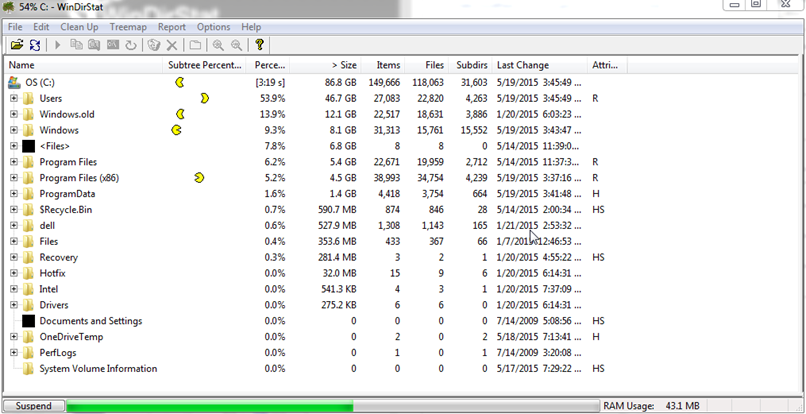
 

You can opt to scan your whole computer or individual drives in the system. In the screen shot above, I have only scanned the C: on the computer.

Once the scan has completed, you will get a visual representation of the files on your computer. It makes more sense when you see it, but basically the bigger the block is the bigger the file is.
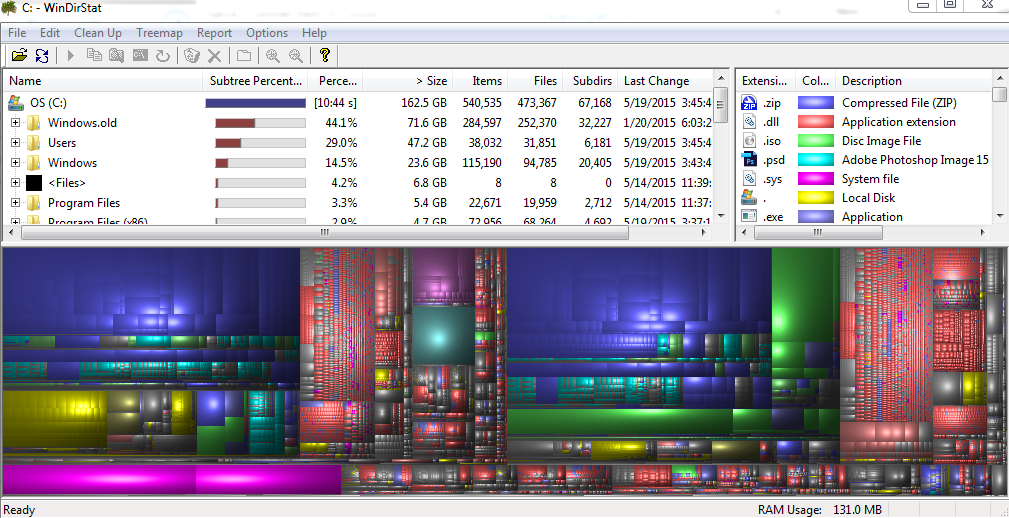
If you click on one of the file blocks, you can see what kind of file it is and whether it is safe to delete or now. Furthermore, file types are organized by color. In the case above, you can see that the green files are .ISO files. You can see they are taking up quite a bit of space and may be safe to delete or remove.

The tree view at the top will also tell you how much space each folder on your drive takes up. If you click on a folder in the tree view, it will highlight all the files below in the visual screen to give you an idea of where they are and how much space they take up.

The best way to really learn the tool is to download it and use it. It is very intuitive and easy to use

Deleting files from WinDirsStat is simple. You can simply right click on a file in the tree view or the visual view and select to delete it.

WinDirStat is a great tool to use to see what is taking up space on the hard drive, and what you can remove to free up space. It is one of the more useful free tools available out there, and it is safe to download as it is not bundled with junk you will find in other free tools.

Filed Under: Articles

Latest Articles

Graphics Card Removal

Replacing your graphics card is easy and the only tools you'll need are a Phillips screwdriver and - just in case you're cack-handed - a pair of tweezers for retrieving dropped screws! If you're wise you'll also use an antistatic wriststrap during the entire process. Power down your PC and … [Read More...]

Dealing with Excel VBA Macros

In this tutorial we will provide an overview of the topic of VBA Functions and User-defined Functions (UDF). We will mention the practices in approaching macros without arguments, functions with one argument and functions with two arguments. We will see some examples of functions with each of these … [Read More...]

SLI Technology

Unveiled in the summer of 2004, SLI (Scaleable Link Interface) is Nvidia's revolutionary approach to 3D graphics scalability which exploits the additional bandwidth and features of the PCI Express bus architecture to allow two graphics … [Read More...]

Why Internet Bundles Are the Next Battleground for Gamers

A weak internet connection can turn seamless gaming sessions into frustrating experiences filled with lag, buffering or sudden disconnects. For … [Read More...]

Importance of Inbound Marketing in the Digital Age

A couple of months ago, Zacks reported that Hubspot was starting to make some major changes to its inbound marketing strategy. They talk a lot about … [Read More...]

Damage Control Strategies for Resolving Online PR Crises

Last July, Astrologer faced a major crisis after its CEO went viral at a ColdPlay concert when having an affair. This was just one of the many times a … [Read More...]

AI is Not Killing Computer Jobs Like Doomers Projected

There is no denying the reality that AI technology has played a massive role in disrupting our lives. A growing number of people claim that AI … [Read More...]

Everything You Need to Know About Sourcing Circuit Boards From U.S. Suppliers

In This Article This article includes: Why Source PCBs From the United States?How to Get a Quote From a U.S.-Based PCB ManufacturerThe Top U.S. … [Read More...]

Top Taplio Alternatives in 2025 : Why MagicPost Leads for LinkedIn Posting ?

LinkedIn has become a strong platform for professionals, creators, and businesses to establish authority, grow networks, and elicit engagement. Simple … [Read More...]

Guides

  • Computer Communications
  • Mobile Computing
  • PC Components
  • PC Data Storage
  • PC Input-Output
  • PC Multimedia
  • Processors (CPUs)

Recent Posts

WinXP Installation Phase 4

Setup proceeds with the installation of devices and the network, then copies and configures the other files needed to install Windows XP. The Start … [Read More...]

CIS Scanners

CIS is a relatively new sensor technology which began to appear at the budget end of the flatbed scanner market in the … [Read More...]

Analogue and Digital Data

Let's not forget that computer data is digital: that is: it is a series of zeros and ones, and nothing else. It's a point easily … [Read More...]

[footer_backtotop]

Copyright © 2026 About | Privacy | Contact Information | Wrtie For Us | Disclaimer | Copyright License | Authors