pctechguide.com

  • Home
  • Guides
  • Tutorials
  • Articles
  • Reviews
  • Glossary
  • Contact

Use TRACERT to Diagnose Network Issues

Windows comes with several commands that help you diagnose network issues. But, one of the more useful commands available to you is the TRACERT command. TRACERT is a command line tool that will show the different hops a packet will take as it reaches its destination. You can type TRACERT followed by an IP address or a URL and you will get a report back as the packet passes through each router on its way to the destination. This tool is good to help you check the path that is taken to see if there is any issues with the path between you and the destination.

In addition to showing you each router the packet passes through, it will also let you know how long it took to get to each hop. Furthermore, it will also let you know if the packet is not able to reach the destination and which router the packet failed to travel through.

Say you are unable to get to a specific website the command will show you where the packet failed. If the packet fails before it reaches your internal router, then you know there is an issue between your computer and your router. This would mean there is an issue inside your network. But, if the packet fails after it leaves your router, then there is an issue beyond your control.

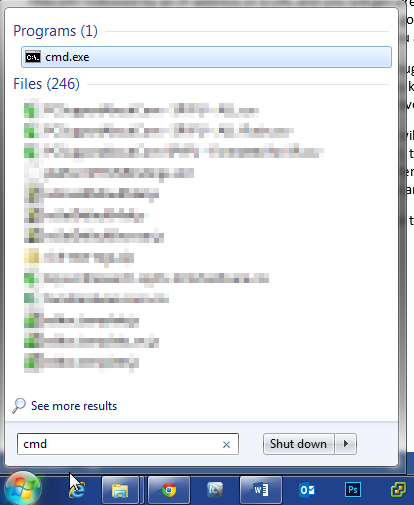
To run the command, click on the Start button and type cmd in the run box. Then hit the <ENTER> button to open the command window.
 

When the command line opens, type in cmd followed by an IP address or domain name. In the example below we are running a trace from our home to popular DNS servers 4.2.2.1. There are times where you will get a time out between the source and the destination. This is usually because the router it passes through is set to now pass back information. This is for security purposes. But, if the packet never reached a final destination it will help you check where the errors starting happening. In this example, you will see that it does reach a final destination passing through 7 routers after leaving ours.
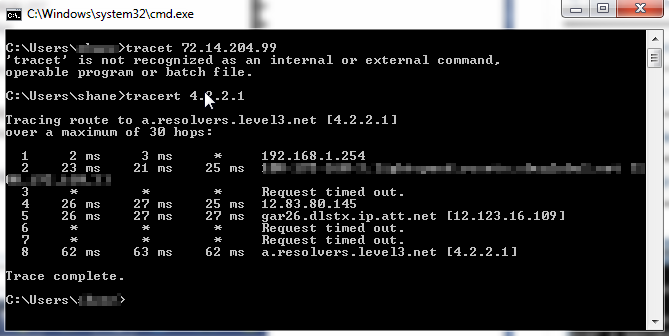
There are some other switches available with the command. For example, you can do tracert -4 <ip address> to show only IPv4 addresses. This is handy if it is showing IPv6 information. If you want to see all the switches, you can use tracert -? to show all the different switches available with the command. If you have an operating system other than Windows, there are many TRACERT utilities available for download.

TRACERT is a useful command to kepe in your bag of tricks when troubleshooting network issues. This command combined with other commands like PING, NSLOOKUP, etc can help narrow down issues you are facing in your network.


Filed Under: Articles

Latest Articles

CD-ROM Blue Book – cdrom rom

The Blue Book defines the Enhanced Music CD specification for multisession pressed disc (i.e. not recordable) comprising audio and data sessions. These discs are intended to be played on any CD audio player, on PCs and on future custom … [Read More...]

Transfer Files From Old Computer to New Computer

When doing a PC to PC file transfer from your old computer to the new one you first need to decide on what files you need to copy over to your new computer. Most likely you will want most of your documents, pictures, music and videos. With a FileCenter's software it's easier to scan, manage and find … [Read More...]

What Video Game Has the Best Graphics?

A regular gamer should never forget that video games are not only about gameplay. Even the most interesting mechanics will not save the game if, instead of a cool picture, only a couple of polygons and pixels are displayed on the screen. Today we have prepared a selection of the most beautiful and … [Read More...]

Why Internet Bundles Are the Next Battleground for Gamers

A weak internet connection can turn seamless gaming sessions into frustrating experiences filled with lag, buffering or sudden disconnects. For … [Read More...]

Importance of Inbound Marketing in the Digital Age

A couple of months ago, Zacks reported that Hubspot was starting to make some major changes to its inbound marketing strategy. They talk a lot about … [Read More...]

Damage Control Strategies for Resolving Online PR Crises

Last July, Astrologer faced a major crisis after its CEO went viral at a ColdPlay concert when having an affair. This was just one of the many times a … [Read More...]

AI is Not Killing Computer Jobs Like Doomers Projected

There is no denying the reality that AI technology has played a massive role in disrupting our lives. A growing number of people claim that AI … [Read More...]

Everything You Need to Know About Sourcing Circuit Boards From U.S. Suppliers

In This Article This article includes: Why Source PCBs From the United States?How to Get a Quote From a U.S.-Based PCB ManufacturerThe Top U.S. … [Read More...]

Top Taplio Alternatives in 2025 : Why MagicPost Leads for LinkedIn Posting ?

LinkedIn has become a strong platform for professionals, creators, and businesses to establish authority, grow networks, and elicit engagement. Simple … [Read More...]

Guides

  • Computer Communications
  • Mobile Computing
  • PC Components
  • PC Data Storage
  • PC Input-Output
  • PC Multimedia
  • Processors (CPUs)

Recent Posts

Intel Mobile Pentium II technology guide

The natural progression of the low-power Deschutes family of Pentium II processors to the portable PC market took place … [Read More...]

Spain Technology Boom Boosts Computing Job Growth by 30%

We have carefully monitored the job market for IT and computer professionals in various countries. A recent study by InfoJobs shows that the market … [Read More...]

Redirecting Browser: Protalsepeti.com Virus

The Portalsepeti.com virus usually presents users with a search bar that can deliver a quick online search. This is also a popular website, which can … [Read More...]

[footer_backtotop]

Copyright © 2026 About | Privacy | Contact Information | Wrtie For Us | Disclaimer | Copyright License | Authors