pctechguide.com

  • Home
  • Guides
  • Tutorials
  • Articles
  • Reviews
  • Glossary
  • Contact

Price Slicer Removal

Price Slicer may seem like a useful piece of software you can use to save money while shopping on the Internet. However, it is much more hassle than it is worth. They even tout the slogan of “Keep more money in your pocket with Price Slicer”. This is a piece of adware that will end up causing more problems in the long run. And, it will increase the likelihood that you will be further infected with other malware. In other words, you should remove it as soon as possible.

Price Slicer is developed to make money for its creators using the pay per click model. Basically, when you click on ads the developer gets money. Furthermore, it will record information about your surfing habits and the developers use this information to more finely tune their ads.

The software can also collect some private information like web log information and IP geolocation information. This information can be shared with third party advertisers as well which can open you up to further issues.

The ads you see can also redirect you to other websites that will unleash more malicious code onto your machine. This can be anything from more adware all the way up to harmful Trojan applications.

If you need an easy way to remove PriceSlicer from your system, we recommend SpyHunter. It is an easy, automated way to remove these types of issues from your computer.

Uninstall PriceSlicer from Windows.

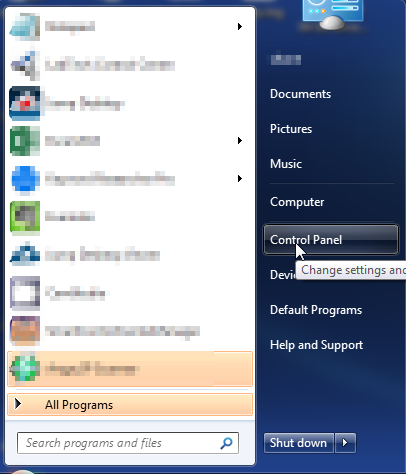
  1. Open up control panel by clicking on the start button in the lower left corner of your computer, and then going to Control Panel
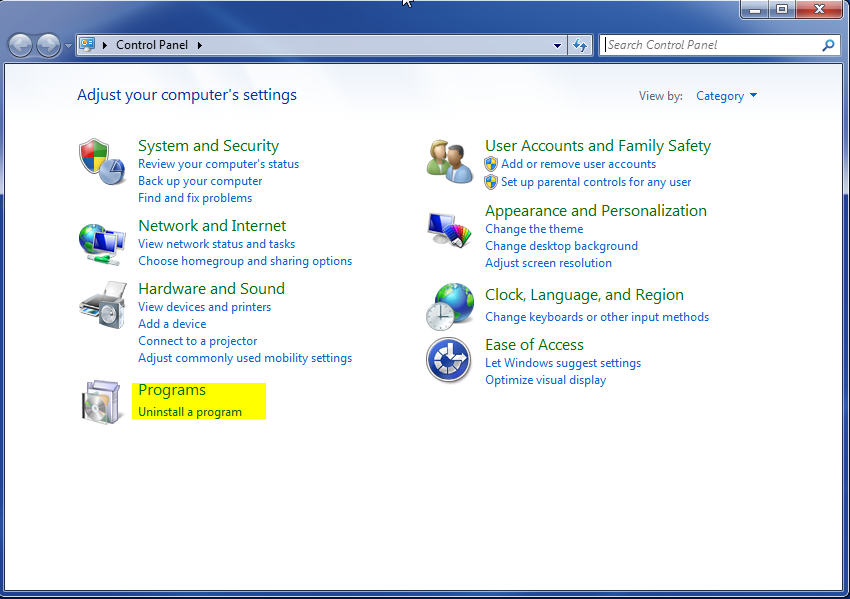
  1. Once, you are in Control Panel, go to the link labeled “Uninstall a Program”. If your computer does not look like the view below, you may have to sort by categories at the top right.
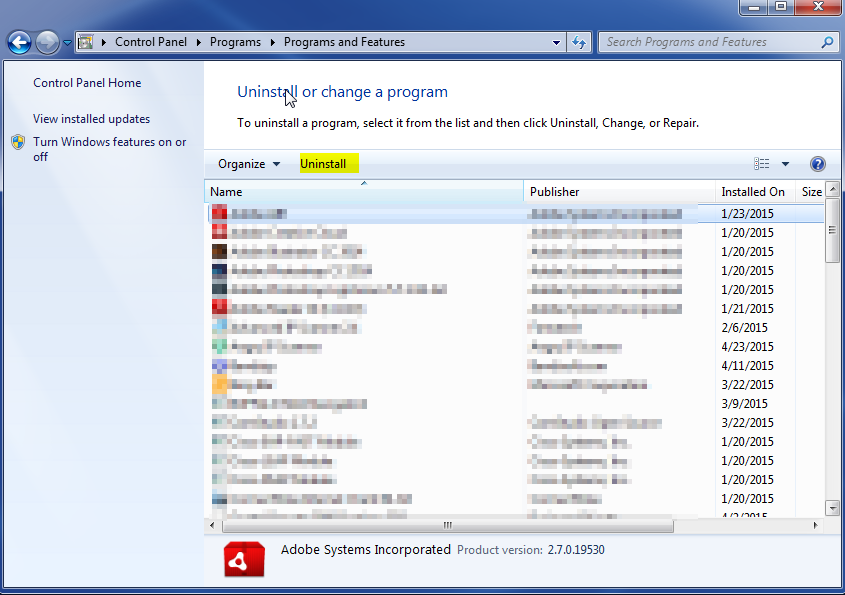
  1. Once in the uninstall programs section, look for the offending program. You can scroll by date installed to find programs that were installed recently. This may be a clue as to what the offending program is. Once you have found the program, highlight it and select “Uninstall” to remove
 

Once you have done this, you will need to go into your browser and set it to its default settings to remove the other changes it made. You will also want to scan your computer to make sure no new issues were introduced by the vulnerability. A good tool to use for this is MalwareBytes. If you already have a virus scanner, you should run this as well.

Filed Under: Articles

Latest Articles

Pentium 4 CPU

Your Pentium 4 motherboard should include a manual with installation instructions. Consult both this and any documentation that came with your Pentium 4 processor. The Pentium 4 uses a FC-PGA2 packaging. While the Integrated Heat Spreader (IHS) affords good protection to the CPU itself, the … [Read More...]

CMOS – complementary metal oxide silicon – RAM chips on motherboards

Motherboards also include a separate block of memory made from very low power consumption CMOS (complementary metal oxide silicon) RAM chips, which is kept alive by a battery even when the PC's power is off. This is used to store basic information about the PC's configuration: number and … [Read More...]

Tips to Getting Engagement that Works the Instagram Algorithm in Your Favor

Building a formidable presence on Instagram these days requires much planning and patience. With over a billion active users, the site is rocketing in popularity for both personal and professional networking purposes. The frequent upgrades in recent times have made Instagram a very versatile space … [Read More...]

Why Internet Bundles Are the Next Battleground for Gamers

A weak internet connection can turn seamless gaming sessions into frustrating experiences filled with lag, buffering or sudden disconnects. For … [Read More...]

Importance of Inbound Marketing in the Digital Age

A couple of months ago, Zacks reported that Hubspot was starting to make some major changes to its inbound marketing strategy. They talk a lot about … [Read More...]

Damage Control Strategies for Resolving Online PR Crises

Last July, Astrologer faced a major crisis after its CEO went viral at a ColdPlay concert when having an affair. This was just one of the many times a … [Read More...]

AI is Not Killing Computer Jobs Like Doomers Projected

There is no denying the reality that AI technology has played a massive role in disrupting our lives. A growing number of people claim that AI … [Read More...]

Everything You Need to Know About Sourcing Circuit Boards From U.S. Suppliers

In This Article This article includes: Why Source PCBs From the United States?How to Get a Quote From a U.S.-Based PCB ManufacturerThe Top U.S. … [Read More...]

Top Taplio Alternatives in 2025 : Why MagicPost Leads for LinkedIn Posting ?

LinkedIn has become a strong platform for professionals, creators, and businesses to establish authority, grow networks, and elicit engagement. Simple … [Read More...]

Guides

  • Computer Communications
  • Mobile Computing
  • PC Components
  • PC Data Storage
  • PC Input-Output
  • PC Multimedia
  • Processors (CPUs)

Recent Posts

Kaspersky Anti-Virus (2015) – A Quick Peek Review

Released in July 2014, the Kaspersky Anti-virus 2015 was said to be the slight improvement of the Kaspersky Anti-virus 2014. More so, it still has so … [Read More...]

Remote Access Software

Have you ever been in a position where you needed to access something on your PC. Or, maybe you thought it would be nice if you could use your PC … [Read More...]

Cleaning out Your Hard Drive Space and Freeing up Disk Space

Even the newest, fastest, most advanced computers can fall prey to slowdown and space shortage. After all, computers might have higher processing … [Read More...]

[footer_backtotop]

Copyright © 2026 About | Privacy | Contact Information | Wrtie For Us | Disclaimer | Copyright License | Authors