pctechguide.com

  • Home
  • Guides
  • Tutorials
  • Articles
  • Reviews
  • Glossary
  • Contact

How to Update Router Firmware

It is good practice to check for updates to your router’s firmware on a regular basis, and update it if available. Most routers have a chip inside similar to what is inside a computer. Firmware is the code that runs on the router, and it is what provides functionality to the router. Updates are important to implement because they can introduce new features to your router, or they can plug in security holes that have been identified. Updating the firmware can even help solve some of the strange issues you will find on your local area network at times.

Typically, you can get firmware for the router in one of two ways. Some manufacturers will ask you to go to their support website and download the upgrade and manually update in another step. Other routers have the ability to connect to the Internet themselves and update the firmwa

re in an automated fashion

Step 1 – Get All The Details

The first thing you need to do is to make sure that you have the correct router information before you download a specific firmware set. If you download the incorrect version and try to apply the wrong version, it can cause severe problems later on; maybe even rendering the router useless.

Typically, you can find the model number on a label on the bottom of the router.
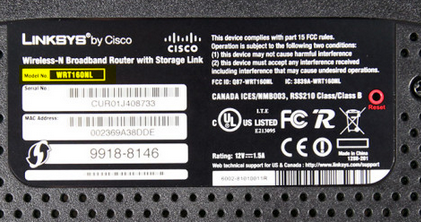
Once you have that information, you can visit the company website to see how to proceed with firmware upgrades.

Step 2 – Install the Firmware

The next thing you need to do is to login to your router. You can usually type the IP address of the router in your browser and get to a login screen. In most home networks, the router is either http://192.168.1.1 or http://192.168.0.1. In some cases, it could be 192.168.0.254 or 192.168.1.254. It depends on the default settings the manufacturer uses, and if you made any changes on the initial install.

Once you get to the login screen, you will need to enter your username and password. Again, this will depend on the manufacturer and if you changed the default. If you do not believe you changed the credentials, and you can’t remember the default, you can find many default credentials here.

If you have the ability to back up your router settings prior to the firmware upgrade, it is a good idea to do so. Look for an area that allows you to save system settings, backup or similar wording.

Look for a tab or link that mentions firmware updates. This could be listed under advanced settings or system settings. This will also depend on the manufacturer. From here, you will have the option to browse for the firmware you previously downloaded or the ability to connect directly to the firmware storage. Once the firmware is installed, the router will need to be rebooted for the changes to take place. At this point, you are done with the upgrade.

We will try to post some router specific tutorials in the future. In the meantime, you can find specific information on your manufacturer’s website.


Filed Under: Articles

Latest Articles

Blackberry Will Buy Your iPhone, Agree?

So it’s true, Blackberry wants to buy your iPhone for up to $550 and you still get Blackberry Passport. Checking the price of iPhone 6 now at Amazon, it costs $789 (16 GB) and $1,054 for the 128 GB while the Blackberry Passport’s price is $599.99 (16 GB) and $645 for the 32 GB. The price of the … [Read More...]

BIOS Reasons

In the past there have been compelling reasons to upgrade your BIOS, such as for Y2K compliance or to support high capacity hard drives that older BIOS chips simply wouldn't recognise. These days the rate of technological development is such that motherboard manufacturers release new BIOS … [Read More...]

Ergonomic Keyboards

Carpal tunnel syndrome (CTS) is a medical condition - more common in women than it is in men - in which the median nerve is compressed at the wrist causing symptoms like tingling, numbness, night time wakening, pain, coldness, and sometimes … [Read More...]

Why Internet Bundles Are the Next Battleground for Gamers

A weak internet connection can turn seamless gaming sessions into frustrating experiences filled with lag, buffering or sudden disconnects. For … [Read More...]

Importance of Inbound Marketing in the Digital Age

A couple of months ago, Zacks reported that Hubspot was starting to make some major changes to its inbound marketing strategy. They talk a lot about … [Read More...]

Damage Control Strategies for Resolving Online PR Crises

Last July, Astrologer faced a major crisis after its CEO went viral at a ColdPlay concert when having an affair. This was just one of the many times a … [Read More...]

AI is Not Killing Computer Jobs Like Doomers Projected

There is no denying the reality that AI technology has played a massive role in disrupting our lives. A growing number of people claim that AI … [Read More...]

Everything You Need to Know About Sourcing Circuit Boards From U.S. Suppliers

In This Article This article includes: Why Source PCBs From the United States?How to Get a Quote From a U.S.-Based PCB ManufacturerThe Top U.S. … [Read More...]

Top Taplio Alternatives in 2025 : Why MagicPost Leads for LinkedIn Posting ?

LinkedIn has become a strong platform for professionals, creators, and businesses to establish authority, grow networks, and elicit engagement. Simple … [Read More...]

Guides

  • Computer Communications
  • Mobile Computing
  • PC Components
  • PC Data Storage
  • PC Input-Output
  • PC Multimedia
  • Processors (CPUs)

Recent Posts

A Guide to LED Screens

A Guide to LED Screens These days, there are countless different ways to grab a potential customer’s attention. Low prices, lots of advertising, an … [Read More...]

How To Remove Remove Internet Antivirus 2017

Internet Antivirus 2017 is a false security client and a clone of several other rogues. Like all fake security clients you are going to want to … [Read More...]

Chrome Bookmarks From Any Browser

Chrome is one of the most popular browsers available and is my personal favorite at the moment. But, you may not always be at a location that has … [Read More...]

[footer_backtotop]

Copyright © 2026 About | Privacy | Contact Information | Wrtie For Us | Disclaimer | Copyright License | Authors