pctechguide.com

  • Home
  • Guides
  • Tutorials
  • Articles
  • Reviews
  • Glossary
  • Contact

How to Turn Off Firewall in Windows 7

There are times where you may want to turn off the firewall in Windows 7, or at least disable it temporarily. This typically is necessary when a program will not work correctly. The firewall should be on your troubleshooting list of things to check when programs are not behaving correctly. This could be because the firewall is blocking network communication between the program and a network resource. So, turning off the firewall temporarily will help test if that is the issue.

Alternatively, you may want to turn off the firewall because you already have a hardware firewall between your PC and the Internet, and you do not want the extra overhead of running a software firewall on your computer. It is still a good idea to run it if you can, but if you have a hardware firewall then you are still pretty well protected.

This article will cover how you can turn off or disable the firewall in Windows 7 either temporarily or permanently. You can also find information on how to turn on the Windows 7 firewall here.

As always in Windows, there are numerous paths to get to just about any application. However, we will take the path through the Control Panel.

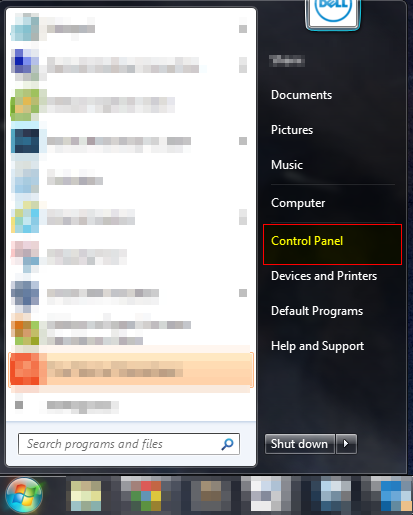
Click on Start, and then Control Panel to begin.
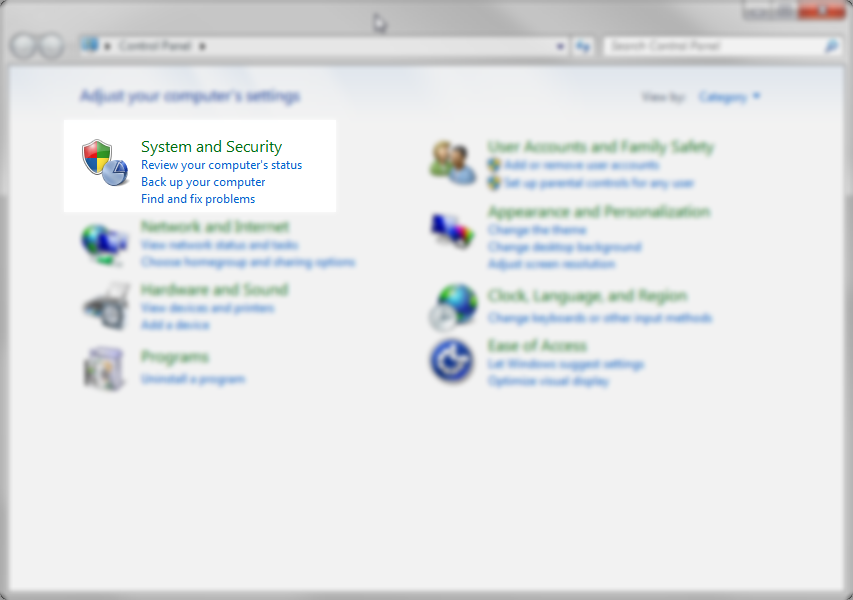
Click on the System and Security section in the Control Panel
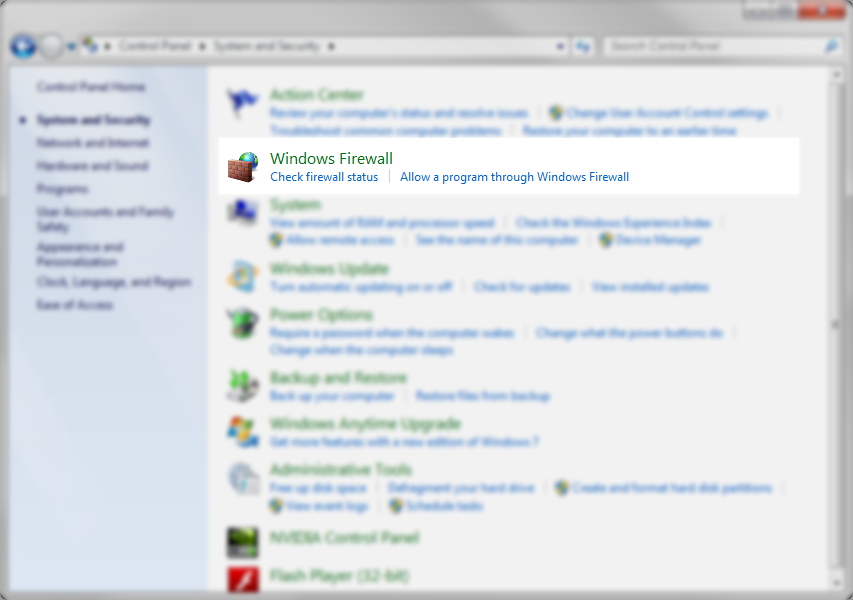
Click on the Windows Firewall section on the next screen
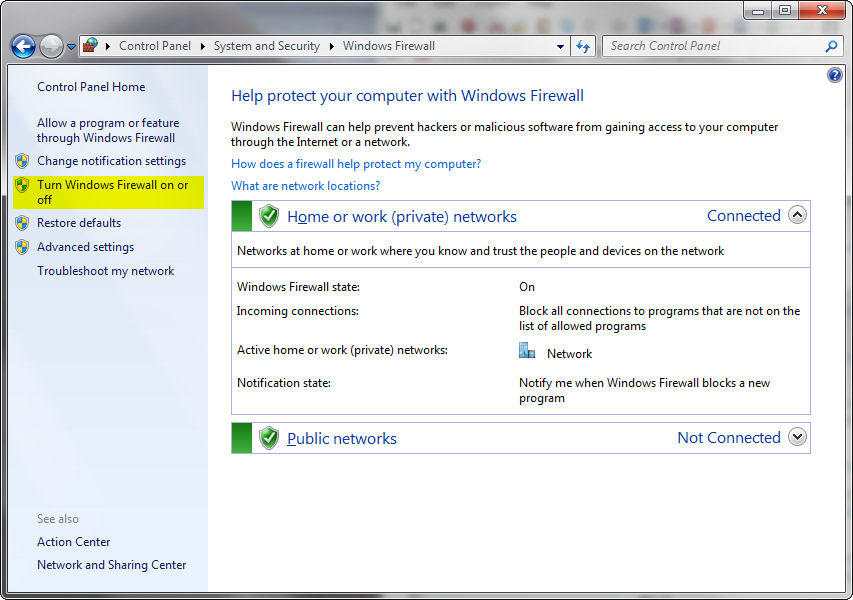
On the next screen, you will see the firewall status for each network found on your computer. You can see entries for Public, Home and Work networks. Whenever your computer connects to a new network, it will ask you to categorize the type of network. This allows you to group the networks for different security levels. As you see in the example below, the firewall is turned off in each network. To turn on the firewall, click on the link on the left that says “Turn Windows Firewall on or off”
 

You can click the radio buttons for each network to turn the Widows Firewall on. Also, the default is to notify you each time Windows Firewall blocks a new program. This is important because if you do not want the program to be blocked by the firewall, you will be given an opportunity to allow it through the firewall. If this box is not checked then the firewall will make some assumptions about what it blocks. You will then run into cases where programs may not work due to being blocked. If you run into that scenario, you will have to go into advanced settings and specify what programs are to be unblocked
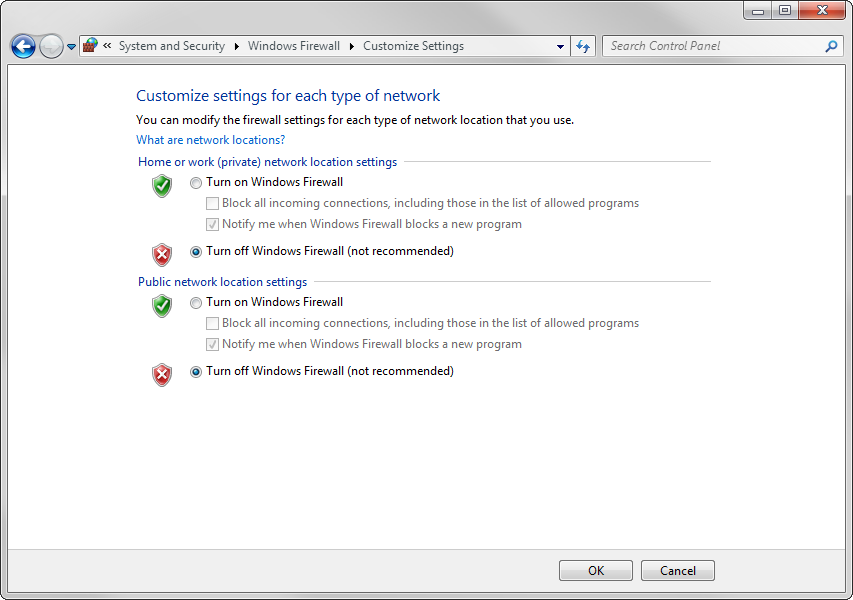
 

Once you have set the firewall to be off for each connection, you just click on the OK button and that is it. It’s pretty simple.

Turning off the firewall can leave your computer exposed to different risks. It is a good idea to make sure that you have at least a hardware firewall between your computer and the Internet. Or, if you have a third party firewall, that is also a good solution.


Filed Under: Articles

Latest Articles

Core i5

The efficiency and accuracy of computers lead to the migration of various business processes onto computer systems. As a result, the small and medium sized businesses started using computers to manage their business operations. This type of workload could only be handled by computers with certain … [Read More...]

Intel Centrino mobile computer platform

The first generation Centrino platform (codenamed Montara) was announced in March 2003. The trio of systems that comprise Centrino focus on battery life and the integration of wireless LAN technology. Only systems that include all three … [Read More...]

How to Use System Restore

What Is System Restore and Why You Should Use It Watch the video or just read the written guide [jwplayer config=player file=http://www.pctechguide.com/videos/system-restore-pctg.mp4 image=http://www.pctechguide.com/videos/system-restore-video.jpg] System Restore takes snapshots of your … [Read More...]

Why Internet Bundles Are the Next Battleground for Gamers

A weak internet connection can turn seamless gaming sessions into frustrating experiences filled with lag, buffering or sudden disconnects. For … [Read More...]

Importance of Inbound Marketing in the Digital Age

A couple of months ago, Zacks reported that Hubspot was starting to make some major changes to its inbound marketing strategy. They talk a lot about … [Read More...]

Damage Control Strategies for Resolving Online PR Crises

Last July, Astrologer faced a major crisis after its CEO went viral at a ColdPlay concert when having an affair. This was just one of the many times a … [Read More...]

AI is Not Killing Computer Jobs Like Doomers Projected

There is no denying the reality that AI technology has played a massive role in disrupting our lives. A growing number of people claim that AI … [Read More...]

Everything You Need to Know About Sourcing Circuit Boards From U.S. Suppliers

In This Article This article includes: Why Source PCBs From the United States?How to Get a Quote From a U.S.-Based PCB ManufacturerThe Top U.S. … [Read More...]

Top Taplio Alternatives in 2025 : Why MagicPost Leads for LinkedIn Posting ?

LinkedIn has become a strong platform for professionals, creators, and businesses to establish authority, grow networks, and elicit engagement. Simple … [Read More...]

Guides

  • Computer Communications
  • Mobile Computing
  • PC Components
  • PC Data Storage
  • PC Input-Output
  • PC Multimedia
  • Processors (CPUs)

Recent Posts

Updating the BIOS

In fact, motherboard manufacturers have made the process of updating your BIOS considerably easier, by providing software that allows this - and more … [Read More...]

Tips & Tricks to Guide Your EA Sports FC 24 to Glory

EA Sports FC 24 is the 31st overall installment of EA Sports' football simulation games and the first not bearing the world-famous FIFA name. Although … [Read More...]

CIS Scanners

CIS is a relatively new sensor technology which began to appear at the budget end of the flatbed scanner market in the … [Read More...]

[footer_backtotop]

Copyright © 2026 About | Privacy | Contact Information | Wrtie For Us | Disclaimer | Copyright License | Authors