pctechguide.com

  • Home
  • Guides
  • Tutorials
  • Articles
  • Reviews
  • Glossary
  • Contact

How to Open Control Panel in Windows 8 and 8.1

The Control Panel in Windows 8 is one of the most important areas of the operating system. This is where all the programs are that help you configure different sections of your operating system.

The programs in the control panel can help you find information about your system, configure power settings, change network options, alter display settings and a host of other options. Being able to get inside this area and control it is extremely important. But, before you can do anything in there you need to know how to get to it. This article will cover how you open up Control Panel in Windows 8 and 8.1

How to Open Control Panel in Windows 8 and 8.1

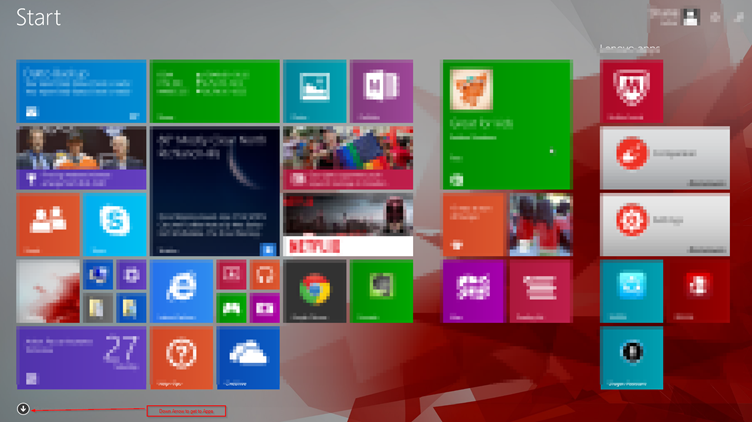
  1. In the Start screen, you can either swipe up to switch to Apps screen or you can click on the down arrow icon to bring up the Apps screen.
 

  1. Once inside the Apps section, you can scroll al the way to the right until you get to the Windows System section.
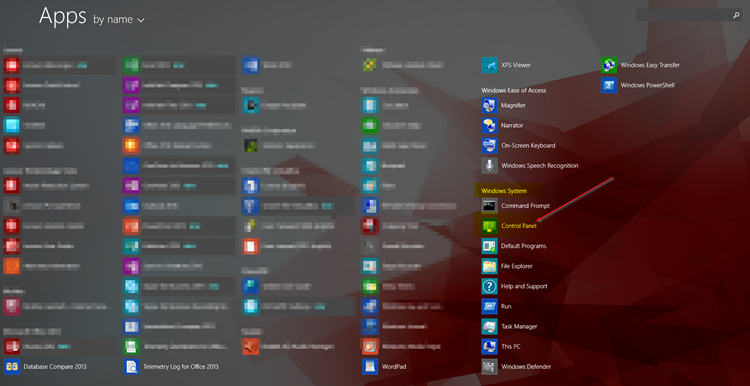
  1. Click on the Control Panel icon
  2. Your computer will switch to the Desktop view and the Control Panel will open.

That is one way to access the Control Panel option in Windows 8 and 8.1. But, as always there are multiple ways to access most programs inside Windows.

On most laptops, you can also use a keyboard combination of the WINDOWS KEY + X to get the Power User Menu
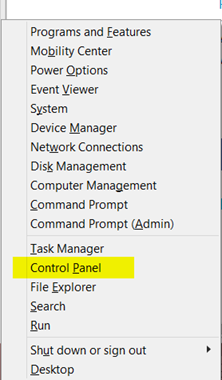
You can also access this same menu by right clicking on the on the Start Button .

Being able to access the Control Panel in Windows 8 and 8.1 is must have knowledge. You will be spending a great deal of time in the Control Panel if you ever decide to do any tweaking or if you need to get any useful information about your system. Hopefully, this article will be useful in helping you access the Control Panel.

Filed Under: Articles

Latest Articles

VBR

VBR Definition: Variable Bit Rate: maximum throughput set in advance, but data not always sent evenly. … [Read More...]

Container vs VM: What Is the Difference and Which One to Pick?

VMs and containers are two implementations of virtualization technology. This means that both VMs and  containers help to optimize how resources are used. However, these two technologies achieve that differently, and the differences between them become clear when you take a deeper look. This … [Read More...]

Graphic Card Resolution

Resolution is a term often used interchangeably with addressability, but it more properly refers to the sharpness, or detail, of the visual image. It is primarily a function of the monitor and is determined by the beam … [Read More...]

Importance of Inbound Marketing in the Digital Age

A couple of months ago, Zacks reported that Hubspot was starting to make some major changes to its inbound marketing strategy. They talk a lot about … [Read More...]

Damage Control Strategies for Resolving Online PR Crises

Last July, Astrologer faced a major crisis after its CEO went viral at a ColdPlay concert when having an affair. This was just one of the many times a … [Read More...]

AI is Not Killing Computer Jobs Like Doomers Projected

There is no denying the reality that AI technology has played a massive role in disrupting our lives. A growing number of people claim that AI … [Read More...]

Everything You Need to Know About Sourcing Circuit Boards From U.S. Suppliers

In This Article This article includes: Why Source PCBs From the United States?How to Get a Quote From a U.S.-Based PCB ManufacturerThe Top U.S. … [Read More...]

Top Taplio Alternatives in 2025 : Why MagicPost Leads for LinkedIn Posting ?

LinkedIn has become a strong platform for professionals, creators, and businesses to establish authority, grow networks, and elicit engagement. Simple … [Read More...]

Shocking Cybercrime Statistics for 2025

People all over the world are becoming more concerned about cybercrime than ever. We have recently collected some statistics on this topic and … [Read More...]

Guides

  • Computer Communications
  • Mobile Computing
  • PC Components
  • PC Data Storage
  • PC Input-Output
  • PC Multimedia
  • Processors (CPUs)

Recent Posts

United States Courts virus | Locked Computer

United States Courts virus is a scam. This kind of scam has been going on for around a year under other names all across the world. The makers use the … [Read More...]

A Cool Computer– Case Closed and Location, Location, Location

We have been writing a series of articles on how to keep your PC running cool and efficiently. Keeping a computer running cool is important because … [Read More...]

Disabling and Uninstalling Soundcards

You first need to remove or disable any existing audio components. Under Windows XP, invoke Device Manager by right-clicking My Computer > … [Read More...]

[footer_backtotop]

Copyright © 2026 About | Privacy | Contact Information | Wrtie For Us | Disclaimer | Copyright License | Authors