In the 1980s, hard-disk drive capacities were limited and large drives commanded a premium price. As an alternative to costly, high-capacity individual drives, storage system developers began experimenting with arrays of smaller, less expensive hard-disk drives. In a 1988 publication, A Case for Redundant Arrays of Inexpensive Disks, three University of California-Berkeley researchers proposed guidelines for these arrays. They originated the term RAID – redundant array of inexpensive disks – to reflect the data accessibility and cost advantages that properly implemented arrays could provide. As storage technology has advanced and the cost per megabyte of storage has decreased, the term RAID has been redefined to refer to independent disks, emphasising the technique’s potential data availability advantages relative to conventional disk storage systems.
The original concept was to cluster small inexpensive disk drives into an array such that the array could appear to the system as a single large expensive drive (SLED). Such an array was found to have better performance characteristics than a traditional individual hard drive. The initial problem, however, was that the Mean Time Before Failure (MTBF) of the array was reduced due to the probability of any one drive of the array failing. Subsequent development resulted in the specification of six standardised RAID levels to provide a balance of performance and data protection. In fact, the term level is somewhat misleading because these models do not represent a hierarchy; a RAID 5 array is not inherently better or worse than a RAID 1 array. The most commonly implemented RAID levels are 0, 3 and 5:
- Level 0 provides data striping (spreading out blocks of each file across multiple disks) but no redundancy. This improves performance but does not deliver fault tolerance. The collection of drives in a RAID Level 0 array has data laid down in such a way that it is organised in stripes across the multiple drives, enabling data to be accessed from multiple drives in parallel.
- Level 1 provides disk mirroring, a technique in which data is written to two duplicate disks simultaneously, so that if one of the disk drives fails the system can instantly switch to the other disk without any loss of data or service. RAID 1 enhances read performance, but the improved performance and fault tolerance are at the expense of available capacity in the drives used.
- Level 3 is the same as Level 0, but 0 sacrifices some capacity, for the same number of drives, to achieve a higher level of data integrity or fault tolerance by reserving one dedicated disk for error correction data. This drive is used to store parity information that is used to maintain data integrity across all drives in the subsystem.
- Level 5 is probably the most frequently implemented. It provides data striping at the byte level and also stripe error correction information. This results in excellent performance coupled with the ability to recover any lost data should any single drive fail.
The data striping storage technique is fundamental to the concept and used by a majority of RAID levels. In fact, the most basic implementation of this technique, RAID 0, is not true RAID unless it is used in conjunction with other RAID levels since it has no inherent fault tolerance. Striping is a method of mapping data across the physical drives in an array to create a large virtual drive. The data is subdivided into consecutive segments or stripes that are written sequentially across the drives in the array, each stripe having a defined size or depth in blocks. A striped array of drives can offer improved performance compared to an individual drive if the stripe size is matched to the type of application program supported by the array:
- In an I/O-intensive or transactional environment where multiple concurrent requests for small data records occur, larger (block-level) stripes are preferable. If a stripe on an individual drive is large enough to contain an entire record, the drives in the array can respond independently to these simultaneous data requests.
- In a data-intensive environment where large data records are stored, smaller (byte-level) stripes are more appropriate. If a given data record extends across several drives in the array, the contents of the record can be read in parallel, improving the overall data transfer rate.
EDAP – Extended Data Availability and Protection
EDAP is another data storage concept closely related to RAID. A storage system with EDAP capability can protect its data and provide on-line, immediate access to its data, despite failure occurrence within the disk system, within attached units or within its environment. The location, type and quantity of failure occurrences determine the degree of EDAP capability attributed to the disk system. Two types of RAID provide EDAP for disks: Mirroring and Parity RAID. Mirroring predated Parity RAID and was identified in the Berkeley Papers as RAID Level 1. Its disadvantage is that, unlike Parity RAID, Mirroring requires 100% redundancy. Its advantages, unlike Parity RAID, are that read performance is improved, the impact on write performance is generally modest and a higher percentage of disks in a Mirrored redundancy group may fail simultaneously as compared to a Parity RAID redundancy group. Parity RAID is identified in the Berkeley Papers as RAID Levels 3, 4, 5 and 6. In these cases, overhead (redundant data in the form of Parity) as compared to Mirroring (redundant data in the form of a complete copy) is significantly reduced to a range of 10% to 33%.
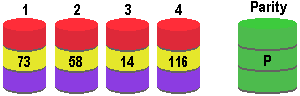
Parity RAID levels combine striping and parity calculations to permit data recovery if a disk fails. The diagram illustrates the concepts of both data striping and Parity RAID, depicting how a block of data containing the values 73, 58, 14, and 126 may be striped across a RAID 3 array comprising four data drives and a parity drive, using the even-parity method.
Up until the late 1990s, the implementation of RAID had been almost exclusively in the server domain. By then, however, processor speeds had reached the point where the hard disk was often the bottleneck that prevented a system running at its full potential. Aided and abetted by the availability of motherboards that included a RAID controller – by 2000 the deployment of RAID’s striping technique had emerged as a viable solution to this problem on high-end desktop systems.
- Hard disk (hard drive) construction
- Hard Disk (hard drive) Operation
- Hard disk (hard drive) format – the tracks and sectors of the hard disk
- File systems (FAT, FAT8, FAT16, FAT32 and NTFS) explained
- Hard Disk (Hard Drive) Performance – transfer rates, latency and seek times
- Hard Disk AV Capability
- Hard Disk Capacity
- Hard Disk Capacity Barriers
- Hard Disk MR Technology
- Hard Disk GMR Technology
- Hard Disk Pixie Dust
- Hard Disk Longitudinal Recording
- Hard Disk Perpendicular Recording
- RAID – Redundant Arrays of Inexpensive Disks
- Hard Disk SMART Drives
- Hard Disk MicroDrives
- Hard Disk OAW Technology
- Hard Disk PLEDM
- Hard Disk Millipede
- Guide to Western Digital’s GreenPower hard drive technology
- Solid state hard drive (SSD) technology guide