pctechguide.com

  • Home
  • Guides
  • Tutorials
  • Articles
  • Reviews
  • Glossary
  • Contact

ArcadeHall Removal

ArcadeHall is a game downloader. Its catch is that it promises users the ability to play online games without the need to download the files. With the popularity of games, it is a good bet that there are many people downloading this application. The application is hosted at a website called arcadehall.com. But, it more than likely uses bundling tricks to get itself installed on your machine. That alone makes it a worthy candidate for removal from your computer ASAP.

It is no surprise that once the software is installed you will start seeing various ads and commercials while browsing on the Internet. These ads can slow down your PC and become a pain while browsing. But, some of the ads that are served can be potential avenues to get further infections from other suspect software. The promise of free video games is not worth the grief all this will cause you.

The good news is that ArcadeHall is not a serious threat to your system by itself. And, removing the software is pretty easy. We have included the directions to remove it below. But, if you want a simple, automated way to remove it then you really should consider using SpyWare Hunter to remove it. This is a free tool that will identify any issues you have on your computer. If you do need to remove anything with it, then you will have to purchase it. But, then you can use it to protect your machine from any future issues. If you are interested, just click on the orange button below.

iStartSurf is typically installed in bundled software. Many times it is bundled in video recording software, download manager and PDF creators. Unfortunately, even if you find out what it was bundled with and uninstall it, it will not remove the iStartSurf malware. Therefore, it is best to follow the directions below to help remove the program from your system.

Uninstall ArcadeHall from Windows.

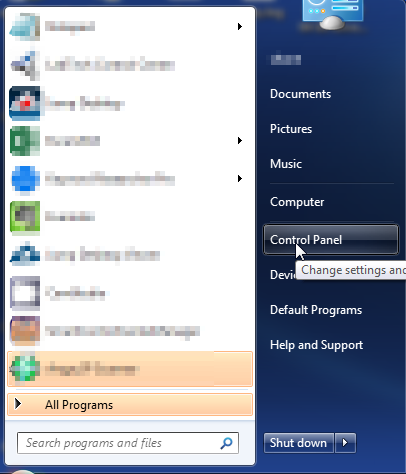
  1. Open up control panel by clicking on the start button in the lower left corner of your computer, and then going to Control Panel
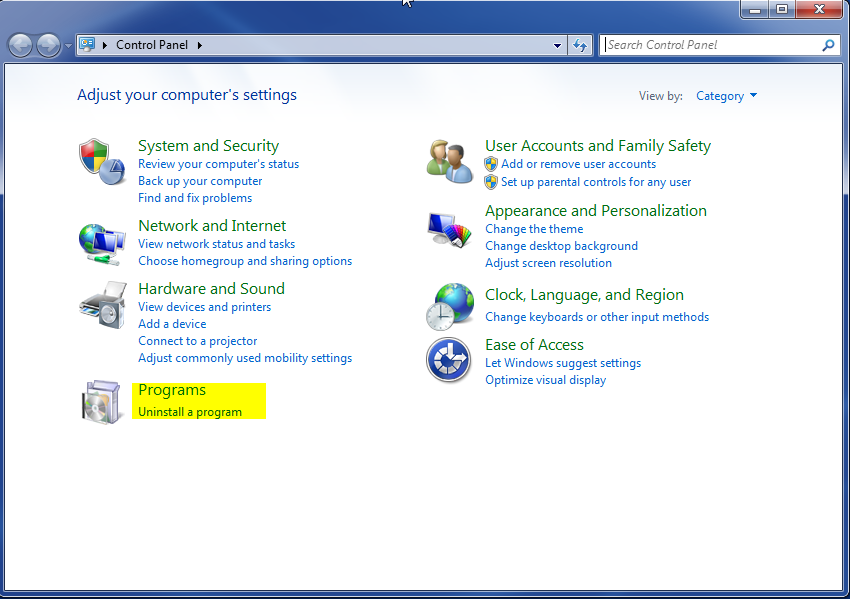
  1. Once, you are in Control Panel, go to the link labeled “Uninstall a Program”. If your computer does not look like the view below, you may have to sort by categories at the top right.
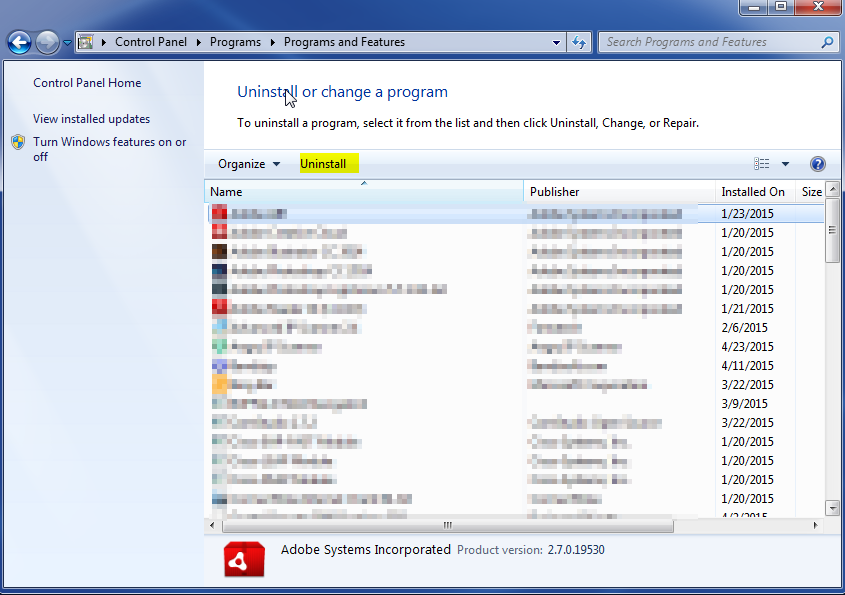
  1. Once in the uninstall programs section, look for the offending program. You can scroll by date installed to find programs that were installed recently. This may be a clue as to what the offending program is. Once you have found the program, highlight it and select “Uninstall” to remove
 

Once you have done this, you will need to go into your browser and set it to its default settings to remove the other changes it made. You will also want to scan your computer to make sure no new issues were introduced by the vulnerability. A good tool to use for this is MalwareBytes. If you already have a virus scanner, you should run this as well.

Filed Under: Virus Removal

Latest Articles

How To Do a Clean Installation of Win98 – Phase 5: Setting Up Hardware and Finalising

Windows 98 Setup now commences its fifth and final phase. During this phase, Setup configures the following: Control Panel Programs on the Start menu Windows Help MS-DOS program settings Tuning Up Application Start Time zone System Configuration When Setup finishes setting up … [Read More...]

Holographic Data Storage

In late 1995 a joint university/industry/government consortium initiated the Holographic Data Storage System (HDSS) programme, with the initial goals of developing several key components for the system, including a high-capacity, … [Read More...]

Registry Mechanic Review

Registry Mechanic is considered as one of the most renowned registry utilities that are currently available in the market. Once you install it in your system and launch it, a decent looking interface will appear on the screen with large buttons that are labeled clearly. While running … [Read More...]

Everything You Need to Know About Sourcing Circuit Boards From U.S. Suppliers

In This Article This article includes: Why Source PCBs From the United States?How to Get a Quote From a U.S.-Based PCB ManufacturerThe Top U.S. … [Read More...]

Top Taplio Alternatives in 2025 : Why MagicPost Leads for LinkedIn Posting ?

LinkedIn has become a strong platform for professionals, creators, and businesses to establish authority, grow networks, and elicit engagement. Simple … [Read More...]

Shocking Cybercrime Statistics for 2025

People all over the world are becoming more concerned about cybercrime than ever. We have recently collected some statistics on this topic and … [Read More...]

Gaming Laptop Security Guide: Protecting Your High-End Hardware Investment in 2025

Since Jacob took over PC Tech Guide, we’ve looked at how tech intersects with personal well-being and digital safety. Gaming laptops are now … [Read More...]

20 Cool Creative Commons Photographs About the Future of AI

AI technology is starting to have a huge impact on our lives. The market value for AI is estimated to have been worth $279.22 billion in 2024 and it … [Read More...]

13 Impressive Stats on the Future of AI

AI technology is starting to become much more important in our everyday lives. Many businesses are using it as well. While he has created a lot of … [Read More...]

Guides

  • Computer Communications
  • Mobile Computing
  • PC Components
  • PC Data Storage
  • PC Input-Output
  • PC Multimedia
  • Processors (CPUs)

Recent Posts

Hard disk (hard drive) construction

Hard disks are rigid platters, composed of a substrate and a magnetic medium. The substrate - the platter's base material - must be non-magnetic and … [Read More...]

Input Device Interfaces

Like the original IBM PC, 1984's IBM PC AT keyboard used a full-size 5-pin DIN connector. IBM's second-generation PS/2 … [Read More...]

Lightness is Power – iPad Air

If you are looking for new tech-design weighing 1 pound, this is the right one for you. The thinner slope end of iPad Air Retina Display makes you see … [Read More...]

[footer_backtotop]

Copyright © 2026 About | Privacy | Contact Information | Wrtie For Us | Disclaimer | Copyright License | Authors