pctechguide.com

  • Home
  • Guides
  • Tutorials
  • Articles
  • Reviews
  • Glossary
  • Contact

IStartSurf.com Virus Removal

iStartSurf is another bothersome browser hijacker that is promoted by free download. Like many other hijackers, it will change your browser homepage when it installs itself. It will change it to iStartSurf.com and it will change the default serch engine to Yahoo.

This may not seem like a big deal since many other programs do the same thing. However, it will append the httP//istartsurf.com to the end of all the shortcuts on your desktop and in the Windows Start Menu. It is very invasive and annoying.
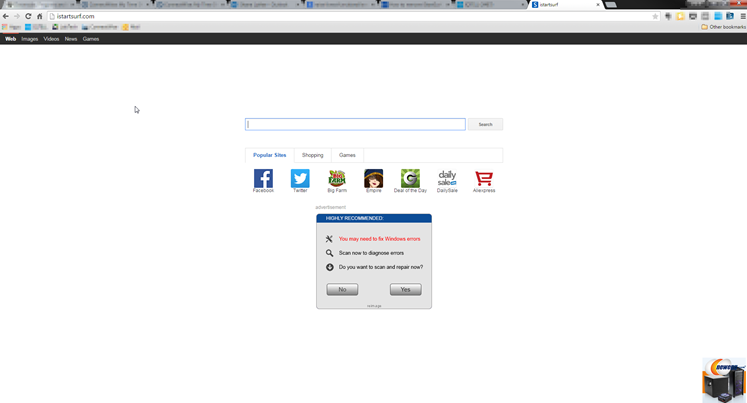
The iStartSurf.com homepage will display advertisements when you arrive. It will also show sponsored links in your search results. It serves these by monitoring your searches from the past. The purpose of the malware is to increase ad revenue and raise page rank for sites to help them with ranking in more legitimate search engines.

iStartSurf.com would not be classified as a traditional virus. But, it does have several traits of a virus. It has rootkit capabilities. And, it can interfere with the users because it slows down computers and can cause popups and other annoyances.

You will see banners, search links, pop-ups, pop-unders and intext advertising. This will be found on popular search engines like Internet Explorer, Firefox and Chrome. It can also lock down the browser to keep you from making changes in the browser.

If you need an easy way to remove the malware from your system, we recommend SpyHunter. It is an easy, automated way to remove these types of issues from your computer.

iStartSurf is typically installed in bundled software. Many times it is bundled in video recording software, download manager and PDF creators. Unfortunately, even if you find out what it was bundled with and uninstall it, it will not remove the iStartSurf malware. Therefore, it is best to follow the directions below to help remove the program from your system.

Uninstall iStartSurf from Windows.

  1. Open up control panel by clicking on the start button in the lower left corner of your computer, and then going to Control Panel

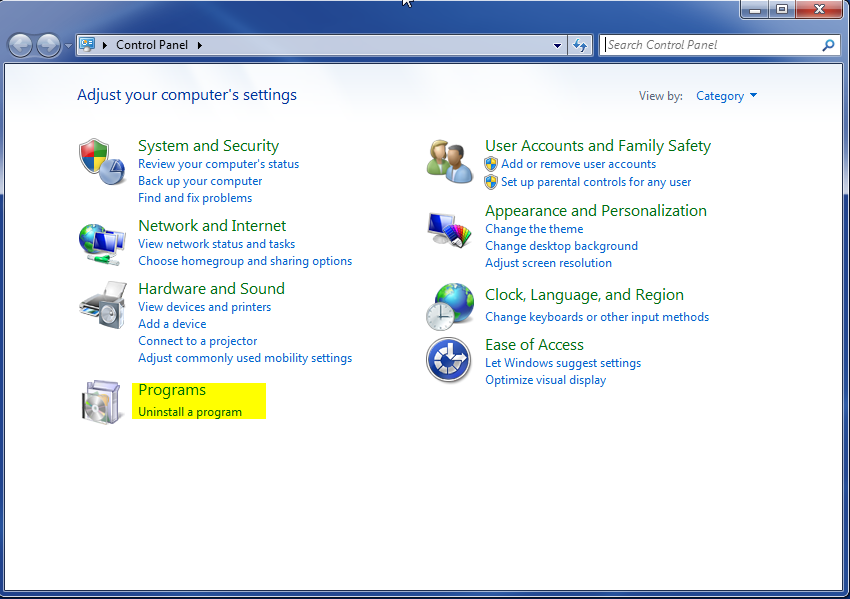
  1. Once, you are in Control Panel, go to the link labeled “Uninstall a Program”. If your computer does not look like the view below, you may have to sort by categories at the top right.
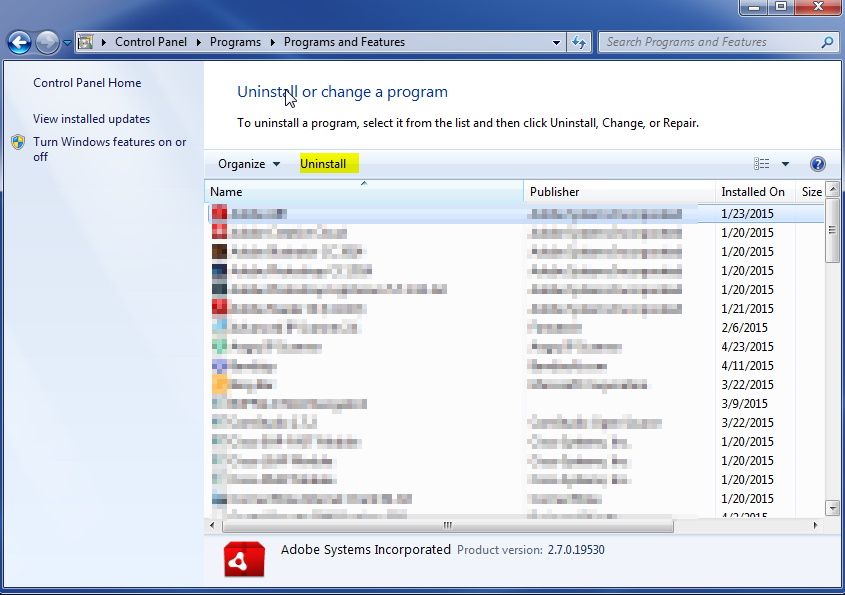
  1. Once in the uninstall programs section, look for the offending program. You can scroll by date installed to find programs that were installed recently. This may be a clue as to what the offending program is. Once you have found the program, highlight it and select “Uninstall” to remove
 

Once you have done this, you will need to go into your browser and set it to its default settings to remove the other changes it made. You will also want to scan your computer to make sure no new issues were introduced by the vulnerability. A good tool to use for this is MalwareBytes. If you already have a virus scanner, you should run this as well.

Filed Under: Virus Removal

Latest Articles

Watch Out for Fake Windows Phone Apps

Like other popular smart phones, the Windows Phone has a store where you go to get apps for it. There have been reports of fake apps turning up on the site. These apps can cause you considerable trouble if you download them and install them on your phone. These smart phone stores do a very good job … [Read More...]

Digital Video for Windows

AVI (Audio Video Interleaved) is Microsoft's generic format for digital video in Windows, provided via its MCI (Media Control Interface). AVI allows for a number of compression methods, in real-time, non-real-time, and with … [Read More...]

ADSL Connect

Type the Gateway address - effectively the IP address of your modem/router - in the address bar of your browser. You'll see a Connection Status screen, which will indicate whether or not a connection has already been set up. If the current status is IDLE, click Change Login. If the … [Read More...]

Shocking Cybercrime Statistics for 2025

People all over the world are becoming more concerned about cybercrime than ever. We have recently collected some statistics on this topic and … [Read More...]

Gaming Laptop Security Guide: Protecting Your High-End Hardware Investment in 2025

Since Jacob took over PC Tech Guide, we’ve looked at how tech intersects with personal well-being and digital safety. Gaming laptops are now … [Read More...]

20 Cool Creative Commons Photographs About the Future of AI

AI technology is starting to have a huge impact on our lives. The market value for AI is estimated to have been worth $279.22 billion in 2024 and it … [Read More...]

13 Impressive Stats on the Future of AI

AI technology is starting to become much more important in our everyday lives. Many businesses are using it as well. While he has created a lot of … [Read More...]

Graphic Designers on Reddit Share their Views of AI

There are clearly a lot of positive things about AI. However, it is not a good thing for everyone. One of the things that many people are worried … [Read More...]

Redditors Talk About the Impact of AI on Freelance Writers

AI technology has had a huge impact on our lives. A 2023 survey by Pew Research found that 56% of people use AI at least once a day or once a week. … [Read More...]

Guides

  • Computer Communications
  • Mobile Computing
  • PC Components
  • PC Data Storage
  • PC Input-Output
  • PC Multimedia
  • Processors (CPUs)

Recent Posts

EIDE Interfaces

In 1993 Western Digital brought EIDE (Enhanced IDE) onto the market. EIDE is a standard designed to overcome the constraints … [Read More...]

Elsword Online

About the game: Title: Elsword Online Status: Released Graphics: 3D Genre: MMORPG Developer: KOG Games Publisher: KOG Games Explosive … [Read More...]

Downsides of Using AI Art Cannot Be Overlooked

AI is changing the way designers and artists create their work. Artificial Intelligence makes it possible to create images faster, more accurately and … [Read More...]

[footer_backtotop]

Copyright © 2025 About | Privacy | Contact Information | Wrtie For Us | Disclaimer | Copyright License | Authors