pctechguide.com

  • Home
  • Guides
  • Tutorials
  • Articles
  • Reviews
  • Glossary
  • Contact

DIMM Memory – Computer Memory – Definition

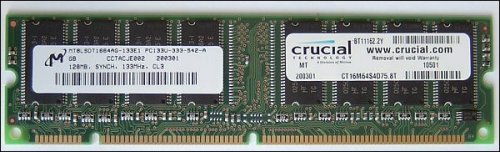
By the end of the millennium, as memory subsystems standardised around an 8-byte data interface, the Dual In-line Memory Module (DIMM) had replaced the SIMM as the module standard for the PC industry. DIMMs have 168 pins in two (or dual) rows of contacts; one on each side of the card. With the additional pins a computer can retrieve information from DIMMs, 64 bits at a time instead of the 32- or 16-bit transfers that are usual with SIMMs.

Some of the physical differences between 168-pin DIMMs and 72-pin SIMMs include: the length of module, the number of notches on the module, and the way the module installs in the socket. Another difference is that many 72-pin SIMMs install at a slight angle, whereas 168-pin DIMMs install straight into the memory socket and remain completely vertical in relation to the system motherboard. Importantly, and unlike SIMMs, DIMMs can be used singly and it is typical for a modern PC to provide just one or two DIMM slots.

The 3.3 volt unbuffered DIMM emerged as the favoured standard. This allows for SDRAM, BEDO, EDO and FPM DRAM compatibility as well as x64 and x72 modules with parity and x72 and x80 modules with ECC and takes advantage of the left key position to establish a positive interlock so that the correct DIMMs are inserted in the correct position.

The advent of DDR and DDR2 SDRAM led to different variants of DIMM packaging, as did the Small Outline (SO) form factor used in notebook PCs. By 2005 the most common types of DIMMs were:

  • 72-pin-DIMMs, used for SO-DIMM
  • 144-pin-DIMMs, used for SO-DIMM
  • 168-pin-DIMMs, used for SDRAM
  • 184-pin-DIMMs, used for DDR SDRAM
  • 240-pin-DIMMs, used for DDR2 SDRAM

DIMM

DDR SDRAM DIMMs can be differentiated from SDRAM DIMMs by the number of notches, the former having one, the latter two.

  • What is Level 1 (L1) Cache Memory?
  • What is L2 (Level 2) cache memory?
  • RAM or Main Memory – PC / computer memory (DIMM, DRAM, SDRAM)
  • DRAM – Dynamic Random Access Memory
  • FPM DRAM
  • EDO (Extended Data Out) and BEDO (Burst Extended Data Out) DRAM
  • SDRAM
  • PC133 SDRAM
  • DDR SDRAM explained
  • DDR2 DRAM
  • Dual Channel DDR Memory
  • 1T SRAM
  • Direct DRAM
  • SIMMs
  • DIMM Memory
  • RIMMs Memory
  • Memory Presence Detection
  • Parity Memory
  • ECC Memory
  • Memory Upgrades
  • The Evolution of Memory
  • Flash Memory
  • Magnetic RAM

Filed Under: Computer Memory

Latest Articles

Galileo

Galileo comprises a constellation of 30 satellites divided between three circular orbits at an altitude of around 24,000 km to cover the Earth's entire surface. They will be supported by a worldwide network of ground stations. At present, … [Read More...]

BIOS – What motherboard BIOS does for a PC

All motherboards include a small block of Read Only Memory (ROM) which is separate from the main system memory used for loading and running software. The BIOS will most likely be stored in a 32-pin chip, which can typically be identified by a silver or gold sticker that shows the name … [Read More...]

Advanced System Protector Virus Removal

Advanced System Protector is a malware virus. This is a direct clone of several other viruses out there. The purpose of this malware virus is to trick the user into thinking they have a virus then tell them they need to purchase Advanced System Protector in order to remove the viruses found. This is … [Read More...]

Importance of Inbound Marketing in the Digital Age

A couple of months ago, Zacks reported that Hubspot was starting to make some major changes to its inbound marketing strategy. They talk a lot about … [Read More...]

Damage Control Strategies for Resolving Online PR Crises

Last July, Astrologer faced a major crisis after its CEO went viral at a ColdPlay concert when having an affair. This was just one of the many times a … [Read More...]

AI is Not Killing Computer Jobs Like Doomers Projected

There is no denying the reality that AI technology has played a massive role in disrupting our lives. A growing number of people claim that AI … [Read More...]

Everything You Need to Know About Sourcing Circuit Boards From U.S. Suppliers

In This Article This article includes: Why Source PCBs From the United States?How to Get a Quote From a U.S.-Based PCB ManufacturerThe Top U.S. … [Read More...]

Top Taplio Alternatives in 2025 : Why MagicPost Leads for LinkedIn Posting ?

LinkedIn has become a strong platform for professionals, creators, and businesses to establish authority, grow networks, and elicit engagement. Simple … [Read More...]

Shocking Cybercrime Statistics for 2025

People all over the world are becoming more concerned about cybercrime than ever. We have recently collected some statistics on this topic and … [Read More...]

Guides

  • Computer Communications
  • Mobile Computing
  • PC Components
  • PC Data Storage
  • PC Input-Output
  • PC Multimedia
  • Processors (CPUs)

Recent Posts

Windows Secure Workstation

Windows Secure Workstation Welcome again to another weekly installment of our infection removal guide. If you've made your way to this page, you've … [Read More...]

Flashing the BIOS

The traditional procedure for flashing your BIOS from within DOS using a floppy disk is similar for all motherboard manufacturers. It starts by … [Read More...]

Motherboard Audio

Finally, some motherboards provide a pin header that allows connection to a front-mounted audio connector, designed to support stereo audio output … [Read More...]

[footer_backtotop]

Copyright © 2026 About | Privacy | Contact Information | Wrtie For Us | Disclaimer | Copyright License | Authors