Windows Defence Counsel
If you’ve found this page, very likely you’ve been infected with Windows Defence Counsel. You must be wondering how something that can’t even manage to spell defense correctly can cause so much trouble, we’re right there with you. Generally speaking, Windows Defence Counsel would be what is known as a rogueware/malware. Essentially, it impersonates a legitimate antivirus application in order to fool you, the user, into paying the manufacturer of the
infection to remove–itself. Dirty right? Well, you’re not going to lie down that easily and neither are we! It’s time to fight back, and this guide will enable you to do just that.
How Did I get infected with Windows Defence Counsel?
Most frequently, you’ll receive no feedback from your web browser when this type of infection gets into your computer. Oftentimes this is what as known as an injection attack, malicious code is inserted between pages on a website; the
infection loads into your computer between the pages by exploiting known vulnerabilities in your web-browser and before you know it, its installed. These types of infections can also come in the guise of fake software updates, or free
virus scans that you’ll find on websites.
How Much Damage is Windows Defence Counsel Doing?
The really obnoxious feature of this infection is breaking the executable file association in Windows. While that sounds complicated, basically all it does is remove the associate of .exe files with a specific utility in Windows. This is what causes that window asking what you would like to use to run a program that would normally just open. The only other problem that some variants of the infection seems to cause is search redirecting. This means that when you type something into google or yahoo, the pages that would normally come up are overridden by the infection. We’ll go over some steps to resolve these issues later on in the guide, but the redirects should be taken care of by your antivirus software once you’ve completed the removal. That’s really the most serious thing that this particular infection does, it doesn’t appear to cause any lasting damage to the registry or other aspects of the Windows install.
Windows Defence Counsel
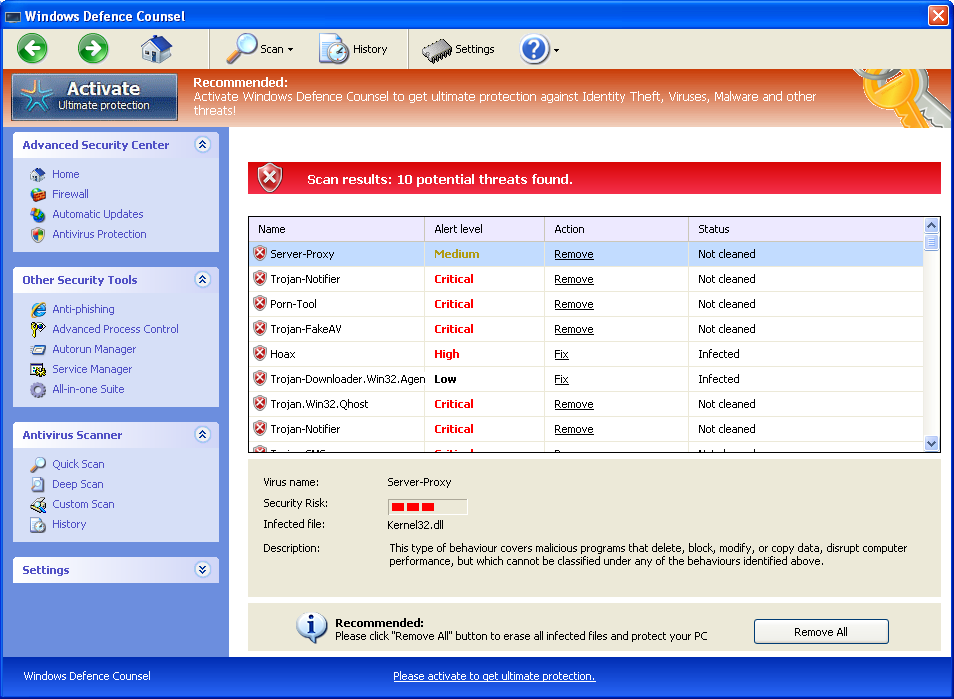
You can use this code to register the product so you can stop
and delete the files with out the annoyance of pop ups.
0W000-000B0-00T00-E0020
» Download Windows Defence Counsel Removal Software
How to Remove Windows Defence Counsel?
This guide will cover the three main ways to remove this software:
1. Use Anti-virus software (Note you may need to follow the manual guide to start so you can install a client.)
2. Hire an expert ( We Recommend http://www.pcninja.com. This is a remote computer repair company)
3. Take matters into your own hands and remove the infection yourself.
Automatic Windows Defence Counsel Removal

Online Windows Defence Counsel Removal Service

Windows Defence Counsel Manual Removal Procedures
Step 1. If you are unable to run any executable programs at all this may be from the virus changing your registry settings. If this is the case you may need to use this patch. It is only for Windows 7 computers.
Download Win 7 Fix exe Issue here.
Step 2. You need to stop and delete the main .exe file that is running Windows Defence Counsel.
You should find the file at the following location:
- c:users[username]AppDatalocal
Keep in mind that the USERNAME will be your user name
The file is called sdw.exe. This will probably change over time, but you can generally identify a threat by the three letter .exe combination. Very few legitimate Windows applications will have a three letter name for their executable. This in concert with the file location should allow you to identify the threatening file, even if the exact letters have changed.
Once you’ve located it, you’ll need to rename the file to prevent it from running the next time you boot your computer. To perform this operation, all you have to do is right click the file and select rename from the drop down menu. You can name it whatever you want, I’m sure you can think of something apt. Once you’ve done this, reboot your computer. When it boots back up, the renamed file should prevent the executable from launching itself, allowing you to delete it.
Once you’ve deleted the file, we would advise performing a full antivirus scan with your antivirus of choice. This is to make certain that the infection didn’t let anything else in whilst your computer’s security was compromised. We Recommend Spyware Doctor with Antivirus. Use whichever client you trust the most. To see a list of other clients we recommend check out our Anti-virus Reviews section.
Windows Defence Counsel Registry Removal Procedures
We don’t advise making any alterations to the registry for this particular infection. You can inadvertently cause damage to the registry any time you seek to edit it manually, and the only real changes to the operating system that this particular infection makes are the aforementioned executable disassociation. If you believe that you do have some trouble with your registry, we recommend that you use a registry cleaner like PC Health Advisor Here to clean out the registry and scan for other malware. For a more complete list of trusted registry cleaning software, you can also read all or registry cleaner reviews
Windows Defence Counsel Directories:
Windows 7 / Windows Vista
- c:users[username]AppDatalocal
If you require advanced help or just want an expert to remove the virus than use this computer repair service. The charge is under a hundred bucks and they can often get started right away. These are real experts when it comes to malware and virus removal.
Related Article Keywords: Windows Defence Counsel,
Remove Windows Defence Counsel, Windows Defence Counsel Removal,
How to Remove Windows Defence Counsel