Modern-day motherboards have EEPROM BIOS chips that can be reprogrammed by software. These are also referred to as flash PROM or flash ROM, the process by which they’re updated being known as flashing.
If your BIOS isn’t flashable it’s still possible to update it – provided it’s housed in a socketed DIP or PLCC chip. This involves physically removing the existing chip and either replacing it after its been reprogrammed with the later version of BIOS code or exchanging it for a completely new chip. Motherboard manufacturers generally provide a BIOS upgrade service for a limited period after a particular model of motherboard comes to market. During this period they should be able to provide you with a patched BIOS containing the latest enhancements and bug fixes.
The replacement option may also appeal to some who actually have flashable BIOSes … but also have a nervous disposition! Notwithstanding the efforts motherboard manufacturers have made in recent years to simplify the process, the fact remains since flashing overwrites your existing BIOS, it has the potential of rendering your PC unusable should anything go wrong during the process or should you inadvertently use an incorrect BIOS file.
For older motherboards there are a number of companies that provide a specialist BIOS chip replacement service. Some require that you send them your BIOS chip for reprogramming, others will simply send you a new chip provided you can provide them with the necessary detailed information on your motherboard and existing BIOS chip.
Motherboard manufacturers:
BIOS chip replacement services:
- BadFlash.Com
- BIOS-Programming Service
- BIOS Recovery Center
- biosupgrade.co.uk
- BIOSWorld
- Micro Firmware
- Recovery BIOS.
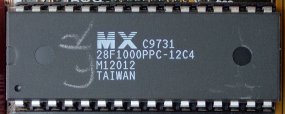
Proper identification of the latter will generally require that you peel off all stickers on top of the chip to reveal the information printed directly on the chip itself.
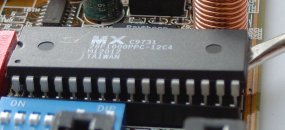
A DIP chip can be removed using a small flat blade screwdriver or pocket knife. Insert the blade under one end of the chip and gently lever it until it begins to lift from the socket. Be careful to keep the angle to which it’s raised shallow or you’ll risk bending the legs of the chip. Move to the other end of the chip and lever it to the same level and then some. Repeat the process until the chip is completely released from the socket.
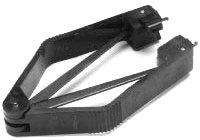
Removing a PLCC chip is a little more tricky, and it’s possible to get a special extraction tool designed for the purpose.
However, a with care a similar method to that described for a DIP chip will work, especially if you use a very small jeweller’s flat blade screwdriver.
If you’re reinstalling the same reprogrammed chip or a replacement chip, first make sure that all the chip’s legs are straight and perfectly in line. Orient the notched end of the chip so that it aligns with the notch in the socket. Make sure all of the chip’s legs are lined up with their corresponding socket positions and gently push down on the top of the chip until its legs begin to slide into in the socket. Be careful to confirm that all legs are properly located before applying stronger pressure to fully seat the chip in its socket.
People often confuse CMOS RAM with their BIOS, thinking of them as one and the same; in fact they’re completely separate components.
The former is a block of memory made from very low power consumption CMOS (complementary metal oxide silicon) RAM chips, which is kept alive by a battery even when the PC’s power is off. It’s used to store basic information about the PC’s configuration: number and type of hard and floppy drives, how much memory, what kind and so on. The other important data kept in CMOS memory is the time and date, which is updated by a Real Time Clock (RTC), the clock, CMOS RAM and battery all typically being integrated into a single chip.
All this used to be entered manually, but these days auto-configuring BIOSes copy the manufacturer default factory settings from the BIOS chip to the CMOS RAM, where they can be subsequently customised via the BIOS Setup interface. These factory default settings can be reinstated, either by discharging the CMOS RAM by jumpering a motherboard pin header or by invoking the Load BIOS Setup Defaults option from Setup.