pctechguide.com

  • Home
  • Guides
  • Tutorials
  • Articles
  • Reviews
  • Glossary
  • Contact

Pentium 4 Memory

Dual-channel memory operation is dependent on a number of conditions being met, Intel specifying that motherboards should default to single-channel mode in the event of any of these being violated:

  • DIMMs must be installed in pairs
  • Both DIMMs must use the same density memory chips
  • Both DIMMs must use the same DRAM bus width
  • Both DIMMs must be either single-sided or dual-sided.

Currently, there are two different strategies being employed in dual-channel memory controllers, one in which where each memory bank has its own memory channel and an arbiter distributes the load between them and the other to actually create a wider memory channel, thereby doubling up on standard DDR’s 64-bit data paths. Current Intel chipsets employ the latter technique, with each pair of installed DIMMs acting as a 128-bit memory module, able to transfer twice as much data as a single-channel solution, without the need for an arbiter.
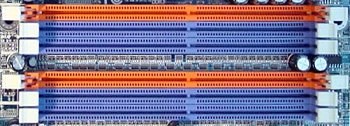
DIMM

This particular motherboard has 6 DIMM slots, arranged as two groups of three and colour-coded to indicate how memory modules should be installed in pairs.


Each group represents a separate channel, as follows:

  • Channel A: DIMMs 1, 2 and 3
  • Channel B: DIMMs 4, 5 and 6

DIMM1 pairing up with DIMM4 (the pair of orange slots), DIMM2 with DIMM5 and DIMM3 with DIMM6.

It’s important to refer to the Motherboard User Manual to determine precisely how DIMM slots may be populated to achieve dual-channel operation. In this case, DIMM3 and DIMM6 can only be used if the neighbouring DIMM2 and DIMM5 slots are either not occupied, or occupied with only a single-sided DIMM, the following table illustrating all the permitted dual-channel combinations:

DIMM1 DIMM2 DIMM3 DIMM4 DIMM5 DIMM6
2 memory modules DS/SS X X DS/SS X X
X DS/SS X X DS/SS X
X X DS/SS X X DS/SS
4 memory modules DS/SS DS/SS X DS/SS DS/SS X
6 memory modules DS/SS SS SS DS/SS SS SS

It is also the case that dual-channel memory performance varies, dependent on the way in which memory is configured. The following table illustrates DDR400 performance for the Intel 865P chipset used by the motherboard in question:

# DIMMS Sides per DIMM Mode SC or DC Ranking
2 2 Dynamic Dual channel 1
4 2 Dynamic Dual channel 2
4 1 Dynamic Dual channel 2
2 1 Dynamic Dual channel 3
4 Any Normal Dual channel 4
Any 2 Dynamic Single channel 5
Any 1 Dynamic Single channel 6
Any Any Normal Single channel 7

Interestingly, the first two rankings are reversed for the 875P chipset.

Insert the module into an available expansion socket, noting how the module is keyed to the socket. This insures the module can be plugged into the socket one way only.
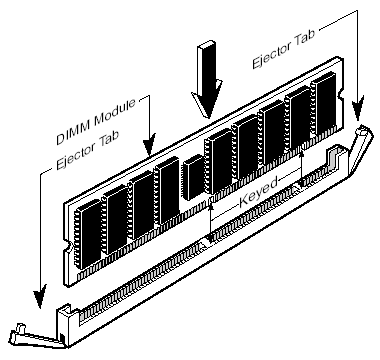
Fit

SDRAM DIMMs and RIMMs both have two notches, albeit with different spacing. DDR modules – which we’re using here – have only one.

Firmly press the module into position, making certain the module is completely seated in the socket. The ejector tab clips will close automatically.


Repeat this procedure for each module you are installing.


  • Pentium 4 CPU
  • Pentium 4 Fan
  • Pentium 4 PSU
  • Pentium 4 Memory
  • Pentium 4 Removal

Filed Under: How to Install a Pentium 4 CPU

Latest Articles

Internet Speed Test

How To Test Your Internet Speed

These days lots of people have high-speed Internet, thanks to the great Internet Installation they get from their provider. And, they hear the blazing fast speeds they are being offered by different Internet Service Providers (ISPs). But, is it really as fast as they claim? So, you may want to … [Read More...]

CD-ROM CD-I Bridge

CD-I Bridge is a Philips/Sony specification, for discs intended to play on CD-i players and other platforms such as the PC. It comprises: Disc format defining CD-I Bridge discs as conforming to the CD-ROM XA specification Data retrieval structure as per ISO 9660. … [Read More...]

Drive Installation Terminology

A drive bay is an area within a PC's system case designed to accommodate drive devices, such as a hard disk drive, floppy drive, CD-ROM drive, tape drive etc. There are two types, external and internal, the former allowing a drive to be accessed from the exterior, the latter requiring that the … [Read More...]

Importance of Inbound Marketing in the Digital Age

A couple of months ago, Zacks reported that Hubspot was starting to make some major changes to its inbound marketing strategy. They talk a lot about … [Read More...]

Damage Control Strategies for Resolving Online PR Crises

Last July, Astrologer faced a major crisis after its CEO went viral at a ColdPlay concert when having an affair. This was just one of the many times a … [Read More...]

AI is Not Killing Computer Jobs Like Doomers Projected

There is no denying the reality that AI technology has played a massive role in disrupting our lives. A growing number of people claim that AI … [Read More...]

Everything You Need to Know About Sourcing Circuit Boards From U.S. Suppliers

In This Article This article includes: Why Source PCBs From the United States?How to Get a Quote From a U.S.-Based PCB ManufacturerThe Top U.S. … [Read More...]

Top Taplio Alternatives in 2025 : Why MagicPost Leads for LinkedIn Posting ?

LinkedIn has become a strong platform for professionals, creators, and businesses to establish authority, grow networks, and elicit engagement. Simple … [Read More...]

Shocking Cybercrime Statistics for 2025

People all over the world are becoming more concerned about cybercrime than ever. We have recently collected some statistics on this topic and … [Read More...]

Guides

  • Computer Communications
  • Mobile Computing
  • PC Components
  • PC Data Storage
  • PC Input-Output
  • PC Multimedia
  • Processors (CPUs)

Recent Posts

How to Remove Windows Active Guard

Windows Active Guard Greetings!  If you've made your way to this page, very likely you've been infected with Windows Active Guard. Infections of this … [Read More...]

Convenient Excel Shortcuts for Quick Formatting

The first version of Microsoft Excel was launched in 1985. The world’s most popular spreadsheeting software has evolved significantly over the past 35 … [Read More...]

Bitdefender Total Security Review

PROS: All products are combined into one for PC security,plus systems tools for PC performance. CONS: Since the program scans your computer … [Read More...]

[footer_backtotop]

Copyright © 2026 About | Privacy | Contact Information | Wrtie For Us | Disclaimer | Copyright License | Authors