pctechguide.com

  • Home
  • Guides
  • Tutorials
  • Articles
  • Reviews
  • Glossary
  • Contact

Win98 Driver Installation

Windows 98 Setup will have attempted to load drivers for the hardware it recognised. However, there is no guarantee that the default drivers loaded are the latest available, or – if you’re re-building what had previously been an operational system – the same as the versions you were running previously.

The first thing to do is to check the status of all your installed hardware via Device Manager. Access this via Start –> Settings –> Control Panel –> Device Manager. An exclamation mark in a yellow circle is used to indicate devices in a problem state. Right-clicking the entry and selecting Properties will display further information, including an associated error code. Oftentimes the problem will be the absence of an installed driver. In such cases you’ll need to install this, either from the CD-ROM or floppy disk that came with you hardware, or from a file that you subsequently downloaded from the Internet.
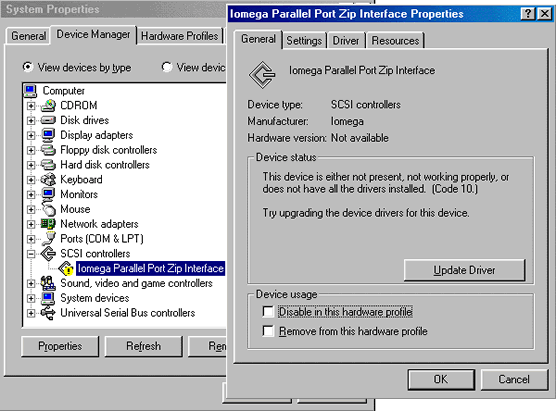
Device

Click here to view the Microsoft Knowledge Base Article entitled Explanation of Error Codes Generated by Device Manager.

This provides a listing of error codes and associated error messages, together with explanations and possible resolutions.

There are a number of ways to update a driver, one being to click the Update Driver button on the General tab of the device’s properties display.
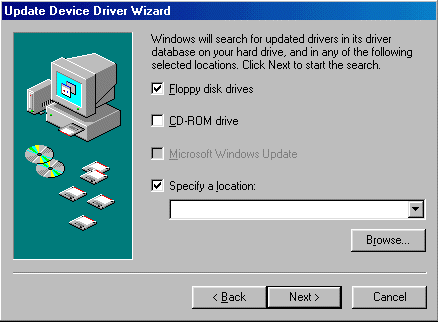
Update

Then, simply direct the Update Device Driver Wizard to the location of the folder that contains the driver you wish to install and click Next to start the installation.

An alternative method of installation – and one that is perhaps more guaranteed to work successfully – is to simply run the the driver’s Setup.exe program, if this is provided. This will install the drivers and usually prompt you to re-boot the system. Upon re-boot, Windows automatic installation routine will locate the drivers and install the hardware.

When you’ve achieved a situation in which Device Manager shows all hardware and associated drivers to be properly installed, you may still have a decision to make as to whether you’ve any drivers you want to update. This is where the cataloguing exercise at the planning stage may help you. If you took the trouble to do this, it’s likely that you’ll be able to identify cases where the driver version installed currently is older than the version you were running prior to the reinstallation of Windows.

Whether or not you choose to update old versions is another matter, you may prefer to leave well alone. However, if you have access to the more recent versions it’s probably wise to upgrade. After all, you did previously, and probably for a good reason!

  • Win98 Installation Planning
  • How To Create A Windows Start Up Disk
  • Installing Windows 98 – Getting Your CD Drive to Work for Installation
  • How To Create A FAT32 Partition on Your Hard Drive
  • Win98 Installation Drive Formating
  • Win98 Installation
  • Win98 Installation Phase 1
  • Win98 Installation Phase 2
  • Installing Windows 98 – Copying the Windows Files to Your Computer
  • Restarting Your Computer After Installing Windows
  • How To Do a Clean Installation of Win98 – Phase 5: Setting Up Hardware and Finalising
  • Installing Windows 98 – Upgrading to Win98SE
  • How to Update Microsoft Windows with Patches and Service Packs
  • Win98 Driver Installation
  • Win98 Installation Tuning

Filed Under: How To Do a Clean Installation of Win98

Latest Articles

Transparent Language-French

[starreviewmulti id=3 tpl=20] PROS: French language lessons from beginner to advanced conversations. CONS: Immature video and graphics quality. OVERVIEW: Learning French can be fun with Transparent Language.Language instruction from beginners with vocabulary, grammar and interactive … [Read More...]

PALCD Flat Panels

A peculiar hybrid of PDP and LCD is the plasma addressed liquid crystal display (PALCD). Sony is currently working, in conjunction with Tektronix, on making a viable PALCD product for consumer and professional markets. Rather than use the … [Read More...]

Hubs and Repeaters

Hubs/repeaters are used to connect together two or more network segments of any media type. In larger designs, signal quality begins to deteriorate as segments exceed their maximum length. Hubs provide the signal amplification required to allow a … [Read More...]

Importance of Inbound Marketing in the Digital Age

A couple of months ago, Zacks reported that Hubspot was starting to make some major changes to its inbound marketing strategy. They talk a lot about … [Read More...]

Damage Control Strategies for Resolving Online PR Crises

Last July, Astrologer faced a major crisis after its CEO went viral at a ColdPlay concert when having an affair. This was just one of the many times a … [Read More...]

AI is Not Killing Computer Jobs Like Doomers Projected

There is no denying the reality that AI technology has played a massive role in disrupting our lives. A growing number of people claim that AI … [Read More...]

Everything You Need to Know About Sourcing Circuit Boards From U.S. Suppliers

In This Article This article includes: Why Source PCBs From the United States?How to Get a Quote From a U.S.-Based PCB ManufacturerThe Top U.S. … [Read More...]

Top Taplio Alternatives in 2025 : Why MagicPost Leads for LinkedIn Posting ?

LinkedIn has become a strong platform for professionals, creators, and businesses to establish authority, grow networks, and elicit engagement. Simple … [Read More...]

Shocking Cybercrime Statistics for 2025

People all over the world are becoming more concerned about cybercrime than ever. We have recently collected some statistics on this topic and … [Read More...]

Guides

  • Computer Communications
  • Mobile Computing
  • PC Components
  • PC Data Storage
  • PC Input-Output
  • PC Multimedia
  • Processors (CPUs)

Recent Posts

Keep Your Browsers Private With These Extensions

Privacy is a big concern for people online these days. Everyday we seem to be hearing about some new invasion of privacy centered around the Internet. … [Read More...]

Hard Disks – What IS ATA and Ultra ATA?

In the second half of 1997 EIDE's 16.6 MBps limit was doubled to 33 MBps by the new Ultra ATA (also referred to as … [Read More...]

Enhanced Dot Pitch Monitors

Developed by Hitachi, EDP is the newest mask technology, coming to market in late 1997. This takes a slightly different approach, concentrating more … [Read More...]

[footer_backtotop]

Copyright © 2026 About | Privacy | Contact Information | Wrtie For Us | Disclaimer | Copyright License | Authors