pctechguide.com

  • Home
  • Guides
  • Tutorials
  • Articles
  • Reviews
  • Glossary
  • Contact

How to Update Microsoft Windows with Patches and Service Packs

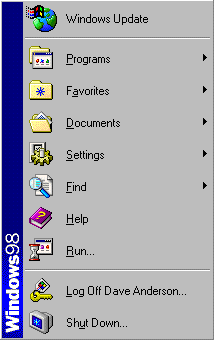
With previous versions of Windows, tracking down system patches and updated drivers was difficult. However, Microsoft streamlined the process in Windows 98 by including Windows Update on the Start menu, effectively providing an online extension of Windows designed to help maintain your computer at an optimum level of serviceability.
Windows

Central to Windows Update is a product Updates catalogue that includes individual bug fixes, service packs, newly available Windows features and updated system files and device drivers. These enhancements will be recommended to you based on what is needed for your specific computer.

Assuming you have Internet access it’s wise to use Windows Update to update your installation of Windows 98SE without delay. From the Start button, select Windows Update.
Welcome

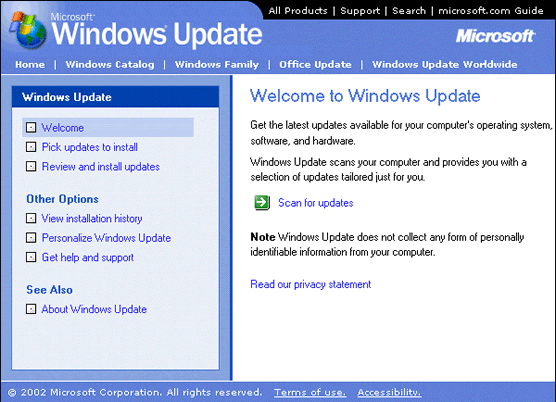
Click the Scan for updates button, and the Update Wizard will scan your Windows 98SE installation and display any updates that are available from Microsoft.
Pick

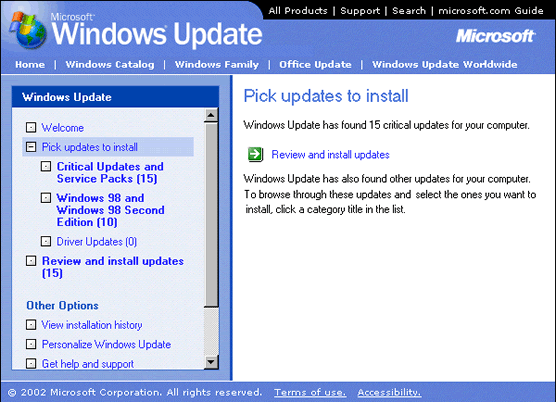
After a clean reinstall of Windows 98 and Windows 98SE, there will be a large number of updates identified. Updates in the Critical Updates and Service Packs should be installed as soon as possible, since many of these will be concerned with addressing security issues that have been identified since the Windows 98SE Updates were released.

Click on the appropriate category title to browse the other identified updates.
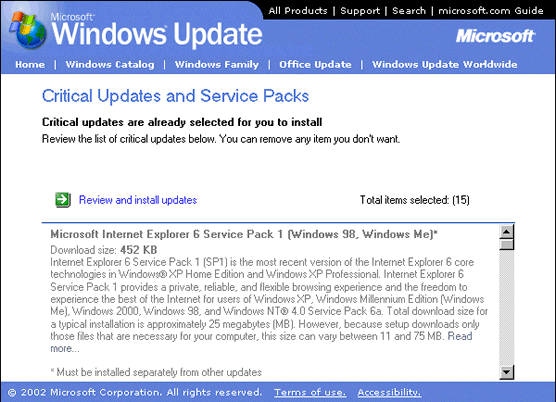
Browse

Click the Add button to select the updates you wish to install. Don’t try to install too many updates at a time. Each update indicates its size and estimated download time, enabling you to organise them into sensibly-sized groupings.

  • Win98 Installation Planning
  • How To Create A Windows Start Up Disk
  • Installing Windows 98 – Getting Your CD Drive to Work for Installation
  • How To Create A FAT32 Partition on Your Hard Drive
  • Win98 Installation Drive Formating
  • Win98 Installation
  • Win98 Installation Phase 1
  • Win98 Installation Phase 2
  • Installing Windows 98 – Copying the Windows Files to Your Computer
  • Restarting Your Computer After Installing Windows
  • How To Do a Clean Installation of Win98 – Phase 5: Setting Up Hardware and Finalising
  • Installing Windows 98 – Upgrading to Win98SE
  • How to Update Microsoft Windows with Patches and Service Packs
  • Win98 Driver Installation
  • Win98 Installation Tuning

Filed Under: How To Do a Clean Installation of Win98

Latest Articles

How to Turn Off Firewall in Windows 7

There are times where you may want to turn off the firewall in Windows 7, or at least disable it temporarily. This typically is necessary when a program will not work correctly. The firewall should be on your troubleshooting list of things to check when programs are not behaving correctly. This … [Read More...]

Writing A Term Paper as a Computer Science Major

There are a lot of different things that you have to deal with as a computer science major. You probably went into the major thinking that you could just write code all day without having to worry about writing term papers. Sadly, this is no the case. Virtually every computer science student will … [Read More...]

5 More Awesome Google Assistant Features

We previously wrote a post on some of the best features of Google Assistant. We wanted to cover some of the more advanced features today. 1.. One of the strong points of intelligent loudspeakers such as Google Home is at the neuralgic center of home automation. Although Google claims that it is … [Read More...]

Comments

  1. Anonymous says

    November 4, 2011 at 3:36 am

    I think there must be few people using windows 98 now.

Importance of Inbound Marketing in the Digital Age

A couple of months ago, Zacks reported that Hubspot was starting to make some major changes to its inbound marketing strategy. They talk a lot about … [Read More...]

Damage Control Strategies for Resolving Online PR Crises

Last July, Astrologer faced a major crisis after its CEO went viral at a ColdPlay concert when having an affair. This was just one of the many times a … [Read More...]

AI is Not Killing Computer Jobs Like Doomers Projected

There is no denying the reality that AI technology has played a massive role in disrupting our lives. A growing number of people claim that AI … [Read More...]

Everything You Need to Know About Sourcing Circuit Boards From U.S. Suppliers

In This Article This article includes: Why Source PCBs From the United States?How to Get a Quote From a U.S.-Based PCB ManufacturerThe Top U.S. … [Read More...]

Top Taplio Alternatives in 2025 : Why MagicPost Leads for LinkedIn Posting ?

LinkedIn has become a strong platform for professionals, creators, and businesses to establish authority, grow networks, and elicit engagement. Simple … [Read More...]

Shocking Cybercrime Statistics for 2025

People all over the world are becoming more concerned about cybercrime than ever. We have recently collected some statistics on this topic and … [Read More...]

Guides

  • Computer Communications
  • Mobile Computing
  • PC Components
  • PC Data Storage
  • PC Input-Output
  • PC Multimedia
  • Processors (CPUs)

Recent Posts

Remote Utilities for Computer Remote Access

Staying connected to your PC while you are travelling or away from it is an extremely useful feature in today’s computer landscape. Remote access … [Read More...]

Optimizing Startup Menu

Video Covering Optimizing Startup Menu - Part of our Fix Slow Computer tutorial found on  … [Read More...]

Inkjet Paper and Ink

The ink used in inkjet technology is water-based, which poses certain problems. The results from some of the early … [Read More...]

[footer_backtotop]

Copyright © 2026 About | Privacy | Contact Information | Wrtie For Us | Disclaimer | Copyright License | Authors