pctechguide.com

  • Home
  • Guides
  • Tutorials
  • Articles
  • Reviews
  • Glossary
  • Contact

How To Do a Clean Installation of Win98 – Phase 5: Setting Up Hardware and Finalising

Windows 98 Setup now commences its fifth and final phase. During this phase, Setup configures the following:

  • Control Panel
  • Programs on the Start menu
  • Windows Help
  • MS-DOS program settings
  • Tuning Up Application Start
  • Time zone
  • System Configuration

When Setup finishes setting up hardware and configuring settings, Setup restarts your computer and asks you to log on. If your computer is connected to the network, you may be asked for a domain name and a network password. After you log on, Setup:

  • Builds a driver information database
  • Updates system settings
  • Sets up personalised settings such as settings for the Internet Explorer 4 browsing software, Start menu, Online services, Volume Control, and Channels.

Finally, Setup displays the Welcome to Windows 98 dialog box.
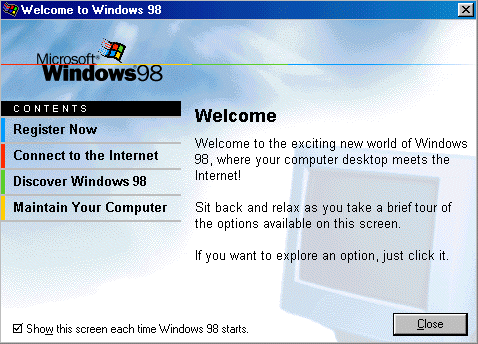
Welcome

On completion of Windows 98 Setup, your display settings may not be exactly as you want them. Now is an appropriate time to try to adjust them. Right-click anywhere on the desktop and select Properties. The Display Properties dialogue box will be displayed. Provided this indicates that you’re using the appropriate graphics card drivers you can carry on and adjust these.

If the indication is that you’re using a Windows default driver, then you’re going to have to wait until a later stage to set your display preferences, after you’ve installed an updated driver for your graphics cards and any other items of hardware where this is necessary.

Select the required colour depth and display resolution. You may also select your preferred font size via the Advanced button. Click OK and Windows will resize your desktop as appropriate.
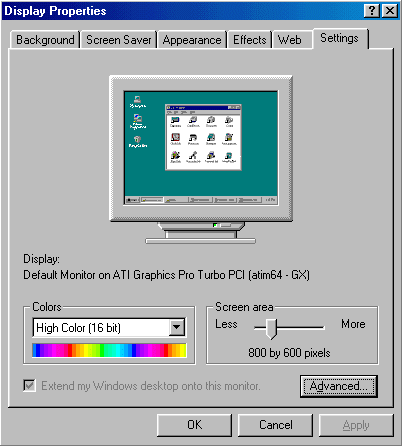
Display

Troubleshooting Windows 98 Setup:

If Setup fails, attempt to restart it using the following procedure:

  • Press F3 or click the Exit button.

    If the system does not respond, restart the computer by pressing CTRL+ALT+DEL. If this fails, turn off the computer, wait 10 seconds, and then turn it on again.

  • Start Setup again. Setup prompts you to use Safe Recovery to recover the failed installation. Choose the Safe Recovery option, and click the Continue button. Setup will skip the portion that caused the initial failure.

When Setup stalls during hardware detection, you might need to disable hardware detection for a device or class of devices. Before you do this, wait until at least three minutes have passed with neither disk nor screen activity (that is, the mouse pointer cannot be moved). Some detection routines take long enough that the computer might appear to stop temporarily.

A number of common Windows 98 Setup issues are identified below, by Microsoft Knowledge Base Article Number:

  • 232142: Troubleshooting Invalid Product Key Error Message During Setup.
  • 140901: Err Msg: Could Not Decode This Setup (.cab) File…
  • 128730: Error Message ‘Invalid System Disk’ After Setup Reboots.
  • 129971: SU Error Message List for Windows 95, Windows 98, and Windows Me Setup.
  • 162453: OEM Product ID Not Accepted During Reinstallation.
  • Windows 98 Solution Center
  • Win98 Installation Planning
  • How To Create A Windows Start Up Disk
  • Installing Windows 98 – Getting Your CD Drive to Work for Installation
  • How To Create A FAT32 Partition on Your Hard Drive
  • Win98 Installation Drive Formating
  • Win98 Installation
  • Win98 Installation Phase 1
  • Win98 Installation Phase 2
  • Installing Windows 98 – Copying the Windows Files to Your Computer
  • Restarting Your Computer After Installing Windows
  • How To Do a Clean Installation of Win98 – Phase 5: Setting Up Hardware and Finalising
  • Installing Windows 98 – Upgrading to Win98SE
  • How to Update Microsoft Windows with Patches and Service Packs
  • Win98 Driver Installation
  • Win98 Installation Tuning

Filed Under: How To Do a Clean Installation of Win98 Tagged With: installing windows 98, setting up hardware in windows 98, system hang installing windows 98

Latest Articles

Windows Backup In Action

Click Start, point to All Programs > Accessories > System Tools, and then click Backup. The Backup or Restore Wizard is launched. Check the appropriate box to proceed in Wizard mode. Select the appropriate radio button for backup. Indicate the way in which you wish to … [Read More...]

Rip Import Copy VCR VHS Video and Burn to DVD with Nero

There are many applications that cover the complete cycle of steps involved in the transfer of video cassettes to DVD. Typically, such fully-featured packages enable you to: capture video from DV cameras or external sources connected to your video capture device edit videos, by trimming … [Read More...]

What Are the Worst Computer Viruses in 2019?

Computer viruses are becoming more dangerous every year. They slow down your computer and can generate all kinds of other unexpected problems. Although the number of attacks detected fell in 2017, there were still over 120,000 attacks and security breaches according to INCIBE. Globally, the figure … [Read More...]

Importance of Inbound Marketing in the Digital Age

A couple of months ago, Zacks reported that Hubspot was starting to make some major changes to its inbound marketing strategy. They talk a lot about … [Read More...]

Damage Control Strategies for Resolving Online PR Crises

Last July, Astrologer faced a major crisis after its CEO went viral at a ColdPlay concert when having an affair. This was just one of the many times a … [Read More...]

AI is Not Killing Computer Jobs Like Doomers Projected

There is no denying the reality that AI technology has played a massive role in disrupting our lives. A growing number of people claim that AI … [Read More...]

Everything You Need to Know About Sourcing Circuit Boards From U.S. Suppliers

In This Article This article includes: Why Source PCBs From the United States?How to Get a Quote From a U.S.-Based PCB ManufacturerThe Top U.S. … [Read More...]

Top Taplio Alternatives in 2025 : Why MagicPost Leads for LinkedIn Posting ?

LinkedIn has become a strong platform for professionals, creators, and businesses to establish authority, grow networks, and elicit engagement. Simple … [Read More...]

Shocking Cybercrime Statistics for 2025

People all over the world are becoming more concerned about cybercrime than ever. We have recently collected some statistics on this topic and … [Read More...]

Guides

  • Computer Communications
  • Mobile Computing
  • PC Components
  • PC Data Storage
  • PC Input-Output
  • PC Multimedia
  • Processors (CPUs)

Recent Posts

Why Drupal Accessibility is Vital for Your Website

Drupal may not be as popular as WordPress, but it is still used in over 1 million websites. The Internet might be more conducive to our needs if more … [Read More...]

Technological Breakthroughs Could Spare Millions from COVID-19

Computer technology has helped society conquer countless challenges over the last 40 years. The most recent problem computers have played a role in … [Read More...]

VBA Macro to Delete All TMP Files in Multiple Folders

I have done a lot of work with Photoshop, where I end up having a ton of annoying TMP files after running a large batch action. This can take up … [Read More...]

[footer_backtotop]

Copyright © 2026 About | Privacy | Contact Information | Wrtie For Us | Disclaimer | Copyright License | Authors