pctechguide.com

  • Home
  • Guides
  • Tutorials
  • Articles
  • Reviews
  • Glossary
  • Contact

Win98 Installation Drive Formating

With the Fdisk procedure completed, restart you computer with the Windows 98 Startup disk in the floppy disk drive and proceed to format the partitions you’ve created with a file system, using the Format tool as follows:

  1. When the Windows 98 Startup menu is displayed, choose the Start computer without CD-ROM support option, and then press Enter.
  2. When a command prompt is displayed, type:

    format c: /s

    and then press Enter.

  3. This command transfers the system files and should only be used when you format drive C (or your active drive). For all other partitions, type format drive: (where drive is the letter of the partition that you want to format).
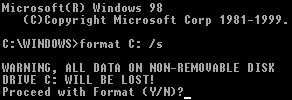
    Warning

  4. A warning that all data on your C: drive will be lost is displayed.
  5. Enter Y, and then press Enter to proceed with the format of drive C:.


  6. After the format procedure is finished, you receive the following prompt:

    Volume label (11 characters, ENTER for none)?

  7. This is an optional feature that you can use to type a name for the hard disk. Type an 11-character name for the drive, or leave it blank, and then press Enter.

  8. Format then prints a number of statistics, including the number of bytes comprising the total disk space, the number of bytes used by the system and the number of available bytes, culminating with a Volume Serial Number.
  9. You can format any additional partitions following a similar procedure to that used for the primary DOS partition above. The only variation is that the /s should be left off the format command.
  • Win98 Installation Planning
  • How To Create A Windows Start Up Disk
  • Installing Windows 98 – Getting Your CD Drive to Work for Installation
  • How To Create A FAT32 Partition on Your Hard Drive
  • Win98 Installation Drive Formating
  • Win98 Installation
  • Win98 Installation Phase 1
  • Win98 Installation Phase 2
  • Installing Windows 98 – Copying the Windows Files to Your Computer
  • Restarting Your Computer After Installing Windows
  • How To Do a Clean Installation of Win98 – Phase 5: Setting Up Hardware and Finalising
  • Installing Windows 98 – Upgrading to Win98SE
  • How to Update Microsoft Windows with Patches and Service Packs
  • Win98 Driver Installation
  • Win98 Installation Tuning

Filed Under: How To Do a Clean Installation of Win98

Latest Articles

What I Learned from a Major Web Design Project in Mexico

I recently had the honor of working closely with a major digital marketing company in Mexico. Due to the COVID-19 crisis, I had to socially distance and work remotely of course. However, I learned a lot of great things about the principles of web design for a Mexican company. Some of them are … [Read More...]

13 Funky Images of Laptops

In our digital age, laptops have become our faithful companions, indispensable tools for work, leisure, and everything in between. They've evolved from clunky machines into sleek, powerful devices that enable us to connect, create, and explore the world at our fingertips. In this blog post, we … [Read More...]

Inkjet Color Perception

Visible light falls between 380nm (violet) and 780nm (red) on the electromagnetic spectrum, sandwiched between ultraviolet and infrared. White light comprises approximately equal proportions of all the visible wavelengths, and when this shine … [Read More...]

Importance of Inbound Marketing in the Digital Age

A couple of months ago, Zacks reported that Hubspot was starting to make some major changes to its inbound marketing strategy. They talk a lot about … [Read More...]

Damage Control Strategies for Resolving Online PR Crises

Last July, Astrologer faced a major crisis after its CEO went viral at a ColdPlay concert when having an affair. This was just one of the many times a … [Read More...]

AI is Not Killing Computer Jobs Like Doomers Projected

There is no denying the reality that AI technology has played a massive role in disrupting our lives. A growing number of people claim that AI … [Read More...]

Everything You Need to Know About Sourcing Circuit Boards From U.S. Suppliers

In This Article This article includes: Why Source PCBs From the United States?How to Get a Quote From a U.S.-Based PCB ManufacturerThe Top U.S. … [Read More...]

Top Taplio Alternatives in 2025 : Why MagicPost Leads for LinkedIn Posting ?

LinkedIn has become a strong platform for professionals, creators, and businesses to establish authority, grow networks, and elicit engagement. Simple … [Read More...]

Shocking Cybercrime Statistics for 2025

People all over the world are becoming more concerned about cybercrime than ever. We have recently collected some statistics on this topic and … [Read More...]

Guides

  • Computer Communications
  • Mobile Computing
  • PC Components
  • PC Data Storage
  • PC Input-Output
  • PC Multimedia
  • Processors (CPUs)

Recent Posts

RAM or Main Memory – PC / computer memory (DIMM, DRAM, SDRAM)

A PC's third and principal level of system memory is referred to as main memory, or Random Access Memory (RAM). It is an impermanent source of … [Read More...]

Object Oriented Programming 2

Imagine creating a blueprint for an intelligent robot. The robot's purpose is very simple: to open the curtains in the morning, and to close … [Read More...]

How to Remove File Recovery

File Recovery Welcome! If you've made your way to this page, you've likely been infected with File Recovery. Infections of this kind are generally … [Read More...]

[footer_backtotop]

Copyright © 2026 About | Privacy | Contact Information | Wrtie For Us | Disclaimer | Copyright License | Authors