 [starreviewmulti id=5 tpl=20]
PROS: Syncables 360 is great for data transfer, whether it is from computer to computer, or phone to computer, it will certainly fit your needs.
CONS: There doesn’t seem to be any way other than email for you to contact the personnel with Syncables with any questions or problems you may have.
OVERVIEW: Syncables 360 is a great product overall and very easy to use. You should have no problems transferring your data from one place to another.


Syncables 360 Review
Company: Syncables
Version: 7
Release Date: September 1, 2010
Operating Systems:
Windows XP, Vista, Windows 7, Mac OS
10.6, Linux, Windows Mobile,
Blackberry, Android smartphones
Price: $39.99
What It Does
Synchronizes all data files, folders, photos, contacts, audio, video, email, and web page favorites:
– PC to Mac – Mac to PC – PC to Linux – Linux to PC – -Mixed OS synchronization(PC to Mac to Linux to Phone) – – Blackberry and Android ( to and from pc) supported
– No support for IPAD or IPHONE
Product Details
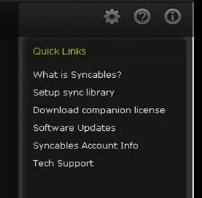
Syncables 360 is a useful tool for those who have more than one computer system running various operating system at home. Send data to another device, or your phone as well as from the phone to a computer or laptop. Either a wireless or wired network is supported. Manual or automatically synchronize your data files. The user menu is simple and straightforward as shown in their Quick Links Menu.
One of the newest features for version 7 is the ability to sync data from your Blackberry and Andriod phones. Also, the company has added the use of your home WiFi connection to sync among systems. When a computer or sync enabled device is connected to the network, it will
automaticatlly sync that system to others detected within the Synchables linked group.
Another benefical feature is the use of profiles. Profiles are created to sync only specific information to certain computers or mobile devices that. This profile can be used reptitively without having to select specfic files or folders berfore each synch session. For instance, at work you make some changes to certain folders on your laptop. When you return home, you use the “work to home” profile. This profile may contain only those folders that were changed while at the office. This is a time saver in that you will have a preset list of files and folders that are ready to
be synched.

Data can be synchronized from whole folders or specific files within folders. If the system encounters two files with identical names, it will present the user a dialogue box to select how to resolve the conflict. These settings can be changed from the preferences menu.
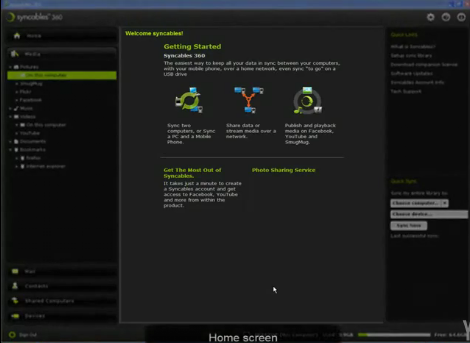
Besides the standard data files and folders, synchronization can be completed for Outlook Express, Thunderbird, or Windows mail. Audio and video files can be synchronized. The system provides steaming audio from a compputer to your phone.
Backups can be done to external US drives or other portable storage devices. For those with Facebook, Flicker, and You Tube accounts, sending your files automaticatlly is an easy task. Just click on the link to social media, choose your service, login and upload.
Installation
All computers require the Synchables 360 application installed via a “.exe” for Windows computers, “.dmg” for Macintosh and “.bin” for Linux systems.
Knowledge Level
Novice = 3 Intermediate = 2 Expert = 1
To utlilize this package, a computer novice will have no issues operating this software.
Technical Support
I found this aspect of the software frustrating. All support is provided strictly from email correspondence with the company helpdesk. There are no phone numbers found anywhere on their website.
License Model
There are three main versions of this software: Syncable 360 allows 3 computers and a phone. There is 360 Home Network that supports 5 computers and phone. The last version is called 360 Workgroup and is avaiable for businesses who need large numbers of systems to be synchronized.
Additional licenses are available for purchase.
Extras
As part of the software is a Task Assistance. This feature makes it very easy to create syncs
between computer systems.
Conclusion
Overall Synchables 360 can be useful for home computers or a work laptop that needs additional data protection. With mobile support phone contacts, emails, are easily sent to a home computer for safe data storage. Having family photos, emails, and videos quickly sent to social media sites is handy as well. However, business users may be better suited by selecting a product with a more enhanced technical support program.
do I need to buy a syncables for each of my devices or is one for my mac sufficient4