Windows Interactive Safety
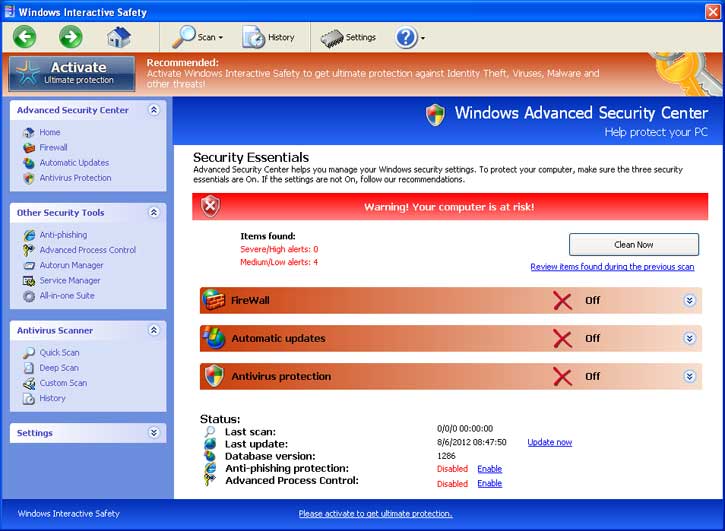
Greetings! Unfortunately, if you’ve made your way to this page, you’ve probably been infected with Windows Interactive Safety. Infections of this kind aren’t particularly harmful to your computer. Most often, they just make it much more difficult to use, as I’m sure you’ve realized once confronted with the infection. The purpose of the infection is to trick you, the user, into paying to remove the infection. It accomplishes this through scare tactics, by telling you that your computer is infected, that the only way to remove said infections is to pay for that software, and by making it difficult to use any antivirus that you have installed on your computer. The infection may also hijack your browser’s search settings, making even basic internet usage quite difficult. This client is a clone of Anti-Spyware, XP Home Security 2012, XP Anti-Virus 2012 and XP Security 2012 as well as Win 7 Anti-Spyware, Win 7 Home Security 2012.
How Did I get infected with Windows Interactive Safety ?
Most often, this type of infection is the result of your computer having visited an infected webpage. Frequently, you won’t even be asked to install anything, you’ll simply be suddenly greeted with the infection. If this is the case, you should consider upgrading to a better anti-virus.
How Much Damage is Windows Interactive Safety Doing?
With most varieties of this infection, the most damaging thing the infection does is removing the registry entries on your computer that tell Windows how to run executables. This is the cause of the messages you’re getting asking you what you would like to use to run any program that you try to use on your computer. We’ve posted a quick fix for this below in the guide.
Windows Interactive Safety
»Download Windows Interactive Safety Removal Software
How to Remove Windows Interactive Safety ?
This article will cover the three major means to remove this infection:
1. Use Anti-virus software (Note you may need to follow the manual guide to start so you can install a client.)
2. Hire an expert ( We Recommend http://www.pcninja.com. This is a remote computer repair company)
3. Remove this threat yourself following our manual removal guide.
Automatic Windows Interactive Safety Removal

Online Windows Interactive Safety Removal Service

Windows Interactive Safety Manual Removal
Procedures
Step 1. If you are unable to run any executable programs at all this may be from the virus changing your registry settings. If this is the case you may need to use this patch. It is only for Windows 7 computers. Download Win 7 Fix exe Issue here.
Step 2. You need to stop and delete the main .exe file that is running Windows Control Series. You should be able to locate this file at
-
Protector-Random 3 to 4 characters.exe
- Exmaple: Protector-123.exe
Keep in mind that the USERNAME will be your user name The file is called <Totallyr andom>.exe. Expect this name to change over time. Once you locate the file you will need to re-name the file. To do this you can right click on the file named and select “Re-name”. Name it whatever you want. Once done re-start your computer. Next time you boot up the virus should not be running. Now you should be able to delete the file name. At this time you should run a full virus scan. We Recommend Spyware Doctor with Antivirus. However you can use any client you trust the most. To see a list of other clients we recommend check out our Anti-virus Reviews section.
Windows Interactive Safety Registry Removal
Procedures
We don’t recommend that users manually edit the registry. Aside from the issue this infection causes with executable files, there shouldn’t be any damage to the registry that cannot be solved automatically by a good antivirus program and registry cleaning software. You may want to use a registry cleaner like PC Health Advisor Here to clean out the registry and scan for other malware. You can also read all or registry cleaner reviews
Windows Interactive Safety Directories:
Windows 7 / Windows Vista
-
%AppData%\NPSWF32.dll
-
%AppData%\Protector-Random 3 to 4 characters example (acf).exe
-
%AppData%\Protector-Random 3 to 4 characters example (acf).exe
-
%AppData%\result.db
- %AppData%\1st$0l3th1s.cnf
%AppData% refers to the current users Application Data folder. By default, this is C:\Documents and Settings\<Current
User>\Application Data for Windows 2000/XP. For Windows Vista and Windows 7 it is C:\Users\<Current User>\AppData\Roaming
If you require advanced help or just want an expert to remove the virus than use this computer repair service. The charge is under a hundred bucks and they can often get started right away. These are real experts when it comes to
malware and virus removal. Related Article Keywords: Windows Interactive Safety , Remove Windows Interactive Safety , Windows Interactive Safety Removal, How to Remove Windows Interactive Safety