pctechguide.com

  • Home
  • Guides
  • Tutorials
  • Articles
  • Reviews
  • Glossary
  • Contact

ADSL Setup

Having networked your PC and installed the ADSL equipment, you need now to set up the Internet Protocol (IP) configuration to enable your PC to access the broadband Internet service. The steps involved will be described in the context of a basic ADSL modem/router, as used by BT in 2000, when ADSL was first introduced in the UK. With modern-day equipment the process is generally conducted via a web-style interface, under the control of a Setup Wizard.

The procedure is described below, for a Windows 98 environment:

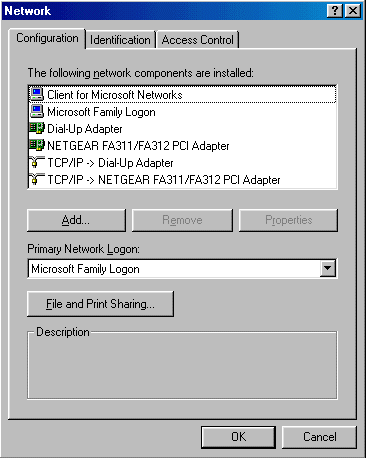
  1. From the Start menu, select Settings > Control Panel and then double-click network.
  2. network

  3. Check that the list includes Client for Microsoft networks, an Ethernet adapter (network Interface Card) and protocol (TCP/IP).
  4.  

  5. If any of these are missing, proceed as follows:
    • highlight the adapter
    • click on the Add button
    • double-click on Client
    • choose Microsoft in the left-hand window
    • choose TCP IP in the right-hand window
    • click on OK
    • highlight Protocol
    • click on the Add button
    • double-click on Client
    • choose Microsoft in the left-hand window
    • choose TCP IP in the right-hand window
    • click on OK
  6. If no adapter or protocol are shown, it indicates that you network interface card is not properly installed. Consult the associated documentation and attempt to reinstall the card.

    If the adapter is the only item shown you will need to add a client and protocol for the adapter to use.

    To add the client:

    To add the protocol:

  7. Select the TCP/IP driver and Properties.
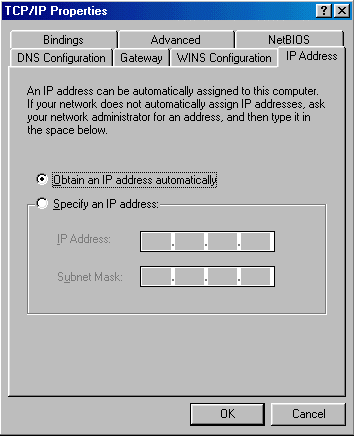
  8. TCP/IP

  9. On the IP Address tab, select the Obtain an IP address automatically option.
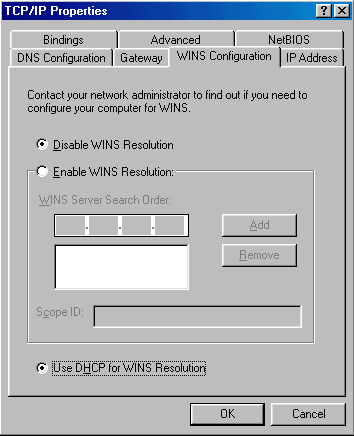
  10. WINS

  11. On the WINS Configuration tab, select the Disable WINS Resolution option.
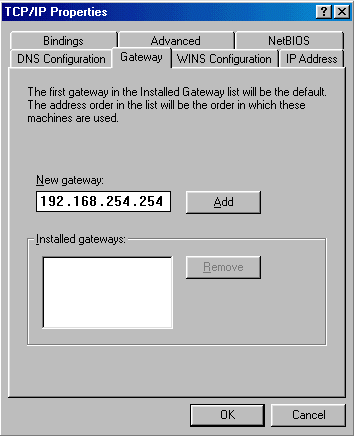
  12. Gateway

  13. On the Gateway tab, enter the Gateway IP address provided by your ISP in the New gateway box and click Add.
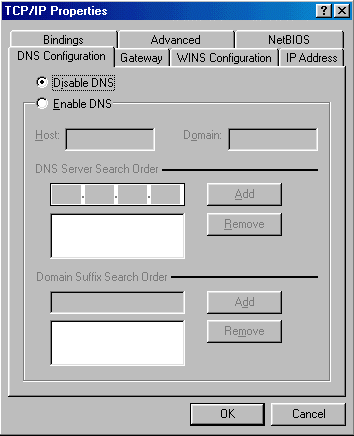
  14. DNS

  15. On the DNS Configuration tab, select Disable DNS.
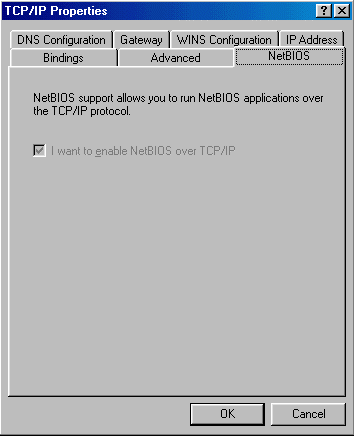
  16. NetBIOS

  17. Check that the tick box is greyed out on the NetBIOS tab.
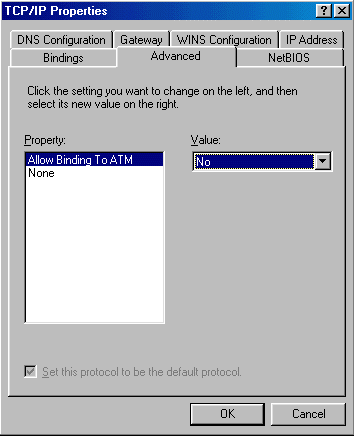
  18. Advanced

  19. Check that nothing is filled in on the Advanced tab.
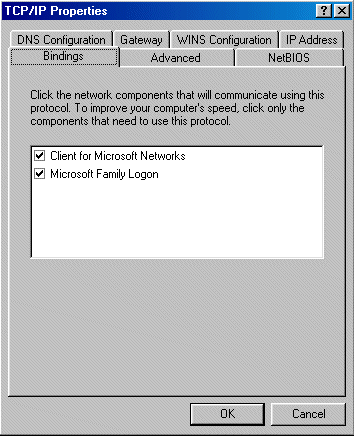
  20. Bindings

  21. Check that the Client for Microsoft networks box is ticked on the Bindings tab.
  22.  

  23. Click OK and restart the machine so that the changes can take effect.
  24. If asked, either insert the Windows 98 CD or enter the location of the .cab files

  • ADSL network
  • ADSL Setup
  • Testing the IP configuration – how to share a broadband Internet connection
  • ADSL Filters
  • How to connect an ADSL modem/router
  • ADSL Connect
  • ADSL Configuration
  • ADSL Sharing

Filed Under: Sharing ADSL broadband Internet

Latest Articles

Enable Two Factor Authentication for Google Account

Protecting your online accounts is becoming more important. Everyday we hear stories of accounts being hacked and broken into. Many times these accounts can contain sensitive information. Or, they can contain useful bits of information that a hacker or identity thief can use to launch more thorough … [Read More...]

How To Remove Spyware Now

Spyware is a type of software that gets installed to your computer quietly without your knowledge. Spyware can watch and record your activities the moment you go online. Some spyware can record information, such as your keystrokes and all other personal information that you use when you login to … [Read More...]

Pentium MMX Technology

Intel’s P55C MMX processor with MultiMedia eXtensions was launched at the beginning of 1997. It represented the most significant change to the basic architecture of the PC processor for ten years and provided three main enhancements: the … [Read More...]

Everything You Need to Know About Sourcing Circuit Boards From U.S. Suppliers

In This Article This article includes: Why Source PCBs From the United States?How to Get a Quote From a U.S.-Based PCB ManufacturerThe Top U.S. … [Read More...]

Top Taplio Alternatives in 2025 : Why MagicPost Leads for LinkedIn Posting ?

LinkedIn has become a strong platform for professionals, creators, and businesses to establish authority, grow networks, and elicit engagement. Simple … [Read More...]

Shocking Cybercrime Statistics for 2025

People all over the world are becoming more concerned about cybercrime than ever. We have recently collected some statistics on this topic and … [Read More...]

Gaming Laptop Security Guide: Protecting Your High-End Hardware Investment in 2025

Since Jacob took over PC Tech Guide, we’ve looked at how tech intersects with personal well-being and digital safety. Gaming laptops are now … [Read More...]

20 Cool Creative Commons Photographs About the Future of AI

AI technology is starting to have a huge impact on our lives. The market value for AI is estimated to have been worth $279.22 billion in 2024 and it … [Read More...]

13 Impressive Stats on the Future of AI

AI technology is starting to become much more important in our everyday lives. Many businesses are using it as well. While he has created a lot of … [Read More...]

Guides

  • Computer Communications
  • Mobile Computing
  • PC Components
  • PC Data Storage
  • PC Input-Output
  • PC Multimedia
  • Processors (CPUs)

Recent Posts

Add A Reminder to Sent Emails in Outlook

Have you ever sent an email to another person requesting they do something? If so, do you wish you could make sure they do not forget about your … [Read More...]

Make Facebook Secure With These Steps

People love Facebook. They spend hours on this social website keeping up with friends and telling the world about what they have been doing. But, many … [Read More...]

Remove System Tool 2011

System Tool 2011, also known as just System Tool is a FALSE security client. This client appears to be very similar to past fake security … [Read More...]

[footer_backtotop]

Copyright © 2026 About | Privacy | Contact Information | Wrtie For Us | Disclaimer | Copyright License | Authors